Smackademia – the Best of Both Worlds!

By Jessica Knott
Associate Editor
Editor, Twitter

[Note: ETCJ editors and writers live full lives, and from time to time, we’ll be publishing some of their extracurricular pursuits. See John Adsit’s “The Great Technology Controversy Follows Me into the Caves,” the first in this series. -Editor]

A few weeks ago, Jim asked me why I never wrote about roller derby. My answer to him was that I’d honestly never thought about it. What’s to say? Every day, I wake up, roll over and groan. Sometimes instead of getting out of bed, I roll out of it and onto the floor, somehow miraculously proceeding to my feet from there. Something on my body always hurts. I am 35 years old, but my laugh lines are thankfully all in the right place. I weigh 180 pounds, but I’m happy with my body and what I can do with it.

Addie Mortem (Jess Knott), blocker for the Lansing Derby Vixens. Photo by Jena McShane of McShane Photography.

Addie Mortem (Jess Knott), blocker for the Lansing Derby Vixens. Photo by Jena McShane of McShane Photography.

Last year, I ran a half marathon with very little training due to a bruised kidney. But I did it. (Wait, you bruised your what?) I spend two hours, three days a week smelling seriously terrible (excuse me?), and the rest of them studying hypermedia and online learning. I teach faculty development workshops and laugh so much I should have an abdominal six-pack (a what?). I am a smackademic (smackaHUH?).

I am Addie Mortem, a blocker for the Lansing Derby Vixens roller derby league of Lansing, Michigan. I am also Jessica Knott, instructional designer at Michigan State University and PhD student in MSU’s nationally-ranked PhD program in Higher, Adult and Lifelong Education. Hence, I am a “smackademic,” as coined in a Chronicle of Higher Education article circa 2010 (http://chronicle.com/article/Smackademics-Join-the-Ranks/123670/). And I am not alone in my league as I am joined by criminal justice PhD student in criminal justice Ludacrush, PhD student in English Rue McSlamahan, PhD in music theory PhDemon, PhD in forestry House of Bruise, PhD student in educational administration Krizzy Azzbee, and Juris Doctor Little Hitaly.   Continue reading

Evidence Approaches, Language Teaching Online, Literacy Skills, Parent Support for Tech

lynnz_col2

U.S. Education Dept. Offers Tools for Evaluating Ed. Tech by Sean Cavanagh from Education Week (12.28.12)
The US Dept. of Education has released a draft (Expanding Evidence Approaches) of a proposed framework for administrators and teachers to use in evaluating educational technology. This research-based framework aims at helping educators make economically wise as well as educationally sound choices.

EEALDW

Language-teaching firms: Linguists online: Technology is starting to change language-learning from The Economist (1.5.13)
This article focuses on two language firms and how they are using technology to teach languages. Berlitz, one of the oldest language teaching companies, has sold off its publishing business. Bought out by a Japanese firm a few years ago, it has been a little slow getting into the language teaching technology market. Rosetta Stone, which recently went public, is moving away from the boxed sets of CDs to an online platform which is more expensive to operate but more flexible for learners.

How to Get Parent Support for Tech Use in Class by Jennifer Carey from MindShift (12.31.12) at KQED (original 12.14.12).
Sometimes parents do not understand the role that technology can play in learning. Carey suggests some practical tips on how to engage students and parents in technology-assisted education. Communication is key to this process.

How to promote literacy skills in the digital age by Laura Devaney from eSchool News (12.19.12)
Many apps that are available for teaching literacy and reading skills to younger students fall short in helping them develop strong reading skills. A report (Pioneering Literacy in the Digital Wild West: Empowering Parents and Educators) commissioned by the Campaign for Grade-Level Reading looks at a wide range of apps and makes recommendations for educators.

Pioneering Literacy

Is Building Apps for Everyone?

picture of Harry KellerBy Harry Keller
Editor, Science Education

[Note: This article was prompted by an email exchange initiated by Lynn Zimmerman on 1.13.13. -Editor]

This sort of question seems to be on my desk daily in many different guises. I began writing software in 1960 and never really stopped.

There’s no simple answer. Also, the “philosopher’s stone” of software, a way to create software without programming, has been sought after for decades without result. There are some teaching languages for elementary school that are like that but are too limited to be of much use in the real world. Do not expect to be able to drag-and-drop an “app” soon even though Eclipse for Java, and other GUIs (graphic user interfaces) for other languages, do something like that for the UI part of an application. It takes more to make the software really do useful work for you.

java

For the novice who’d like to have an application, you can use HTML5 and Javascript as long as your program is relatively short, maybe under 100 lines. For comparison, Smart Science® explorations uses a 20,000-line client-side Java program with around 20,000 lines of Java on the server and a substantial SQL database. Once you exceed 1,000 lines, Javascript begins to break down, and you must use something more robust. (Actually, I’d stay away from Javascript programs longer than two pages, about 150 lines.) The advantage of this approach is that your program will run essentially anywhere, including those tablets.   Continue reading

Teaching Science — A Former Classroom Teacher’s View

[Note: This article was originally an email reply to Harry Keller. Bonnie had published a reply, “The Sad State of Teaching Thinking in Our Nation’s Schools” (3 Dec. 2012), to his article, “Need More Software Engineers? Teach Thinking Skills Better” (29 Nov. 2012). In his email to Bonnie, Harry attached a draft of a book he’s working on, which clarifies some of the ideas in his article. –Editor]

I don’t have any answers and I have not had time to read your draft. I have been consumed with family responsibilities and some of my emails have gotten lost while running two households. Sorry about that.

I was always punished for teaching thinking, until I was picked by President Clinton to be on the NIIAC. OK, and with the Lucas Foundation, which was also a boost. But my heart is sad. I see the same things going on in schools now, and worse practices. Not sure about Common Core and how it will be enacted.

The tests you hear about are the tip of the iceberg. There are internal, school-level, grade-level, county and practice tests.

I was a gifted and talented teacher. It was because I was determined to make school better, interesting and a compelling place to go. So  I learned not to gate kids. I thought I knew math but found that I was very poorly prepared, that most people taught with their hand in the back of the book (for the answers), and that most schools allowed only one way to do math — the approach used in the book. A student, who was brilliant, took me to task when he understood number systems and then invented his own. It is really not that hard, but you have to get it. I took lots of courses that required thinking, creating, inventing — and understanding math. I understood cuisenaire rods and visual math. My 4th graders tested at the top in standardized math tests. All of them.  Continue reading

‘Stickies’ – A Prewriting Tool for Writers

Jim ShimabukuroBy Jim Shimabukuro
Editor

I’m visual when it comes to verbal. With topics that are complex and new, I automatically doodle before actually sitting down at my computer to write sentences and paragraphs. With paper and pencil, I map out the relationships between and among ideas or units of thought. I usually begin with a word that rises to the surface of my mind. I write it down on whatever’s handy. Backs of envelopes or scraps of paper are the usual. I add another word that I associate with the first and position it in a way that reveals their logical relationship.

I add small rectangles around the words and connect them with lines and arrows to suggest causal links, or I use circles that overlap or contain smaller circles to show various set relationships. I continue to construct the picture by dropping in idea words and sketching in their logical connection to the parts and the whole. Some words surface but don’t seem to fit anywhere at the moment so I plop them on the side. Later, I work them into the evolving picture or erase them if they don’t seem to fit in anywhere. As you can imagine, with paper and pencil this means a lot of erasing and redrawing.

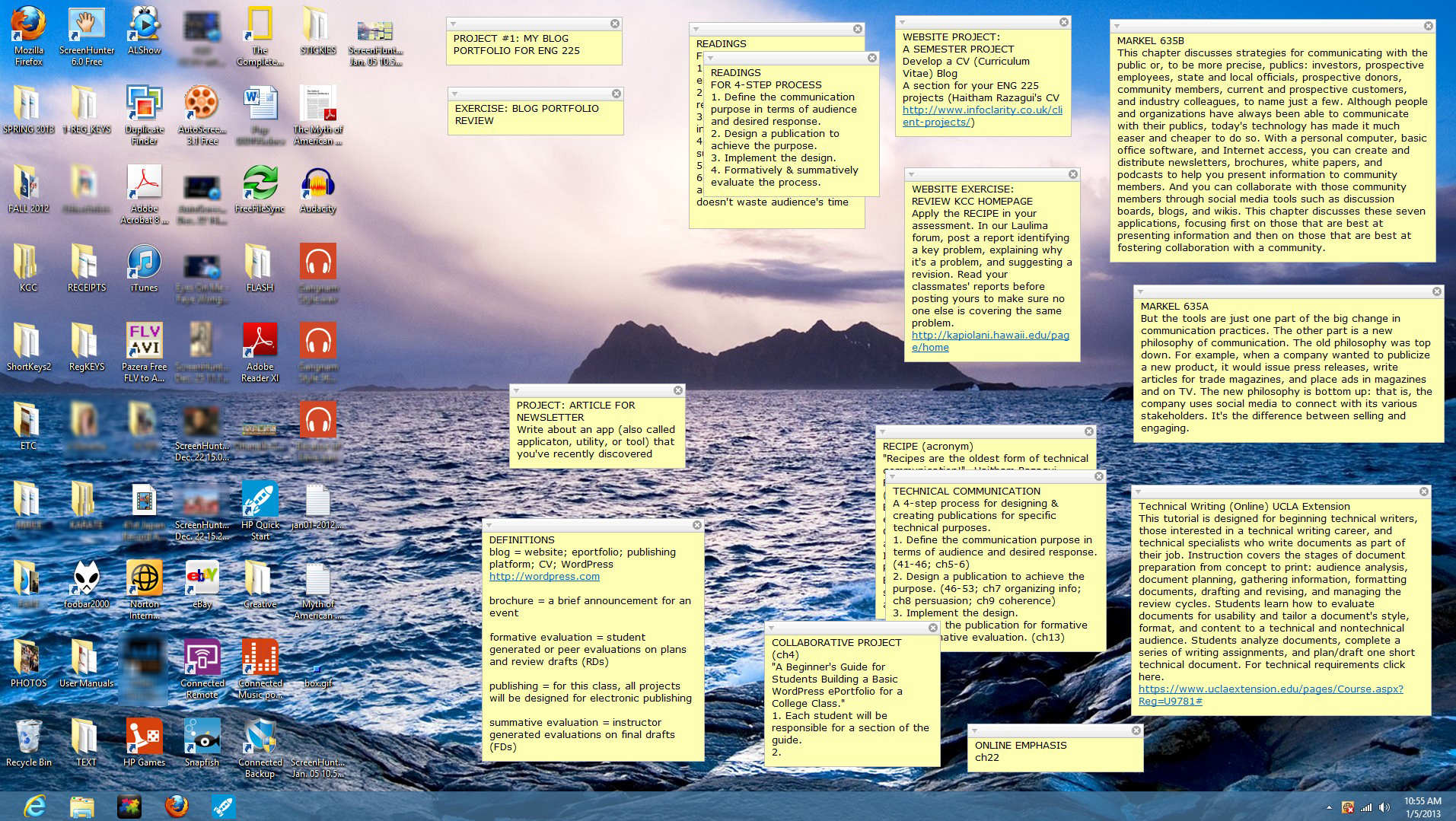
Stickies3My 32-inch desktop screen with Stickies.

In grad school, I found a huge blackboard at a thrift shop a couple blocks away from my apartment. I lugged it back to my small room and screwed it into one of the walls. It filled nearly the entire wall. I was in doodle heaven. This became my thinking pad. I could quickly sketch idea maps with chalk and revise with an eraser as I went along. I could step back at any time to see the whole picture, and step in to futz with the parts. When it was complete, I sat down with my typewriter (no personal computers back then) and wrote the paper.   Continue reading

Chromebooks for Teachers Through 12/21 for $99

bonnie icandy

The following are excerpts from the Chromebook and Donors Choose sites:

Through 12/21, Google is providing an exclusive opportunity through DonorsChoose.org for public school teachers to request the Samsung Series 5 Chromebook for the heavily discounted price of $99 each, including hardware, management and support. The Chromebook is a new type of web-based computer designed to make learning with technology easier, and will be available in Lakeshore’s eSchoolMall catalog.

Chromebook

Chromebooks for Education are fast, intuitive, and easy-to-manage computers that connect students and teachers with the power of the web. Chromebooks provide fast access to the web’s vast education and collaboration resources, while offering easy centralized management at a low cost. Click here to read more.

UPDATE: As of December 10th, 11pm eastern time, we’ve received a tremendous response to this offer. With a limited quantity of discounted Chromebooks available, we cannot accept additional submissions at this time. If you’d like to be notified if additional Chromebooks become available, read on for instructions. Click here* to read more.

__________
* WebCite alternative.

Need More Software Engineers? Teach Thinking Skills Better

picture of Harry KellerBy Harry Keller
Editor, Science Education

We’ve seen much hue and cry about our schools being unable to meet the demand for “computer scientists.” What industry really misses is software engineers. The term “computer scientist” is misleading because the skill set of those who write computer programs is one of engineering. Science expands the boundaries of knowledge about the natural universe. That’s why just about every computer scientist worthy of the name is in academia.

Software engineers design computer software, and software coders are the technicians of computer software who implement those designs. Software architects work at a level above the engineers and consider much broader aspects of software creation. It turns out that really good software engineers can do architecture, design, and coding.

Should our high schools be preparing our young people for these careers specifically? Are our math classes geared to producing mathematicians? Are our English classes designed to produce novelists, playwrights, and journalists? Do our history classes create the next generation of historians? These rhetorical questions all have the same answer: no.

What is the most important skill that a software engineer can possess? It’s a strong analytical mind capable of advanced abstraction. No amount of practice with toy programming languages or simple subsets of industrial-strength programming languages will provide students with those thinking skills. However, good math, science, and even history classes just may do the trick if the talent is already there. Other courses can buttress this learning if they stop being memory courses.  Continue reading

The Real Issue in Ed Tech May Be Maintenance

In the earliest days of technology use in schools, particularly computing, it was understood that the school would provide and maintain the equipment. Today that is changing, and some schools are expecting students to come equipped with their own computing ability, maintaining equipment for only students with a proven financial need. Obtaining the equipment is less of a challenge than many might think; the real issue may turn out to be maintenance. With students having to provide their own tech support, reliability of service may become an important issue.

This problem was brought home to me with all too much clarity over the past few months. As I write a highly shortened version of what happened, imagine that I am a student trying to deal with assignments under my school’s technology requirements. I take a lot of trips in which total luggage weight and space is a real concern, and I decided my best option would be a tablet. I researched the reviews and settled on a top rated model, an ASUS Transformer, a tablet with the ability to be used like a laptop with a keyboard. Since I did not see it as a critical part of my life, I foolishly spurned the store’s additional full replacement warranty and stayed with the basic ASUS warranty.

When the tablet would not turn on one day, I used the ASUS email tech support. A couple of days later I got a reply telling me to go into the settings and make a number of changes. I replied that the solution they offered required me to turn on the tablet first, which I could not do. After a couple of days I got a new set of instructions for doing something completely different in the settings. I again tried to make them see that changing the settings was not possible unless the computer was turned on. Eventually I talked to a human being on the phone, and after a bit of an exchange he was able to see that point. Continue reading

Joe Chianakas

[Note: This bio was first published on 10/22/13. -Editor]

Joseph Chianakas160Joe Chianakas
Professor of Communication
Illinois Central College
Joseph.Chianakas@ICC.edu

He previously taught high school English and communication for over a decade. Besides teaching, he loves fitness, martial arts, travel, and pop culture.

ETC Publications

Qualities for a Strong Online vs. F2F Teacher: Are They Different?

Size May Be the iPad Mini’s Downfall

Jim ShimabukuroBy Jim Shimabukuro
Editor

[Update 11.24.12: I just had my first hands-on trial with the iPad Mini a few minutes ago. I was wrong! It is narrow enough to grasp in one hand with thumb hooked over one edge and fingertips over the other. Also, despite its much smaller size, the screen is surprisingly readable and viewable. My apologies to Apple and congrats on a beautiful design! -Jim]

The release date is just a couple of days away, and the rumors seem to be converging on an iPad mini that will be 8.4x 5.7 inches in size, smaller than the iPad’s 9.5×7.3. But not by much. To get a feel for the mini’s size, I created a rough model out of a flyer that I received in the U.S. Mail. It was thick enough to hold the shape that I cut, roughly the height and width of the mini.

At 5.7 wide, I couldn’t wrap my fingers around it, as I do the iPhone, which is only 2.3 wide. I systematically reduced the width until I could comfortably get my fingers around it – the thumb at one end, the fingertips at the other. The grippable width that I arrived at was 4.0. At this width, the 8.4 height became awkward. I sliced away at it until the whole seemed right. The finished height was 6.0. It’s roughly the size of a postcard and slightly smaller than a paperback.

I then drew a rectangle on one side to get an idea of the screen size. Using the iPhone as a model, I decided to leave a bezel at the top and bottom, with the bottom slightly larger than the top. I left a slim margin for the sides. The diagonal screen size turned out to be 6.0, roughly midway between the iPhone’s 4.0 and the mini’s 7.9.

My aim wasn’t to build a large iPhone. I think the iPhone has maxed out in terms of size. Any larger than its 4.9×2.3 and it would be too big. My target was a new iPad that met two criteria:

  1. It is grippable by the human hand when held in portrait or landscape.
  2. It has a screen that’s at least twice that of the iPhone.

Continue reading

Passport – Blurring the Lines Between LMSs, Game Environments, and e-Portfolios

By Jessica Knott
Associate Editor
Editor, Twitter

Today, we hear a lot on education blogs and in conference presentations about gamification and badging, especially in regard to how they challenge the current LMS structure and effectiveness. Purdue University has developed Passport, an app that blurs the line between LMSs, game environments, and e-portfolios.

Passport offers learning activities to students as a series of challenges rather than your typical pedagogical narrative.

“Digital badges create a new common currency for learning that enables us to identify smaller units of learning,” says Kyle Bowen, director of informatics for Information Technology. “Passport connects badges with an LMS-like interaction. In a ‘choose your own adventure’ style, students can self-select how to complete each challenge. Once complete, students are awarded digital badges that they can share as part of an online and mobile portfolio.”

Development on Passport began in May of 2012, and it was released in August of the same year. According to Bowen, developers are partnering with faculty members using the product to “assess the impact related to their use in an effort to find effective practices to teaching with digital badges.”

Purdue’s Studio projects have served as a mechanism for their initial immersion in the mobile market, and they are currently experimenting with the Passport Profile iPad app as a portfolio that can be used to demonstrate student work in interviews, meetings, and job fairs. Bowen notes that Passport is primarily a Web platform, and the Passport Profile portfolio app is currently the only component that is unique to mobile devices. The same functionality is also available online.

Passport is currently in a limited beta, and interested parties are invited to throw their hat into the ring. Bowen also invites those with passing interest to log in and try Passport for themselves. Two challenges have been provided to get you started in understanding how Passport works.

What Will Drive the Future of Educational Technology?

The FETC conference in Florida, one of the largest conferences in the world, is fast approaching, and that spurred some memories of when I went last year. I thought then about how different the exhibits and presentations were from what such a conference would have featured a decade before, and I wondered what it will look like a decade in the future. I thought then that much of what I was seeing was already becoming obsolete (or should be), and it makes me wonder what direction educational technology will (or should) take in the future.

The huge exhibit hall was filled with flashy demonstrations of the latest miracle products, few of which drew my interest. The vast majority of the big ticket items were all designed to improve the quality of a lecture. There were new and improved ways to put information on a screen as the lecturer explained it, and there was especially better ways for the audience to indicate their understanding electronically. I am all for the use of such response mechanisms for lectures, but since I don’t do a lot of that it would not do me a whole lot of good.

I went to two presentations with almost identical titles and almost identical announced purposes — to show cool web sites that could be made a part of instruction. Despite those similarities, there was a stark difference in the content, a difference that  illustrates the fundamental problem with anticipating  the future of educational technology and change. If we all agree that the purpose of technology is to enhance good instructional technique, then the difference lies not so much in technology but upon the vision of the instructional technique it is supposed to enhance. Continue reading

Wireless EdTech 2012, Augmented Reality Device, Infographics on Ed Tech, Broadband Deployment

“The Future of Education Is Wireless” — according to the Wireless EdTech Conference 2012, which was held in Washington, D.C., October 10-12. Why? “Mobile is innovative, affordable and provides 24/7 access to a seemingly endless amount of resources. That’s why there are more mobile subscriptions than toothbrushes. From low-income urbanites, to the suburban upper-class, to the poorest of poor in rural areas of the world, mobile connectivity has the power to transform learning in a 21st century environment” (conference site).

Then they go about showing, sharing and introducing policy, educational performance and international examples. There are powerful examples, and you really get up close and personal to the people who present and share their ideas.

I attended the conference. It’s the one conference that makes me want to attend all of the sessions. I usually go for the education section and the policy sessions. The conference is star-studded with people who know education and who are in touch with the pulse of the nation — educators, pupils, school board leaders, and policy makers. It’s a great conference to do powerful networking with, to name a few, the new president of ISTE, influential people from the Smithsonian and the wireless industry, and tried and true leaders like Dr. Chris Dede.

If international is your interest, here are a couple of videos for you:

Continue reading

Remote Proctoring: More Questions Than Answers

[Note: Bert Kimura is a professor at Kansai University and the University of Hawaii at Manoa. He’s fully online at Manoa. As coordinator of an annual, completely online international conference, he’s also in the process of releasing a call for presentation proposals. See preliminary details for TCC 2013 in the right sidebar of this page. I emailed these questions to him earlier this week. -Editor]

Bert Kimura

ETCJ: Would a typical college or school district be able to set up a video capture system such as Tegrity?

BK: I would contract Tegrity if interested rather than setting up my own system. Support costs, especially personnel, need to be included to determine if it is worthwhile to do your own. I would assume that Tegrity hosts an application and database on their servers to perform this service. I think that this is one of the services that becomes economical with a large number of users.

It is not clear to me whether a person has to be monitoring the video in real-time as well; or if it is monitored in real-time, whether the monitor views several video streams at once. In the end, I would think that someone has to review each recording to make sure there wasn’t any suspicious behavior. Therein lies added costs.

ETCJ: How and what would it require to set up a video capture system such as this?

BK: A server, databases, applications and a web based application for starters. Probably some form of added security to prevent hacking or tampering with the system.

ETCJ: Can you think of ways students intent on cheating might still beat this system?

BK: Not offhand. However, if you ask your students, I’m sure that they can think of ways to beat the system. Oh, here’s one possibility — someone could sign the answers from off camera or hold up a card with answers based on body language signals given by the test taker.

ETCJ: Any further thoughts?

BK: I must say that the concept is novel and worth testing. It would be great if Tegrity would publish some basic research data on it. That will ease the minds of faculty who would be the people that, I think, need convincing the most.

On the other hand, the issue may need review by people involved with student privacy concerns. I presume Tegrity has looked at this, but, clearly, students would need to be fully informed of their rights and privileges, if any, in using this system. For example, what if a student swears or bangs on the camera? Would it affect the student’s reputation or credibility?

My last thought is this: If paper and pencil testing is absolutely required in a class, it probably shouldn’t be offered as a DE class. Not today anyway.

I believe that student learning can be assessed through writing assignments, presentations, projects, and other creative methods of expression in virtually any class. Faculty would need to make the adjustments to do so.

Remote Proctoring Services May Not Be Necessary

Tegrity has announced its Remote Proctoring System. The purpose of the system is to allow online programs to assess students with the same level of security as would be found in the physical classroom. Before giving my response, I would like to look at the issue of academic cheating in general.

On the first day of school one year, I happened to be in the high school hallway when our calculus teacher walked by, a grim look on his face as he led one of the school’s most well known students, a highly regarded member of the honor society, to the office. Something had aroused his suspicions, and he had tested her, learning that her mathematical abilities were at the early algebra stage, roughly 8th grade. Throughout high school she had copied every math homework assignment and every test from friends. She had never been caught until then.

That girl was by no means unusual. The Educational Testing Service’s campaign to stop cheating cites statistics indicating that academic cheating has risen dramatically over the last few decades at both the high school and college level.  Recent studies indicate that 75-98% of college students admit to having cheated. Another study said that 95% of students who admitted cheating said they had never been caught. It used to be that cheaters were the people just trying to get by, but today’s cheaters are just as likely to be the top performers in the school.

Those statistics all come from traditional, physical classrooms. If the goal of the new Tegrity Remote Proctoring System is to provide the same level of security found in those classrooms, then it has set a pretty low bar for its standard. A better approach lies in changing the nature of assessment itself, thus making the concept of proctoring unnecessary. Continue reading

Advising Umbrella: Maximum Faculty Involvement for Maximum Student Success

By Sharaf Rehman, M.Ed., Ed.S., Ph.D.
Professor of Communication
The University of Texas-Brownsville

College faculty is powerless in deciding what happens in their area high schools or in setting the mission and goals of their college. Still, it has a dual obligation to students: to help students master discipline specific knowledge and acquire life-skills. To fulfill this responsibility, the aquthor developed and implemented an all-encompassing model for advising in an academic unit in a state-supported, regional university. This “Umbrella Model” involves some participation from the administration but is mainly carried out by faculty members.

The model evolved purely out of necessity, on a campus that had abandoned a model in which faculty advised students. In the previous model, all advising was carried out by a team of advisors that reported to a Director of Advising. Every semester, prior to registration, all students were required to visit one of the advisors for help in building their class schedules. This was mandatory. However, students were not required to consult with faculty from their respective areas of study in making selections. The dropout rate for this approach was close to 50 percent. Worth noting is a figure from the placement tests, which revealed that 48 percent of the entering freshmen in 2011 were not college ready.

To implement the Umbrella Model, the author, who was careful to avoid stepping on anyone’s toes, offered to advise a group of 20 students in his major area. The effort would focus on planning course schedules for the coming semester. This was done after a meeting with the Director of Advising, who agreed that the author, as a faculty program advisor, would help the students develop their schedules. The students would then take the schedules to the official university advisors who would, in turn, register them in the courses. Hence, both the program-level as well as mandatory advising conditions were met. Continue reading

Lessons Learned from a MOOC

By Kae Novak*
Online Learning
Front Range Community College

[Note: On 28 Sep. 2012, Russell Poulin, Deputy Director, Research and Analysis, for WCET – WICHE Cooperative for Educational Technologies, posted a question in WCET Discussions: “What is your experience in taking or teaching a MOOC? What are the ‘lessons learned’ that you have to share?” This article is based on Kae’s response to the forum a few hours later. -Editor]

I just finished facilitating a Games Based Learning MOOC. We may be considered more “modest” as our total student count was 301. This MOOC was specifically for educators to learn about games based learning and is part of a Colorado Community College System Immersive and Games Based Learning Initiative Grant. The MOOC ran for six weeks.

I have taught (facilitated) courses at P2PU so the concept of open online was not new to me. I have also taken two of Stephen Downes and George Siemens’ Connectivist MOOCs. I lurked in Stanford’s AI MOOC last year and am currently participating in a Coursera MOOC.

So what are the lessons learned?

Participants in your course will have more than one style of learning online.

We had learners for whom this was the first online class ever. We also had veteran online instructors who were involved in emerging technology. Because of the topic we also had educators who are gamers and very involved online in rich interactive gaming communities. The Games Based Learning MOOC was designed as a connectivist course. It was setup up to build a community of educators who are learning online about games. The participants in the course seemed to be evenly split when it came to their online learning styles. Continue reading

Sep. 20, 2012: Teachers & Technology, iPad Study, Video Sites, Computer Tutoring

Report: Schools not Meeting Students’ Technology Needs by Joshua Bolkan in THE Journal online, 09.13.12

Although this study was conducted by Dell, a purveyor of technology, this brief overview of the results is worth reading. The majority of teachers in the study said that “technology allows them to create a more personalized learning experience” (para. 3), but many still feel that they do not have the necessary expertise to implement it effectively.

Using iPads With Mixed-Ability Students, Teachers Must ‘Give Up Some Control by Kim Fortson in THE Journal online, 09.12.12

Even elementary students seem to able to unlock the power of iPads intuitively. In a pilot study of students in a mixed 7th/8th grade class, students who were given iPads performed higher on standardized test than those who were taught in the traditional manner. One of the results of this experiment was that the teacher realized that they had to give students with iPads more freedom to choose the way in which they would use the iPads. For example, students were told which skills they needed to practice and they had the freedom to choose the app they preferred to work on that skill.

100 Video Sites Educators Should Bookmark from The Innovative Educator

Even though this article/website is a bit dated (Feb. 24, 2010) it is still is a good resource for finding videos online. It is divided into categories such as Educational Videos, which contains resources such as Teacher Tube and Cosmo Learning and General Videos, which contains resources such as Hulu and TED. The other categories are Teacher Education, Lesson Planning, Science, Math and Technology, History, Arts and Social Sciences, Video Tools, Network and Program Videos, Free Movies and Clips, How-Tos, and Government and Organizations.

The Machines Are Taking Over by Annie Murphy Paul The New York Times Magazine online, 09.14.12

Tutoring has long been recognized as the most effective form of teaching. Neil Heffernan wanted to make the advantages of this one-on-one interaction between student and teacher available to all students through computer technology simulating the immediate feedback and “nudging” that a human tutor provides.

For Schools, Laptops Are Still Better Than Tablets

picture of Harry KellerBy Harry Keller
Editor, Science Education

[Note: This article was first posted by Harry as a reply to Jim Shimabukuro’s statement that “laptops are going the way of the dinosaur,” in “Sep. 6, 2012: edX and VUE, Kapiolani CC, Manchester Study, Lake Park-Audubon HS,” on 9.17.12. – Editor]

WRT laptops [going the way of the dinosaur], it’s not so clear. With many tablets costing more than laptops, the cost is not the issue. Tablets do not perform well as writing implements while laptops do. Tablets still do not support much of the more advanced (e.g., grades 10-12) learning software.

The ideal computer-based learning platform is still evolving. Tablets were not intended for this use. Phones certainly were not. It’s nice that they can be adapted somewhat to use for learning and will help to point the way to better devices for learning.

What should such a device have? Until really good speech recognition software comes along, it should have a tactile keyboard. It should also have a pointing device capable of pixel precision, not just a fingertip. Laptops have these. It should also be rugged, light, and inexpensive to acquire and to operate. It also should run the enormous libraries of educational software currently available. Why expect vendors to invest millions in converting software to today’s latest fad in hardware?

There is no real barrier to having tablets run Flash or Java. It’s just the prejudices of the manufacturers and their desire to force software vendors to make platform-specific applications. WORA will come back, and, when it does, developers of serious applications will be happy if they resisted the trend. Continue reading

Technology Has a Long History in Learning — and It’s Getting Even Better

Frank B. WithrowBy Frank B. Withrow

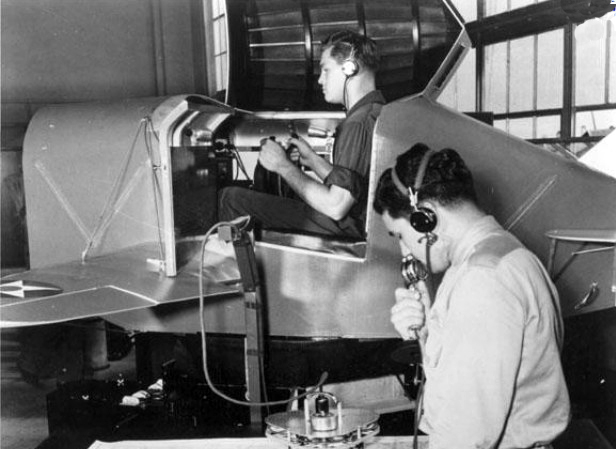
From Link Trainers in World War II to complex simulations for pilot and space shuttle training programs, we have seen technology used for more and more learning experiences. Don Bitzer, in designing PLATO, envisioned a defined set of skills and knowledge to be learned. Entry-level learners could be tested to determine their current abilities and then learning materials could be assigned to have them reach the desired level of achievement. Constant feedback monitoring the learners’ achievements until they reach the desired skill and knowledge level is a major element of his system.

For more than forty years “Sesame Street” has shown that television can teach millions of children around the world basic skills. “The Voyages of the Mimi” demonstrated the power of multiple media in teaching science. This program used television coordinated with computers and books to teach basic elementary science. Bioblast is an example of a compelling learning experience based technology program. The New Frontier program demonstrated the power of social media.

Bits and pieces of many programs have demonstrated, time and again, the effectiveness of technology-based learning programs. Some large programs have been demonstrated in various school systems. Critical today is a learning management system that tracks students as they progress through their individualized learning programs and gives both the students and the teacher feedback with respect to their progress.

Feedback, in these cases, must be almost immediate and relevant.

The teacher in such a system is less a “sage on a stage” and more of a tutor, mentor and coach that guides the learner through his or her learning experiences. School facilities provide laboratories where teams of students can produce relevant products in their learning experiences. Continue reading

Sep. 6, 2012: edX and VUE, Kapiolani CC, Manchester Study, Lake Park-Audubon HS

MOOCs Are Growing Up Quickly
A sign that MOOCs are evolving into viable credit courses is today’s edX announcement that students will soon be able to take “a course final exam at one of over 450 Pearson VUE test centers in more than 110 countries.” Students will be charged “a modest fee for the proctoring service.”[1] Perhaps a natural consequence of the need for onground proctoring for open online courses will be the emergence of public and school libraries as well as schools and colleges around the world as providers of walk-in proctoring services. Proctors and sites could be certified and monitored by a nonprofit international board for a small fee. For most everyone, a library, school, or college is within easy commute. For some, proctoring could provide a small profit. However, in-person proctoring services may be a transitional solution for an issue that will probably disappear as online testing technology advances.

Dropping Enrollment at Kapi’olani CC — Implications?
This may just be a fluke, but for the second consecutive term, enrollment has dropped at KCC while it has gone up on other campuses[2]. The numbers are small so this may not be indicative of a significant trend. Still, after years of recording among the highest enrollments in the University of Hawaii system, this drop is worrisome. The emphasis at KCC in the past few years has been on campus-based strategies to raise retention and program completion rates. Perhaps it’s time to focus on infrastructure, instruction, and service improvements that rely on the latest personal communication technologies such as smartphones and pads. Already in the hands of students and potential students, these devices downplay location and spotlight anytime-anywhere access to services and instruction. With online technology increasingly dominating the college experience, KCC may be seeing the beginnings of a beautiful campus with expensive concrete ‘n’ glass facilities evolving into a dead zone, i.e., classrooms, labs, library, and campus standing open but empty.

Hello?
In a comprehensive study, by a team from the University of Manchester (UK), of “more than 13,000 11- to 16-year-olds at 40 secondaries across the country,” researchers found that the traditional high transmission approach to teaching math, characterized by a “tendency towards a more conventional, teacher-centred mode of teaching, with knowledge meant to be transmitted from teacher to pupil,” is less effective than student-centered, interactive approaches. In short, lecturing “can turn pupils off maths.”[3] Midway through 2012, I have to wonder why money is being spent to reiterate the obvious.

Millions on New Buildings and Outdated Technology?
Lake Park-Audubon High School (Minnesota) is celebrating the spending of millions of dollars on the construction of a new campus and new technology defined, in part, as “four computer labs with 25 to 30 computers each,” a “media center,” and “laptop computers and carrying bags … issued to the 180 students in grades 10 through 12.”[4] With the trend toward personal pads and smartphones as well as online instruction and services, one has to wonder if the district has made the best decisions. The “campus-wide Wi-Fi” with double the bandwidth, flipped classrooms, and movement toward ebooks are wonderful. However, these as well as the physical education and athletics facilities notwithstanding, the question remains: Is this the wisest use of education dollars? Laptops are going the way of the dinosaur, but when placed in the hands of all students, the need for computer-equipped labs or even labs seems redundant. iPhones and iPads can easily turn any room or environment into a “lab.” Furthermore, the construction of classroom buildings at a time when the trend is toward anytime-anywhere access seems, at least to me, counter-intuitive.
__________

1. “EdX Announces Option of Proctored Exam Testing Through Collaboration with Pearson VUE,” Daily Markets, 9.6.12.

2. “University of Hawaii Enrollment Reaches Record,” AP/Star-Advertiser, 9.6.12.

3. “Traditional Teaching Methods Still Dominant in Maths Classrooms,” University of Manchester, UK, 9.6.12.

4. Helmut Schmidt, “LP-A’s $17.5 Million High School Open for Learning,” DL-Online, 9.5.12.

Sep. 6, 2012: Grammar and Texting, Flipped Classrooms, iPods, iPads

iPods in Classroom Can Boost Academic Time and Resources for English Language Learners from The University of Texas at Austin News:
A study from The University of Texas at Austin’s College of Education by Min Liu, a professor in the Department of Curriculum and Instruction, has found that the iPod can serve as a social and academic equalizer for students whose first language is not English. The study with K-12 students in Texas showed that students did use the devices for school-related work and benefited from their use.

Text Speak Does Not Affect Children’s Use of Grammar: Study by Rebecca Smith from The Telegraph online:
According to a study conducted in the UK, “There was no evidence of any significant relationships between poor grammar in text messages and their understanding of written or spoken grammar.”

Educators Evaluate ‘Flipped Classrooms’: Benefits and Drawbacks Seen in Replacing Lectures with On-demand Video by Katie Ash from Education Week:
Ash’s article is a good companion to Greg Green Is Flippin’ in Clinton, which I wrote a few weeks ago, about “flipped classrooms.” She examines pros and cons of this approach, which is quickly catching on in many schools.

Best Practices for Deploying iPads in Schools by Matt Levinson from MindShift:
Levinson presents some ideas on how to effectively use iPads in the classroom. Be sure to read the comments, where he elaborates on some of his ideas when answering questions from readers.

Punking Klout

By Jessica Knott
Associate Editor
Editor, Twitter

Last week, I stumbled upon an article in Inside Higher Ed (Alexandra Tilsley, “Grading Clout?“, 30 Aug. 2012) highlighting Todd Bacile, a Florida State University instructor, who uses Klout to assess his digital communication students. On the surface, this technique seems to open doors to creative assessment. However, dig a little deeper and some big questions begin to emerge about what students are actually learning.

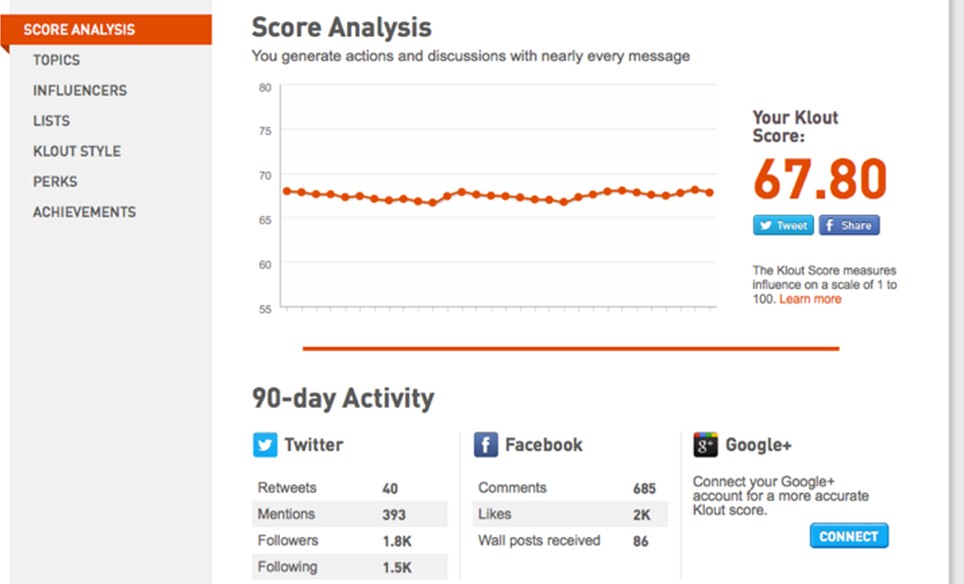
I am a Klout user. I have a high-ish score (68), and receive frequent inquiries based on my number. Here’s the secret: in a lot of ways, that score is completely bogus.

As you can see, my Klout score remains relatively steady, and my number is high. At a glance, it would appear that I am social media-savvy, with frequent re-tweets and conversations started.

This is not completely incorrect. I am relatively social media savvy, and I start a lot of conversations about education, social media, and the career cycle. These are my interests, and at the risk of sounding boastful, I am experienced and knowledgeable in them. So, given this data, I would probably do relatively well in a high-level assessment. Now, let’s dig a little deeper and I’ll reveal my true social media identity.

Continue reading

Sep. 2, 2012 – Digital Literacy, Computerized GED, 50 Best Apps…

The Common Core’s Digital-Literacy Gap by Paul Barnwell from Education Week Teacher online:
Barnwell asserts that the Common Core is too vague in how it addresses digital literacy, and he is concerned that it will be overlooked. He contends instead that traditional skills should be combined and integrated with new-literacy skills.

In 22 States, GED Exam Now Computerized by Ian Quillen from Education Week online:
The GED (General Educational Development) exam will be offered in a computerized version only after 2014. The rationale offered is that it is one way for test takers to demonstrate their technology skills, which the author says is debatable. He says that the more valid reasons are that it offers more flexibility for scheduling, registration, and obtaining scores and feedback.

50 Apps for Lifelong Learners by Caity Doyle from Technapex:
Edudemic and their content partner Online College Courses have published a list of what they consider the 50 best educational apps for lifelong learners. The list seem to contain something for everybody, from National Geographic Today to Goodreads to Star Walk.

The Tech-Driven Classroom Is Here, But Grades Are Mixed by James Crotty from Forbes:
Crotty asserts that while newer educational technology is more interactive and has possibilities for creating more personalized learning for students, studies do not completely support the anecdotal evidence of proponents of laptop programs and other such initiatives.

How Will Traditional Leaders Fare in the Wave of Open Courses?

By Cathy Gunn, Ph.D.
Dean, College of Education
Morehead State University

[Note: This article was originally submitted as a comment on Jim Shimabukuro’s “Online Learning 2012: Six Issues That Refuse to Die.” -Editor]

Jim, you wrote: “The traditional campus-based college won’t disappear….The second wave is building just beyond the horizon, and when it strikes it will further undermine land-locked institutions. The select few on high ground will survive, but the vast majority on lower ground will be forced to migrate to the virtual world.” Bill Sam’s video “EPIC 2020” and its prophesies of degrees replaced by credentials and badges is an interesting look into the future and will obviously incite some and provide some interesting dialogues among others.

David Moursund (Editor in Chief of ISTE publication Learning and Leading with Technology 1974-2001) predicted a number of years ago that students would be engaging with their professor and classmates from a distance, engaging in “flipped” classrooms (not called that, of course), and that students would be wearing their computer on their wrists using anytime/anyplace access to information as they learned as much out of the classroom as they did within. At the time, his predictions were seen as outlandish and very sci-fi like. Did he get it most righty? Hmm…Sam’s predictions of total replacement of traditional classrooms and campuses may cause a ripple across higher education, but my prediction is that it will take a different kind of leader in our nation’s IHE’s for this to become a tsunami.

Using Clayton Christensen’s “disruptive innovation” idea (Larissa MacFarquhar, “When Giants Fail: What Business Has Learned from Clayton Christensen,” New Yorker, 14 May 2012), change in current traditions of higher education for many institutions will most likely require disruptive innovations outside of the academy first and we can see the evidence of the first seeds of that through the open course movement. I’m in a mostly land-locked institution on lower ground, and I’m curious about how other traditional institutions, led by traditional leaders, will fare. And what is my place in this movement? Traditional methods for effecting change at my institution aren’t getting us even to a trickle yet, let alone to thinking about or planning for a wave!