AT&T’s Online Mentoring Academy: A Model for Public-Private Partnering

By Jessica Knott
Associate Editor
Editor, Twitter

AT&T recently announced a $350 million initiative designed to increase high school graduation rates and place at-risk students more firmly on the career track. The Aspire Mentoring Academy plans to fund three different types of mentoring, in many cases provided by AT&T’s employees, and encompassing job mentoring, skills mentoring and e-mentoring.*

Job mentors are AT&T employees, sharing their experiences via project-based activities. According to Kat Bockli, PR representative for AT&T, employees sign up through the Aspire Mentoring Academy internal website. They are then provided with preparatory materials and training. Most of the training is online, but AT&T also plans partnerships with non-profits such as Junior Achievement, We Teach Science and The LEAD Program. “As our organizations work together to increase U.S. high school graduation rates, giving students real-world learning experiences is key to showing them the importance of staying in school,” said Jack E. Kosakowski, president and chief executive officer of Junior Achievement USA(r). “By working with AT&T employees at Aspire Mentoring Academy, students understand how what they learn in school applies to their lives after graduation.”

When it comes to project assessment, the program is interested in “data-driven outcomes that improve high school graduation rates,” according to Janiece Evans-Page, AVP for Community Engagement at AT&T. “Other on-track to graduate indicators, or ‘smaller metrics,’ include on-time promotion to the next grade and improved attendance rates. These shorter term metrics are key to achieving the high school graduation goal and will be included in how we measure our success.”

To be effective, the initiative requires significant support from AT&T employees. “I was mentored by a young professional when in high school. It made a big difference in the path my life took,” said Clara Garza, Aspire Academy mentor and Lead Chief of Staff for Executive Operations at AT&T, Dallas. “One of the best things about AMA is there are several mentoring opportunities the employee can choose from. You can participate in short-term mentoring events in the workplace or in classroom settings or choose a long-term mentoring option with a series of classroom settings or student mentoring. AMA is also fully customized – you can do it on your own time, when there is a particular need and they give you the tools to be successful.”

More information on Aspire Mentoring Academy can be found at http://www.att.com/gen/corporate-citizenship?pid=11547.
__________
* Update submitted by Kat Bockli, AT&T, on 10.24.12: “AT&T has launched AT&T Aspire, a $350 million initiative designed to increase high school graduation rates and place at-risk students more firmly on the career track. The Aspire Mentoring Academy is the key community engagement program of Aspire that plans to fund three different types of mentoring provided by AT&T’s employees, and encompassing job mentoring, skills mentoring and e-mentoring.”

Edited 10.24.12 at 07:00.

What Will Drive the Future of Educational Technology?

The FETC conference in Florida, one of the largest conferences in the world, is fast approaching, and that spurred some memories of when I went last year. I thought then about how different the exhibits and presentations were from what such a conference would have featured a decade before, and I wondered what it will look like a decade in the future. I thought then that much of what I was seeing was already becoming obsolete (or should be), and it makes me wonder what direction educational technology will (or should) take in the future.

The huge exhibit hall was filled with flashy demonstrations of the latest miracle products, few of which drew my interest. The vast majority of the big ticket items were all designed to improve the quality of a lecture. There were new and improved ways to put information on a screen as the lecturer explained it, and there was especially better ways for the audience to indicate their understanding electronically. I am all for the use of such response mechanisms for lectures, but since I don’t do a lot of that it would not do me a whole lot of good.

I went to two presentations with almost identical titles and almost identical announced purposes — to show cool web sites that could be made a part of instruction. Despite those similarities, there was a stark difference in the content, a difference that  illustrates the fundamental problem with anticipating  the future of educational technology and change. If we all agree that the purpose of technology is to enhance good instructional technique, then the difference lies not so much in technology but upon the vision of the instructional technique it is supposed to enhance. Continue reading

Wireless EdTech 2012, Augmented Reality Device, Infographics on Ed Tech, Broadband Deployment

“The Future of Education Is Wireless” — according to the Wireless EdTech Conference 2012, which was held in Washington, D.C., October 10-12. Why? “Mobile is innovative, affordable and provides 24/7 access to a seemingly endless amount of resources. That’s why there are more mobile subscriptions than toothbrushes. From low-income urbanites, to the suburban upper-class, to the poorest of poor in rural areas of the world, mobile connectivity has the power to transform learning in a 21st century environment” (conference site).

Then they go about showing, sharing and introducing policy, educational performance and international examples. There are powerful examples, and you really get up close and personal to the people who present and share their ideas.

I attended the conference. It’s the one conference that makes me want to attend all of the sessions. I usually go for the education section and the policy sessions. The conference is star-studded with people who know education and who are in touch with the pulse of the nation — educators, pupils, school board leaders, and policy makers. It’s a great conference to do powerful networking with, to name a few, the new president of ISTE, influential people from the Smithsonian and the wireless industry, and tried and true leaders like Dr. Chris Dede.

If international is your interest, here are a couple of videos for you:

Continue reading

CFHE 2012 Impressions: My Bumpy Start to a MOOC on Future Trends in Higher Ed – ‘505 Unread Discussion Messages’

By Stefanie Panke
Editor, Social Software in Education

The Massive Open Online Course Edfuture 2012 (CFHE 2012, Current/Future State of Higher Education: An Open Online Course) started on October 8 and will be running for six consecutive weeks. Since I am currently working on an article about future trends in educational technology, I was very excited to learn about the course and plan to participate as intensively and regularly as my schedule allows.

Getting Started

Unsurprisingly, the last week has been busy at work, and after a brief review of the reading material on Monday, I “skipped class” for the remainder of the weekly MOOC format. Checking back in on Friday only to get ambushed by “505 Unread Discussion Messages” that had secretly been piling up in the course forums, left me disheartened for a second. As usual, it pays to take a deep breath and a closer look at the MOOC’s course activities.

The majority of messages were personal introductions (441); about 65 dealt with the reading material of week one. The discussion threads covered various topics from sustainability and diversity of open education to the costs of higher education and international trends. I did not engage in any particular topic. Instead, I drifted through the threads in a serendipitous fashion and enjoyed listening in to different conversations. Here are my favorite quotes of the week:

I’m not participating in this MOOC to compare apples and oranges (bricks and bytes); I’m here to imagine ways we can be present to each other across time and distance. (Joe Moses, Oct. 9)

I personally have taken courses in Udacity and [they] are among the best courses I ever had. (William Colmenares, Oct. 9)

Continue reading

Update on UNC’s Remote Proctoring Services

By Franklin Hayes
Media Coordinator
ProctorU

[Note: This article was originally received as an email response to ETCJ’s “Remote Proctoring: UNC’s Low-Tech Network Model May Be the Best.” -Editor]

I was skimming through Educational Technology and Change and thoroughly enjoyed the lively discussion about online proctoring. More specifically, I honed in on the article titled “Remote Proctoring: UNC’s Low-Tech Network Model May Be the Best” and was intrigued by not only the subject matter but also for a couple of other reasons.

I agree that online proctoring is the most effective when it replicates the in-classroom experience and can appreciate UNC’s proctor Remote Testing Services for its simplicity.

Additionally, I work for a company called ProctorU that provides online proctoring for over 200 partner institutions, including a handful of those mentioned in the article. Most recently, we signed a major agreement with the University of North Carolina System that integrates ProctorU with their web infrastructure, enabling students to find an online proctor and test without ever having to leave the UNC site. This Application Programming Interface (API) was recently highlighted in a press release by UNC and covered by the publication Campus Technology.

The partnership with UNC represents the first statewide agreement with a single online proctoring company. We also proctor exams for Northern Virginia Community College (NOVA), the University of Minnesota, and Northwestern University. For a listing of our partner institutions, please visit http://proctoru.com/partners.php. Continue reading

Remote Proctoring: UNC’s Low-Tech Network Model May Be the Best

Jim ShimabukuroBy Jim Shimabukuro
Editor

[Note: See Franklin Hayes’s “Update on UNC’s Remote Proctoring Services,” 10.9.12. -Editor]

A persistent concern about completely online courses is testing security. Without the physical presence of the professor or teaching assistant at the exam site, the fear is that students will cheat. For some (Adsit, Kimura), security is a non-issue, and the real issue is test design. For others, the issue is the ills of high-stakes testing (Keller). These issues notwithstanding, secure testing remains a critical step in the credentialing process for the vast majority of teachers and educational institutions. Its omission, alone, is enough to ensure that a course cannot be taken for credit, and credits are the universal currency for diplomas and certificates.

The mushrooming popularity of MOOCs has magnified the issue of secure testing for the purpose of certification. Minus the security, MOOCs are relegated to non-credit status. In other words, a terrific learning experience, but it won’t count toward graduation. Thus, as a business model, MOOCs are considered by most to be nonviable.

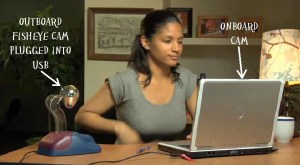
Consequently, there’s a need – a need for a workable remote proctoring procedure or service. One of the latest to enter this market is the Tegrity Remote Proctoring System. It relies primarily on the webcam built into today’s notebook computers. This type of service is not new. Kryterion‘s “online proctoring solutions accommodate on-board cameras commonly found on today’s laptops.” However, it also uses “more advanced USB cameras that offer wider view of the test taker and surrounding environment.”

Software Secure‘s Remote Proctor Pro is billed as “the gold-standard in remote test integrity.” It claims to address “every area of exam security by authenticating … identity and controlling a student’s computer while watching and listening to the exam environment.” See the video for a demo of its outboard camera setup.

Software Secure’s Remote Proctor Pro

Test proctoring per se, as an onground service, has a relatively long history. Colleges have offered exam proctoring services to students as well as the public for years. The National College Testing Association‘s Consortium of College Testing Centers (CCTC) is a free referral service designed “to facilitate distance learning.” Cal Poly is a member. Its “Testing Services office offers proctoring services for anyone needing to take tests in San Luis Obispo for another school or agency. Students participating in distance learning programs or correspondence degree programs, and professionals needing to be tested in order to receive certification in their field may be able to arrange to have their tests proctored at our facility.” Continue reading

Remote Proctoring: More Questions Than Answers

[Note: Bert Kimura is a professor at Kansai University and the University of Hawaii at Manoa. He’s fully online at Manoa. As coordinator of an annual, completely online international conference, he’s also in the process of releasing a call for presentation proposals. See preliminary details for TCC 2013 in the right sidebar of this page. I emailed these questions to him earlier this week. -Editor]

Bert Kimura

ETCJ: Would a typical college or school district be able to set up a video capture system such as Tegrity?

BK: I would contract Tegrity if interested rather than setting up my own system. Support costs, especially personnel, need to be included to determine if it is worthwhile to do your own. I would assume that Tegrity hosts an application and database on their servers to perform this service. I think that this is one of the services that becomes economical with a large number of users.

It is not clear to me whether a person has to be monitoring the video in real-time as well; or if it is monitored in real-time, whether the monitor views several video streams at once. In the end, I would think that someone has to review each recording to make sure there wasn’t any suspicious behavior. Therein lies added costs.

ETCJ: How and what would it require to set up a video capture system such as this?

BK: A server, databases, applications and a web based application for starters. Probably some form of added security to prevent hacking or tampering with the system.

ETCJ: Can you think of ways students intent on cheating might still beat this system?

BK: Not offhand. However, if you ask your students, I’m sure that they can think of ways to beat the system. Oh, here’s one possibility — someone could sign the answers from off camera or hold up a card with answers based on body language signals given by the test taker.

ETCJ: Any further thoughts?

BK: I must say that the concept is novel and worth testing. It would be great if Tegrity would publish some basic research data on it. That will ease the minds of faculty who would be the people that, I think, need convincing the most.

On the other hand, the issue may need review by people involved with student privacy concerns. I presume Tegrity has looked at this, but, clearly, students would need to be fully informed of their rights and privileges, if any, in using this system. For example, what if a student swears or bangs on the camera? Would it affect the student’s reputation or credibility?

My last thought is this: If paper and pencil testing is absolutely required in a class, it probably shouldn’t be offered as a DE class. Not today anyway.

I believe that student learning can be assessed through writing assignments, presentations, projects, and other creative methods of expression in virtually any class. Faculty would need to make the adjustments to do so.

Remote Proctoring Services May Not Be Necessary

Tegrity has announced its Remote Proctoring System. The purpose of the system is to allow online programs to assess students with the same level of security as would be found in the physical classroom. Before giving my response, I would like to look at the issue of academic cheating in general.

On the first day of school one year, I happened to be in the high school hallway when our calculus teacher walked by, a grim look on his face as he led one of the school’s most well known students, a highly regarded member of the honor society, to the office. Something had aroused his suspicions, and he had tested her, learning that her mathematical abilities were at the early algebra stage, roughly 8th grade. Throughout high school she had copied every math homework assignment and every test from friends. She had never been caught until then.

That girl was by no means unusual. The Educational Testing Service’s campaign to stop cheating cites statistics indicating that academic cheating has risen dramatically over the last few decades at both the high school and college level.  Recent studies indicate that 75-98% of college students admit to having cheated. Another study said that 95% of students who admitted cheating said they had never been caught. It used to be that cheaters were the people just trying to get by, but today’s cheaters are just as likely to be the top performers in the school.

Those statistics all come from traditional, physical classrooms. If the goal of the new Tegrity Remote Proctoring System is to provide the same level of security found in those classrooms, then it has set a pretty low bar for its standard. A better approach lies in changing the nature of assessment itself, thus making the concept of proctoring unnecessary. Continue reading

Advising Umbrella: Maximum Faculty Involvement for Maximum Student Success

By Sharaf Rehman, M.Ed., Ed.S., Ph.D.
Professor of Communication
The University of Texas-Brownsville

College faculty is powerless in deciding what happens in their area high schools or in setting the mission and goals of their college. Still, it has a dual obligation to students: to help students master discipline specific knowledge and acquire life-skills. To fulfill this responsibility, the aquthor developed and implemented an all-encompassing model for advising in an academic unit in a state-supported, regional university. This “Umbrella Model” involves some participation from the administration but is mainly carried out by faculty members.

The model evolved purely out of necessity, on a campus that had abandoned a model in which faculty advised students. In the previous model, all advising was carried out by a team of advisors that reported to a Director of Advising. Every semester, prior to registration, all students were required to visit one of the advisors for help in building their class schedules. This was mandatory. However, students were not required to consult with faculty from their respective areas of study in making selections. The dropout rate for this approach was close to 50 percent. Worth noting is a figure from the placement tests, which revealed that 48 percent of the entering freshmen in 2011 were not college ready.

To implement the Umbrella Model, the author, who was careful to avoid stepping on anyone’s toes, offered to advise a group of 20 students in his major area. The effort would focus on planning course schedules for the coming semester. This was done after a meeting with the Director of Advising, who agreed that the author, as a faculty program advisor, would help the students develop their schedules. The students would then take the schedules to the official university advisors who would, in turn, register them in the courses. Hence, both the program-level as well as mandatory advising conditions were met. Continue reading

Lessons Learned from a MOOC

By Kae Novak*
Online Learning
Front Range Community College

[Note: On 28 Sep. 2012, Russell Poulin, Deputy Director, Research and Analysis, for WCET – WICHE Cooperative for Educational Technologies, posted a question in WCET Discussions: “What is your experience in taking or teaching a MOOC? What are the ‘lessons learned’ that you have to share?” This article is based on Kae’s response to the forum a few hours later. -Editor]

I just finished facilitating a Games Based Learning MOOC. We may be considered more “modest” as our total student count was 301. This MOOC was specifically for educators to learn about games based learning and is part of a Colorado Community College System Immersive and Games Based Learning Initiative Grant. The MOOC ran for six weeks.

I have taught (facilitated) courses at P2PU so the concept of open online was not new to me. I have also taken two of Stephen Downes and George Siemens’ Connectivist MOOCs. I lurked in Stanford’s AI MOOC last year and am currently participating in a Coursera MOOC.

So what are the lessons learned?

Participants in your course will have more than one style of learning online.

We had learners for whom this was the first online class ever. We also had veteran online instructors who were involved in emerging technology. Because of the topic we also had educators who are gamers and very involved online in rich interactive gaming communities. The Games Based Learning MOOC was designed as a connectivist course. It was setup up to build a community of educators who are learning online about games. The participants in the course seemed to be evenly split when it came to their online learning styles. Continue reading

Sep. 20, 2012: Teachers & Technology, iPad Study, Video Sites, Computer Tutoring

Report: Schools not Meeting Students’ Technology Needs by Joshua Bolkan in THE Journal online, 09.13.12

Although this study was conducted by Dell, a purveyor of technology, this brief overview of the results is worth reading. The majority of teachers in the study said that “technology allows them to create a more personalized learning experience” (para. 3), but many still feel that they do not have the necessary expertise to implement it effectively.

Using iPads With Mixed-Ability Students, Teachers Must ‘Give Up Some Control by Kim Fortson in THE Journal online, 09.12.12

Even elementary students seem to able to unlock the power of iPads intuitively. In a pilot study of students in a mixed 7th/8th grade class, students who were given iPads performed higher on standardized test than those who were taught in the traditional manner. One of the results of this experiment was that the teacher realized that they had to give students with iPads more freedom to choose the way in which they would use the iPads. For example, students were told which skills they needed to practice and they had the freedom to choose the app they preferred to work on that skill.

100 Video Sites Educators Should Bookmark from The Innovative Educator

Even though this article/website is a bit dated (Feb. 24, 2010) it is still is a good resource for finding videos online. It is divided into categories such as Educational Videos, which contains resources such as Teacher Tube and Cosmo Learning and General Videos, which contains resources such as Hulu and TED. The other categories are Teacher Education, Lesson Planning, Science, Math and Technology, History, Arts and Social Sciences, Video Tools, Network and Program Videos, Free Movies and Clips, How-Tos, and Government and Organizations.

The Machines Are Taking Over by Annie Murphy Paul The New York Times Magazine online, 09.14.12

Tutoring has long been recognized as the most effective form of teaching. Neil Heffernan wanted to make the advantages of this one-on-one interaction between student and teacher available to all students through computer technology simulating the immediate feedback and “nudging” that a human tutor provides.

For Schools, Laptops Are Still Better Than Tablets

picture of Harry KellerBy Harry Keller
Editor, Science Education

[Note: This article was first posted by Harry as a reply to Jim Shimabukuro’s statement that “laptops are going the way of the dinosaur,” in “Sep. 6, 2012: edX and VUE, Kapiolani CC, Manchester Study, Lake Park-Audubon HS,” on 9.17.12. – Editor]

WRT laptops [going the way of the dinosaur], it’s not so clear. With many tablets costing more than laptops, the cost is not the issue. Tablets do not perform well as writing implements while laptops do. Tablets still do not support much of the more advanced (e.g., grades 10-12) learning software.

The ideal computer-based learning platform is still evolving. Tablets were not intended for this use. Phones certainly were not. It’s nice that they can be adapted somewhat to use for learning and will help to point the way to better devices for learning.

What should such a device have? Until really good speech recognition software comes along, it should have a tactile keyboard. It should also have a pointing device capable of pixel precision, not just a fingertip. Laptops have these. It should also be rugged, light, and inexpensive to acquire and to operate. It also should run the enormous libraries of educational software currently available. Why expect vendors to invest millions in converting software to today’s latest fad in hardware?

There is no real barrier to having tablets run Flash or Java. It’s just the prejudices of the manufacturers and their desire to force software vendors to make platform-specific applications. WORA will come back, and, when it does, developers of serious applications will be happy if they resisted the trend. Continue reading

Technology Has a Long History in Learning — and It’s Getting Even Better

Frank B. WithrowBy Frank B. Withrow

From Link Trainers in World War II to complex simulations for pilot and space shuttle training programs, we have seen technology used for more and more learning experiences. Don Bitzer, in designing PLATO, envisioned a defined set of skills and knowledge to be learned. Entry-level learners could be tested to determine their current abilities and then learning materials could be assigned to have them reach the desired level of achievement. Constant feedback monitoring the learners’ achievements until they reach the desired skill and knowledge level is a major element of his system.

For more than forty years “Sesame Street” has shown that television can teach millions of children around the world basic skills. “The Voyages of the Mimi” demonstrated the power of multiple media in teaching science. This program used television coordinated with computers and books to teach basic elementary science. Bioblast is an example of a compelling learning experience based technology program. The New Frontier program demonstrated the power of social media.

Bits and pieces of many programs have demonstrated, time and again, the effectiveness of technology-based learning programs. Some large programs have been demonstrated in various school systems. Critical today is a learning management system that tracks students as they progress through their individualized learning programs and gives both the students and the teacher feedback with respect to their progress.

Feedback, in these cases, must be almost immediate and relevant.

The teacher in such a system is less a “sage on a stage” and more of a tutor, mentor and coach that guides the learner through his or her learning experiences. School facilities provide laboratories where teams of students can produce relevant products in their learning experiences. Continue reading

Sep. 6, 2012: edX and VUE, Kapiolani CC, Manchester Study, Lake Park-Audubon HS

MOOCs Are Growing Up Quickly
A sign that MOOCs are evolving into viable credit courses is today’s edX announcement that students will soon be able to take “a course final exam at one of over 450 Pearson VUE test centers in more than 110 countries.” Students will be charged “a modest fee for the proctoring service.”[1] Perhaps a natural consequence of the need for onground proctoring for open online courses will be the emergence of public and school libraries as well as schools and colleges around the world as providers of walk-in proctoring services. Proctors and sites could be certified and monitored by a nonprofit international board for a small fee. For most everyone, a library, school, or college is within easy commute. For some, proctoring could provide a small profit. However, in-person proctoring services may be a transitional solution for an issue that will probably disappear as online testing technology advances.

Dropping Enrollment at Kapi’olani CC — Implications?
This may just be a fluke, but for the second consecutive term, enrollment has dropped at KCC while it has gone up on other campuses[2]. The numbers are small so this may not be indicative of a significant trend. Still, after years of recording among the highest enrollments in the University of Hawaii system, this drop is worrisome. The emphasis at KCC in the past few years has been on campus-based strategies to raise retention and program completion rates. Perhaps it’s time to focus on infrastructure, instruction, and service improvements that rely on the latest personal communication technologies such as smartphones and pads. Already in the hands of students and potential students, these devices downplay location and spotlight anytime-anywhere access to services and instruction. With online technology increasingly dominating the college experience, KCC may be seeing the beginnings of a beautiful campus with expensive concrete ‘n’ glass facilities evolving into a dead zone, i.e., classrooms, labs, library, and campus standing open but empty.

Hello?
In a comprehensive study, by a team from the University of Manchester (UK), of “more than 13,000 11- to 16-year-olds at 40 secondaries across the country,” researchers found that the traditional high transmission approach to teaching math, characterized by a “tendency towards a more conventional, teacher-centred mode of teaching, with knowledge meant to be transmitted from teacher to pupil,” is less effective than student-centered, interactive approaches. In short, lecturing “can turn pupils off maths.”[3] Midway through 2012, I have to wonder why money is being spent to reiterate the obvious.

Millions on New Buildings and Outdated Technology?
Lake Park-Audubon High School (Minnesota) is celebrating the spending of millions of dollars on the construction of a new campus and new technology defined, in part, as “four computer labs with 25 to 30 computers each,” a “media center,” and “laptop computers and carrying bags … issued to the 180 students in grades 10 through 12.”[4] With the trend toward personal pads and smartphones as well as online instruction and services, one has to wonder if the district has made the best decisions. The “campus-wide Wi-Fi” with double the bandwidth, flipped classrooms, and movement toward ebooks are wonderful. However, these as well as the physical education and athletics facilities notwithstanding, the question remains: Is this the wisest use of education dollars? Laptops are going the way of the dinosaur, but when placed in the hands of all students, the need for computer-equipped labs or even labs seems redundant. iPhones and iPads can easily turn any room or environment into a “lab.” Furthermore, the construction of classroom buildings at a time when the trend is toward anytime-anywhere access seems, at least to me, counter-intuitive.
__________

1. “EdX Announces Option of Proctored Exam Testing Through Collaboration with Pearson VUE,” Daily Markets, 9.6.12.

2. “University of Hawaii Enrollment Reaches Record,” AP/Star-Advertiser, 9.6.12.

3. “Traditional Teaching Methods Still Dominant in Maths Classrooms,” University of Manchester, UK, 9.6.12.

4. Helmut Schmidt, “LP-A’s $17.5 Million High School Open for Learning,” DL-Online, 9.5.12.

Sep. 6, 2012: Grammar and Texting, Flipped Classrooms, iPods, iPads

iPods in Classroom Can Boost Academic Time and Resources for English Language Learners from The University of Texas at Austin News:
A study from The University of Texas at Austin’s College of Education by Min Liu, a professor in the Department of Curriculum and Instruction, has found that the iPod can serve as a social and academic equalizer for students whose first language is not English. The study with K-12 students in Texas showed that students did use the devices for school-related work and benefited from their use.

Text Speak Does Not Affect Children’s Use of Grammar: Study by Rebecca Smith from The Telegraph online:
According to a study conducted in the UK, “There was no evidence of any significant relationships between poor grammar in text messages and their understanding of written or spoken grammar.”

Educators Evaluate ‘Flipped Classrooms’: Benefits and Drawbacks Seen in Replacing Lectures with On-demand Video by Katie Ash from Education Week:
Ash’s article is a good companion to Greg Green Is Flippin’ in Clinton, which I wrote a few weeks ago, about “flipped classrooms.” She examines pros and cons of this approach, which is quickly catching on in many schools.

Best Practices for Deploying iPads in Schools by Matt Levinson from MindShift:
Levinson presents some ideas on how to effectively use iPads in the classroom. Be sure to read the comments, where he elaborates on some of his ideas when answering questions from readers.

Punking Klout

By Jessica Knott
Associate Editor
Editor, Twitter

Last week, I stumbled upon an article in Inside Higher Ed (Alexandra Tilsley, “Grading Clout?“, 30 Aug. 2012) highlighting Todd Bacile, a Florida State University instructor, who uses Klout to assess his digital communication students. On the surface, this technique seems to open doors to creative assessment. However, dig a little deeper and some big questions begin to emerge about what students are actually learning.

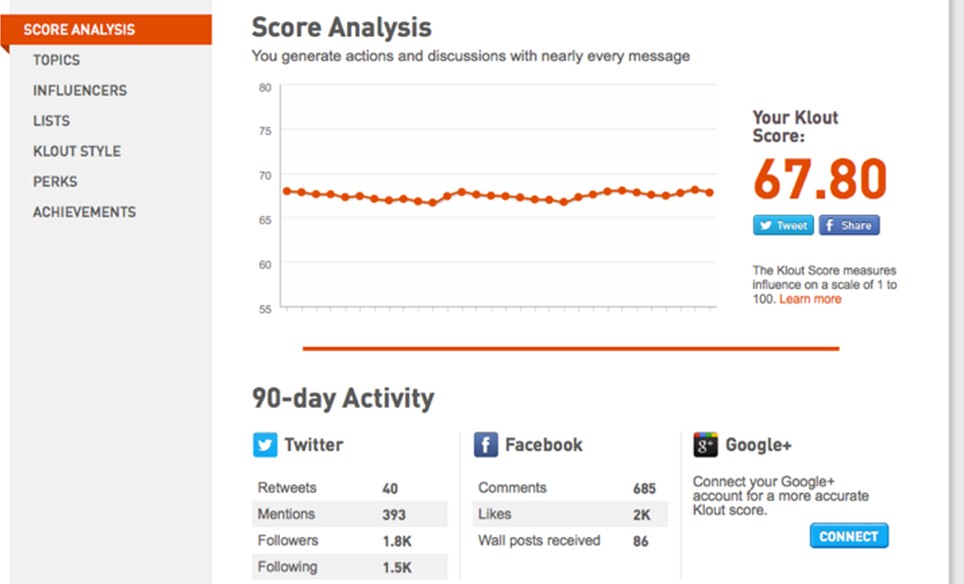
I am a Klout user. I have a high-ish score (68), and receive frequent inquiries based on my number. Here’s the secret: in a lot of ways, that score is completely bogus.

As you can see, my Klout score remains relatively steady, and my number is high. At a glance, it would appear that I am social media-savvy, with frequent re-tweets and conversations started.

This is not completely incorrect. I am relatively social media savvy, and I start a lot of conversations about education, social media, and the career cycle. These are my interests, and at the risk of sounding boastful, I am experienced and knowledgeable in them. So, given this data, I would probably do relatively well in a high-level assessment. Now, let’s dig a little deeper and I’ll reveal my true social media identity.

Continue reading

Sep. 2, 2012 – Digital Literacy, Computerized GED, 50 Best Apps…

The Common Core’s Digital-Literacy Gap by Paul Barnwell from Education Week Teacher online:
Barnwell asserts that the Common Core is too vague in how it addresses digital literacy, and he is concerned that it will be overlooked. He contends instead that traditional skills should be combined and integrated with new-literacy skills.

In 22 States, GED Exam Now Computerized by Ian Quillen from Education Week online:
The GED (General Educational Development) exam will be offered in a computerized version only after 2014. The rationale offered is that it is one way for test takers to demonstrate their technology skills, which the author says is debatable. He says that the more valid reasons are that it offers more flexibility for scheduling, registration, and obtaining scores and feedback.

50 Apps for Lifelong Learners by Caity Doyle from Technapex:
Edudemic and their content partner Online College Courses have published a list of what they consider the 50 best educational apps for lifelong learners. The list seem to contain something for everybody, from National Geographic Today to Goodreads to Star Walk.

The Tech-Driven Classroom Is Here, But Grades Are Mixed by James Crotty from Forbes:
Crotty asserts that while newer educational technology is more interactive and has possibilities for creating more personalized learning for students, studies do not completely support the anecdotal evidence of proponents of laptop programs and other such initiatives.

How Will Traditional Leaders Fare in the Wave of Open Courses?

By Cathy Gunn, Ph.D.
Dean, College of Education
Morehead State University

[Note: This article was originally submitted as a comment on Jim Shimabukuro’s “Online Learning 2012: Six Issues That Refuse to Die.” -Editor]

Jim, you wrote: “The traditional campus-based college won’t disappear….The second wave is building just beyond the horizon, and when it strikes it will further undermine land-locked institutions. The select few on high ground will survive, but the vast majority on lower ground will be forced to migrate to the virtual world.” Bill Sam’s video “EPIC 2020” and its prophesies of degrees replaced by credentials and badges is an interesting look into the future and will obviously incite some and provide some interesting dialogues among others.

David Moursund (Editor in Chief of ISTE publication Learning and Leading with Technology 1974-2001) predicted a number of years ago that students would be engaging with their professor and classmates from a distance, engaging in “flipped” classrooms (not called that, of course), and that students would be wearing their computer on their wrists using anytime/anyplace access to information as they learned as much out of the classroom as they did within. At the time, his predictions were seen as outlandish and very sci-fi like. Did he get it most righty? Hmm…Sam’s predictions of total replacement of traditional classrooms and campuses may cause a ripple across higher education, but my prediction is that it will take a different kind of leader in our nation’s IHE’s for this to become a tsunami.

Using Clayton Christensen’s “disruptive innovation” idea (Larissa MacFarquhar, “When Giants Fail: What Business Has Learned from Clayton Christensen,” New Yorker, 14 May 2012), change in current traditions of higher education for many institutions will most likely require disruptive innovations outside of the academy first and we can see the evidence of the first seeds of that through the open course movement. I’m in a mostly land-locked institution on lower ground, and I’m curious about how other traditional institutions, led by traditional leaders, will fare. And what is my place in this movement? Traditional methods for effecting change at my institution aren’t getting us even to a trickle yet, let alone to thinking about or planning for a wave!

Teaching and Learning Conference at Elon University: Technology As a Prop – Not at Center Stage

By Stefanie Panke
Editor, Social Software in Education
Instructional Analyst, School of Government, University of North Carolina
Rob Moore
Instructional Designer, SOG, UNC
Greg Whisenhunt
Multimedia Developer, SOG, UNC

[updated 8.27.12]

The annual Teaching and Learning Conference at Elon is a regional event that attracts professors, instructional designers, postdocs and other academic personnel from North Carolina colleges and universities  The 9th edition of this free, one-day conference took place on August 16. As instructional designers at UNC School of Government, we seized the opportunity to spend a day of professional development and took home new ideas, concepts and insights.

Morning Plenary

The keynote address by Ashley Finley, Director of Assessment and Research from the Association of American Colleges and Universities (AAC&U), set the pace for a stimulating day. Her talk, “How to Hit a Moving Target: Assessing Engaging Learning in Changing Environments,” emphasized the application of student-centered rubrics. She presented the “Integrative Learning Value Rubric,” a set of rubrics developed in the context of the VALUE (Valid Assessment of Learning in Undergraduate Education) project.

In this project, expert teams developed rubrics for fifteen learning outcomes. Finley paired the use of carefully designed rubrics with examples of creative assessment using web 2.0 tools. “I am not at all tech savvy,” Ashley Finley admitted, “but I am thrilled by the possibilities for reflective practice.” She added, “Obviously, without creative assignments, the technology is just that, a technology.” Finley illustrated her point by showing several examples of e-portfolios and other student-centered activities. A particularly interesting example came from Georgetown University’s collaboration space.

Students in the course “Bioethics and the Moral Imagination” at Georgetown used Youtube Analytics to annotate Obama’s speech on the contraception mandate. After Rush Limbaugh’s derogatory comments about a Georgetown student, this topic was going to dominate the class anyway – the instructor used innovative tools to steer the debate towards an analytical approach.

Continue reading

Mapping Dragons: Esri 2012 Conferences

By Charlie Fitzpatrick

[Note: This article was coordinated by ETCJ associate editor Bonnie Bracey Sutton. See her related article, The ESRI Conferences: A GIS Journey Toward Citizen Science, 8/2/12. – Editor]

Today we face dragons. Some were here when we arrived, others we ourselves unleashed, inattentively, perhaps even mindfully. But they are here, growing in strength, in spread, in number. Tomorrow, we must rely on our children to protect us. For that, they must understand the world, its countless patterns and fractal details, and be able to focus on the key elements of a given puzzle, yet grasp how it fits in the larger whole.

Geography is the study of the world and all that is in it, or was, or could be, at infinitely varied scale. These infinite details link together to make patterns in interlocking systems. If we can tease out the patterns – assemble the vast galaxies of data and classify, symbolize, query, analyze, and model – we can find the keys that help us answer questions, solve problems, design solutions.

Geographic information system (GIS) technology allows us to find, generate, integrate, analyze, manage, and display data, illuminating the patterns and relationships large and small. The tools come in all sizes, shapes, and powers. As children explore and analyze their world, they build the capacity and disposition to see patterns, integrate information, discover relationships, make decisions, solve problems. Like a fire, it grows, slowly at first, needing consumable tinder before sticks, logs, and trunks. But kids devour content like web-based maps, use the tools to leap from the near and familiar to farther afield, bringing along their skills and knowledge, testing those against new situations. They poke into interesting worlds, find crevices, explore ideas, inhale new details. Restlessly, they seek the next challenge, take the larger step, find the next hill to climb and peer over, discovering new concepts and perspectives with which to build capacity.

Around the world, GIS is used in countless jobs, in hundreds of careers, because people need to solve problems and have to understand the nature of things to do that. Esri makes GIS software, and every year we have a conference at which people from around the world meet to celebrate their victories and learn from each other how to do a little more. This year, 14,000 practitioners assembled, including over 800 educators. The International Conference grows every year, and the Education Conference this year grew like wildfire. People are finding hope in problem-based learning, in helping youth from elementary school to graduate school think critically, work collaboratively, dig for answers, extract patterns, and see how to make a difference in their lives, their community, and the planet. They build background in tackling unfamiliar problems, bulking up in STEM fields and social studies content, in communication skills, opening doors to more and more future jobs as they grow.

We will never run out of problems. But, through the power of maps – our common language – we can explore, analyze, and understand our world, and diminish those dragons around us.


Pinterest: A Quick and Easy Tool to Gather Web Materials

Lynn ZimmermannBy Lynn Zimmerman
Associate Editor
Editor, Teacher Education

After reading an article about it, I decided to sign up for a Pinterest (http://pinterest.com/) account. It is touted as a virtual bulletin board, and the article I read especially recommended it for teachers. I have been looking for a simple way to create a “swipe” file for online materials related to TESOL (Teaching English to Speakers of Other Languages), and it looks like Pinterest may be what I was looking for.

Setting up a free account on this social networking site is quick and easy. Then you can create boards to organize items you “pin.” These items are web pages that must have graphics on them. I created a board called “TESOL” on which I am pinning related links. I have pinned some websites that I found by searching the Pinterest site using the search terms “esl” and “tesol.”

Since you can also add a “Pin It” button to your favorites bar in Internet Explorer, you can pin sites that you run across yourself. In turn, these can also be re-pinned by others who see them on your board. Editing the board and editing your pins, deleting, renaming, etc. are simple and easy to do. Time will tell if this site continues to serve my needs, but for now, I am satisfied that it is easier to manage than my desktop folder where I stored articles and information from websites.

I intend to share Pinterest with my students so they can add it to their teaching toolbox along with some other free sites that I think teachers would find useful. For example, I have found electronic post-its that can be downloaded to your desktop. Another useful tool for teachers is Penzu (http://penzu.com/), a free online journal/diary application that is fairly easy to use.

Has anyone else found quick and easy sites that meet a specific need and/or that teachers and students could use?

August 21, 2012 – Education in 2020, DCL, Tech Costs

What Higher Education Will Look Like in 2020 – A report from Pew Internet says, among other things, that it won’t look too different from how it does now.

Deep Conceptual Learning: Creating Connections That Last – Tim Ham says that DCL is critical to students’ success in and out of the classroom. He highlights how Common Core State Standards (CCSS) can connect students, teachers, and content, transform not just assessment but “requires a shift in the way teachers teach and students learn.” Technology has an important role to play as one of the tools for student success.

Affording the Classroom of the Future – Bridget McCrea looks at the logistics and costs of setting up and maintaining technology-intensive classrooms. “As the nation’s K-12 schools consider the equipment and space requirements of tomorrow’s classrooms, many of these institutions are also looking at how to pay for the new learning spaces.”

Home Schooling As the 21st Century Model for Public Schools?

Jim ShimabukuroBy Jim Shimabukuro
Editor

Blake Binkley may very well be the emerging face of learning. “He has taken classes through Truckee Meadows Community College, the University of Nevada, Reno, through the Washoe County School District’s online learning program, the Stanford University Online High School and even the high school he is zoned to attend, Galena [in Reno].”[1] Binkley is 18 and a home-school student, but, he says, “‘It isn’t the traditional view of … being taught at home by my mommy.'” He says, “‘It’s basically given me the opportunity to choose what I want to do.'”

Binkley should have educators, with an eye on the big e-picture, connecting the dots and realizing that the trend toward home schooling, on the one hand, and MOOCs, on the other, may be merging. Against the backdrop of MOOCs that are sprouting all over the virtual landscape, Binkley’s technologically enabled “opportunity to choose” courses to construct a learning program geared to his personal interests and needs may be an indication that land-based, lock-step, one-size-fits-all schools are becoming less relevant by the day.

Obviously, the gap between schools as they are and home schooling as the dominant model is enormous and the dots joining them are spaced far apart, but, a constructivist point of view notwithstanding, the trend seems both natural and inevitable. The major obstacle is the land-based district boundaries that are used to define and finance schools. As Michael Van Beek observes, “Even though the Internet is without boundaries, under current law a student’s ability to enroll in online programs is still limited by local and intermediate school district boundaries.” His conclusion is compelling: “These ‘schools-of-choice’ boundaries just don’t make sense when any school in the state can easily provide instruction to any student with the help of technology.”[2]

This problem of boundaries is not insurmountable. Creative decision makers will be able to come up with solutions, and one is to simply have the funds follow the students’ choices. For example, students are allocated a certain amount, and they are free to choose courses within that budget. If they exceed it, then the the remainder is paid out of pocket. In this scenario, there are no district or state boundaries. The courses can originate from anywhere on the planet. A method for approving courses and credits will also need to be factored in. Continue reading

A Sign of How MOOCs Will Impact Colleges

Jim ShimabukuroBy Jim Shimabukuro
Editor

In the wake of the recent onslaught of MOOCs in higher ed, the word “tsunami”* is often used to describe their potential impact. It evokes images of the 2004 Indian Ocean and 2011 Tohoku disasters, and fear and panic are widespread among faculty and administrators who cannot begin to fathom the threat to their ivory towers. To fully appreciate the analogy, however, we need to consider the speed of a tsunami. At 500 miles per hour, it can travel thousands of miles over open ocean in a matter of hours. But what’s truly sinister about this movement is that we usually don’t notice it until it hits our shores. By then, it’s too late. It’s difficult to detect. To our naked eye, the surface of the ocean may appear to be a bit darker and rougher, but it’s still relatively calm compared to the huge waves that we associate with tsunamis. Thus, we don’t see it coming unless we know what to look for.

As far as tsunamis go, the MOOCs that are lapping at our campus borders today are minuscule, perhaps a few inches high at most. But many are taking the threat seriously and believe the worst is yet to come. Is it? To answer this question, we need to look for signs. Not surprisingly, we turn to the most visible figures on our college campuses — administrators. As leaders, they should know. Right?

Well, no. That is, unless they’re in very close touch with teachers in the classroom and students. And this is especially true at the junctures where students, who are comfortable with the latest communications technology, and teachers, who are independently exploring and implementing strategies that are in sync with the open online learning environment, intersect.

The signs are easy to miss, like the subtle surface changes in the open ocean that indicate a massive tsunami is racing toward land, just below the surface, at the speed of a jet plane. For the full impact of MOOCs, what are the signs that we need to look out for?

We get a hint from an article by Laura Pasquini, “Online Learning: More Than Just a MOOC” (TechKNOW Tools, 28 July 2012). Pasquini is an education professional and a doctoral student in learning technologies at the University of North Texas. She turned to MOOCs to connect with “new concepts, research ideas, learning networks.” She says, “My intention when signing up for this type of free, online learning was to support my own professional development and expose myself to new learning concepts.”

Student interest in MOOCs is definitely an indicator, but what really caught my attention was this comment: “I reflected my MOOC experiences to my faculty advisor and he believed that participation in any one of these classes could be an added elective for my doctoral degree plan since this informal learning environment was contributing to my research design.”

Continue reading

Constructing a Sustainable Model for Higher Education: Part 1 – Disaggregation of Teaching

By Brian Mulligan

[Note: In his series, Constructing a Sustainable Model for Higher Education, Brian will explore and propose a process and apply it to generate a viable model. In this first part, he begins with an analysis of the major elements or factors that define teaching and asks readers to participate in the discussion that’s attached to this article. In part 2, he plans to discuss criteria for disaggregating teaching functions into different institutions; in part 3, a green-field design of disaggregated higher education; and in part 4, the inhibitors, or economic and sociological barriers, to moving from here to there. – Editor]

You can learn virtually anything online. So why go to college? It does seem that more and more people are asking that question, the most famous (or infamous) recently being Peter Thiel in his description of a higher education bubble. There are, of course, plenty who disagree, particularly those with “skin in the game.” So who is right? Is higher education too expensive? Does it represent a good Return On Investment for students and the country? Is it sustainable in the long run?

To paraphrase Yogi Berra, making predictions is difficult, especially about the future. That has not stopped the many, including myself, who are making predictions on the future of higher education. A particularly dramatic example of such predictions is on the epic2020.org site. Amara’s Law states “We tend to overestimate the effect of a technology in the short run and underestimate the effect in the long run.” So it may be some time before we see these predictions coming true, but when they do, they may well be as dramatic as some have predicted.

So, is higher education, as it currently exists, sustainable in the long run? How would we go about answering that question? Those of us of an analytical bent would probably look at this as a design problem. We might define what we are trying to achieve, list all the tools and techniques available to us, and then try to come up with the best solution. To be honest, we’d probably start again from scratch. In a truly competitive world, anyone who did this would win “customers” from the less efficient and this model would win out very quickly. But higher education is much messier than this. The objectives we are trying to achieve are not fully clear and seem to be the subject of much debate. Competition is hindered by bureaucracy, regulations, and cartels. The “product” is complex, and even if you offer the best value, you can’t be sure the customer will recognise it. It may even be unclear who your customer is. The student? The employer? Or even the government, who in most countries picks up the tab for a very significant part of the cost?

Continue reading