A Sensible Higher Ed Business Model for Online Degrees: Are We There Yet?

Jim ShimabukuroBy Jim Shimabukuro
Editor

Not yet, but we’re getting close.

Devon Haynie, in “10 Most Inexpensive Online Bachelor’s Programs for Out-of-State Students,”1 provides signs that higher ed has reached a milestone in the quest for a business model for online degrees that makes sense for the population that needs it most — students and families of students who simply can’t afford today’s high cost of a bachelor’s degree.

For students from low-income families, the bottom line is tuition that can be paid through minimum-wage part-time jobs. In other words, can they earn enough working 20-30 hours a week to pay their tuition?

In a time when tuition is rising instead of falling, online technology has been the light at the end of a very long tunnel. But until now, that light has remained distant and dim, receding rather than growing closer, with colleges viewing technology as added value to onground traditional courses and calling the mix “blended” while driving the cost of education even higher.

To further stymie the growth of online courses, they make them as unattractive as possible, continuing to charge online students the same fees as their onground counterparts even when they don’t use the same resources. To further stick it to online programs, out-of-state fees are also charged, effectively shutting out the potentially large disruptive population of nontraditional and low-income students.

But all of that is changing. At last.

For example, Mary, a hypothetical student who lives at home with her parents and works 20 hours a week at the counter of a fast-food restaurant in Wai’anae, Hawaii, can now earn enough to pay her tuition at Texas Tech University, where she’s working toward a bachelor’s in Special Education and Teaching. The cost per credit hour is $213, and she needs 120 credits to graduate. The total cost for four years is $25,560, which breaks down to $6,390 a year or $3,195 a semester.  Continue reading

MOOC Sightings 007: The Battushig Factor in College Admissions

MOOC Sightings2

The difference between SAT scores of students from the lowest (<$20K) and highest (>$200K) income brackets is approximately 400 points. This point difference is mirrored in comparisons between the lowest (<high school) and highest (graduate degree) parental education levels.1

Battushig Myanganbayar

Battushig Myanganbayar

This correlation seems immutable. Parental education and income levels impact SAT scores and determine who gets into the most selective colleges. Then along came Battushig — Battushig Myanganbayar of Mongolia, that is, “The Boy Genius of Ulan Bator” — who, in June 2012, at 15, “became one of 340 students out of 150,000 to earn a perfect score in Circuits and Electronics, a sophomore-level class at M.I.T. and the first Massive Open Online Course, or MOOC.”2 His accomplishment didn’t go unnoticed, and he is now a research student at the MIT Media Lab.

Battushig is, of course, a rare exception, but his success adds to the already enormous potential of MOOCs and raises the possibility that they could become a factor in college admissions. In an editorial yesterday, Pitt News broaches this very idea: “Universities sometimes directly accept a student that excels in one of their MOOCs…. If not, the student may still choose to list the MOOC on his or her resumé under skills or relevant education. A completed MOOC is a valuable asset, comparable to a week-long leadership conference.”3

The message for parents and students is clear: MOOCs are poised to clear their current wildcard status and earn credibility as a key factor in college admissions.
__________
1 Zachary A. Goldfarb, “These Four Charts Show How the SAT Favors Rich, Educated Families,” Washington Post, 5 Mar. 2014. Also see Josh Zumbrun, “SAT Scores and Income Inequality: How Wealthier Kids Rank Higher,” WSJ, 7 Oct. 2014.

2 Laura Pappano, “The Boy Genius of Ulan Bator,” NY Times, 13 Sep. 2013. Also see her “How Colleges Are Finding Tomorrow’s Prodigies,” Christian Science Monitor, 23 Feb. 2014.

3Massive Open Online Courses Better Depict Student Potential,” op-ed, Pitt News, 23 Mar. 2015.

A Network for Under-served Populations

By Bonnie Bracey Sutton
Associate Editor

The article below is from a dear friend, Joyce Malyn-Smith. Please send her names and interests. We are trying to get funding for programs and grants for more minorities.

A Network for Under-served Populations

By J. Malyn-Smith

Joyce Malyn-Smith

Joyce Malyn-Smith

I want to expand my own professional network in order to share information and opportunities I come across in my work to build the next generation of technology enabled citizens and workers. As someone who has spent many years working with under-served populations I am particularly concerned that persons of color, Hispanics and Native Americans may not be aware of many of these opportunities, or may learn of them too late to participate. For example, I am working with NSF’s Cyberlearning and ITEST resource centers, both hosting workshops in June aimed at helping people, who have not received Cyberlearning or ITEST funding, to develop strong NSF proposals.

The first goal for the expansion of my own professional network is to do what I can to ensure that these workshops are accessible to persons of color, Hispanics and Native Americans. To that end, I am asking you to help me expand my network so that I can forward relevant information, answer questions they might have about the events, and make sure a diverse group of potential participants are aware of when applications open so that these types of events are more accessible to them.  Continue reading

Digital Equity and Social Justice

VicSutton80By Vic Sutton

The challenges of digital equity and social justice were recurrent themes in two recent meetings looking at ways to leverage technology to improve education.

“Digital equity” is shorthand for the bundle of problems that prevent many from accessing online resources, in particular the Internet.

Some would-be users live in areas that do not have broadband access. Other users, even in areas where there is high-speed broadband, cannot afford it. Yet more people have simply not gotten around to getting online.

As Dr. Louis Gomez of UCLA put it, we are facing “epic inequality.” The U.S. education system, Dr. Gomez maintained, “is marked by racial and class inequality.” He added that poor educational performance “has persisted for decades for large swaths of the U.S. population.”

Dr. Gomez was speaking at this year’s Cyberlearning 2015 conference, organised by the Center for Innovative Research in Cyberlearning (CIRCL) and held in Arlington, VA, on 27-28 January.  Continue reading

Technological Advances for the Disabled Benefit Everyone

Frank B. WithrowBy Frank B. Withrow

Captioned Films for the Deaf became a Federal law in 1958. Television was a more difficult problem. Open captions on television were opposed by a percentage of the hearing population. Therefore, we had to develop a system that, on the same broadcast, could have captions and a broadcast that was free of the captions. We experimented with the broadcast technology and discovered that we could in fact encode the caption in the broadcast signal and with the proper decoding system have a clear non-captioned broadcast and with the decoder have a captioned program. The FCC approved the system and it works today.

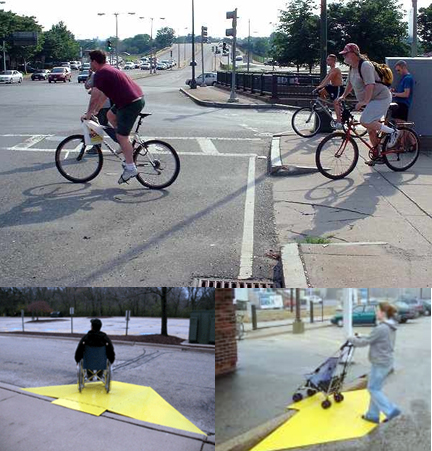
Curb cuts benefit everyone.

Curb cuts benefit everyone.

Ironically the side effects of captions have made caption television an interesting product. Bars have used it in crowded environments. Doctors and dentists have used it and captions are widely used in hospital rooms. Like so many devices the captioned TV has been used beyond its original purpose. We see many applications of systems devised for the disabled being used by the wider community. The IQ test was originally developed to identify mentally limited children. The typewriter was developed for cerebral palsied individuals. In fact, Alexander Graham Bell was a teacher of deaf children when he developed the telephone. While he was not specifically developing the telephone to aid deaf people, his concern for deaf education provided the background for the telephone.

Many advances in our society have come from work among the disabled that was designed to enable them to more effectively compete in the world.

Today’s advancements with high technology lead us to believe that cochlear implants and optical implants will lessen the limitation of hearing and sight loses.

We know that the human brain can overcome many obstacles. Digital technologies will open many doors in the future. For example, we have the technology today to translate a severe speech problem into understandable speech. If the speaker has consistent speech even if it is not understandable we can use digital technologies to make it understandable.

Wheelchair curb cuts benefit parents with babies in strollers. I had a DC bicycle delivery boy tell me they were for them.

The larger community also uses things that benefit the disabled. Education for the disabled makes them taxpayers rather than tax users. Good programs for the disabled are wise investments for society.

Broadband for Schools: Do We Need Gbps Bandwidth?

picture of Harry KellerBy Harry Keller
Editor, Science Education

A great many people are agitating for broadband in schools.1 They insist that our young people will not be prepared for the future without it. If you look at these people carefully, you’ll mostly find technophiles and members of companies making online learning products.

[Disclaimer: I am the president of a company that makes an online learning product.]

They are taking the easy way out. Schools have greater needs than broadband Internet access. Eventually they’ll all have it as the broadband wave sweeps our nation. (I’m writing in the U.S.)  However, has anyone really assessed the necessity for really high bandwidth, 1 Gbps and above? If so, I haven’t seen it.

ScreenHunter_06 Aug. 03 11.44

Consider what’s really important for schools to have. Number one is good teachers. Broadband has nothing to do with that. Number two is good leader/administrators. Again, no broadband here. Somewhere well down the list is new technology. But, what technology?

To know what the requirements will be, we must have a good crystal ball. We don’t have that so think about what’s available today rather than attempt to predict the future. You can find plenty of interesting online learning options. What are their bandwidth requirements? Leave out non-learning options such as students downloading the latest horror flick or porn movie. Consider only the requirements for learning software.

How many students at one time will be using the Internet for learning? Maybe half. What fraction of the time on the Internet actually involves downloading media? Media are the major bandwidth users. Now, average out the bandwidth for everyone. You’ll probably get a smaller number than you thought you would.  Continue reading

Cloudy with a Rain of Data

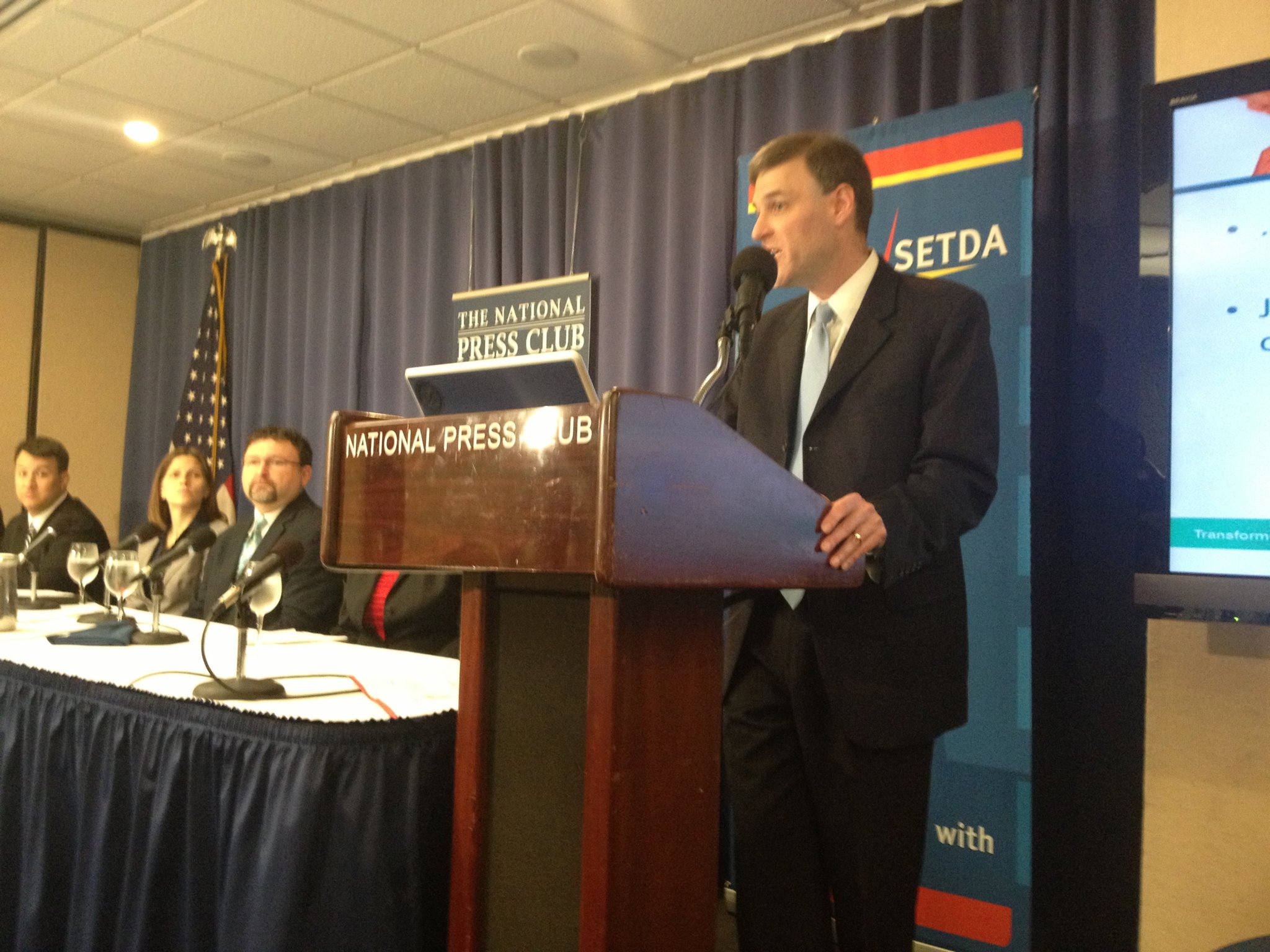
I attended the press conference for the release of SETDA’s (State Educational Technology Directors Association) report Transforming Data to Information in Service of Learning. It was hosted by SETDA’s executive director, Douglas A. Levin, at the National Press Club in Washington, DC, May 21, 2013.

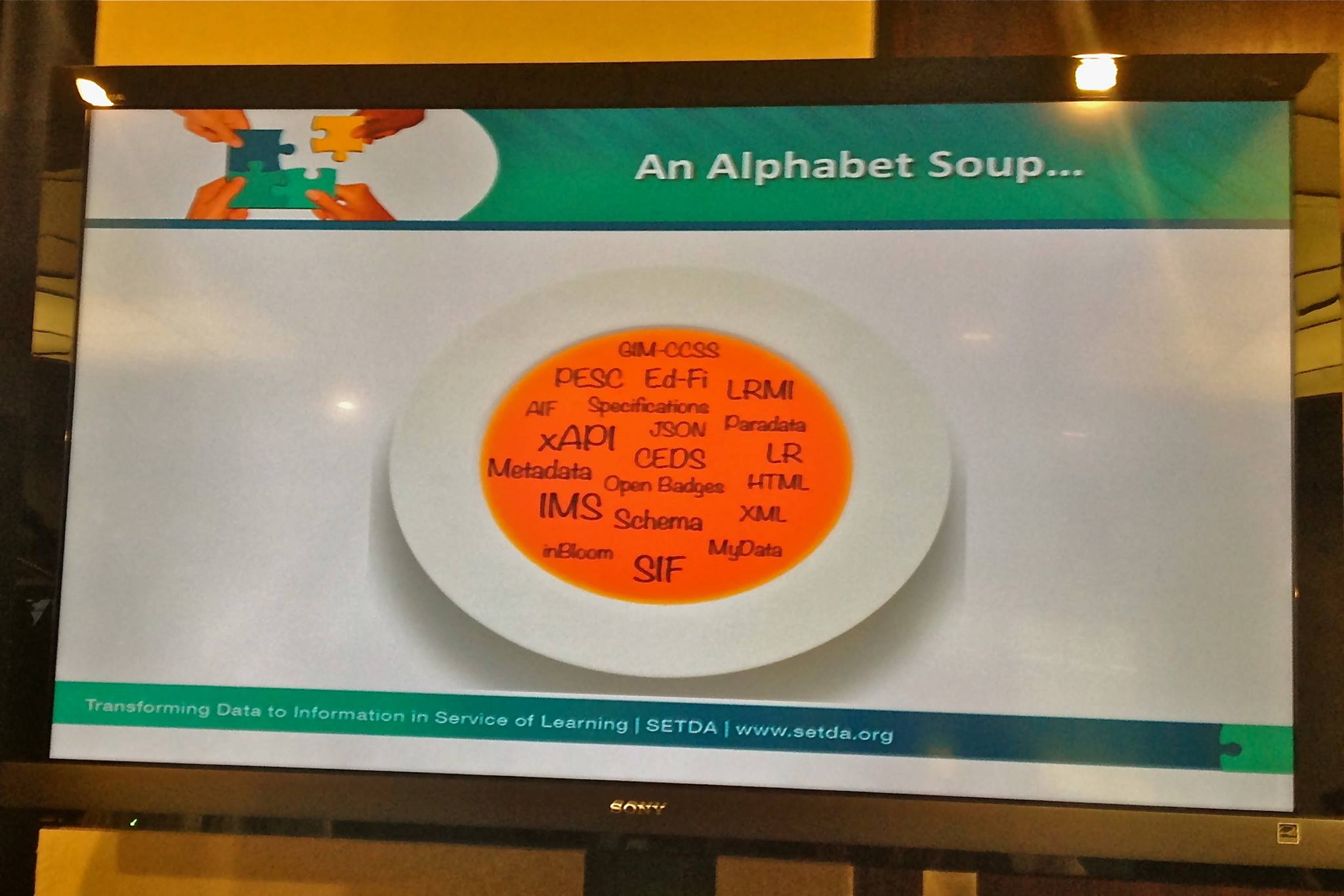
The presenters had RTT (Race to the Top) funding* and spoke in an alphabet of words that few regular people, including school board members who make big decisions, understand. SETDA had the task of trying to make it understandable and explain fluent ways to help schools and communities understand the task, cost and rationale. There was an attempt to make us understand the terminology and to explain the importance of the topic.

[*Update 5.23.13, 2:10pm: See the correction from Douglas A. Levin.]

As I sat there I knew I was privileged to be a part of the audience. My concern is that we have a digital divide, and one part of it is big data information. The report spells out data standards and interoperability initiatives. I know these topics and descriptions from my work on the NIIAC, but the school boards, parent committees and people dealing with the transformational change in education, as well as regular citizens, have a lot to learn. This is actually a Race to the Top project, and SETDA is trying to facilitate learning and understanding across the states.

Douglas A. Levin, SETDA (State Educational Technology Directors Association) executive director.

Douglas A. Levin, SETDA (State Educational Technology Directors Association) executive director.

The presenters ... spoke in an alphabet of words ...

The presenters … spoke in an alphabet of words …

Click image for PDF report.

Click image for PDF report.

__________
Posted on 5.23.13 at 10:23am.
Updated on 5.23.13 at 10:30am.
Updated on 5.23.13 at 2:10pm.

Impact of Facebook on Deaf Language Users?

Frank B. WithrowBy Frank B. Withrow

It is a sophomoric question, but I will ask it anyway. Is it better to be blind, deaf, or crippled? Of course, the answer is it is better not to have any of these disabilities.

Crippled means that you will have ambulatory limitations. However, if you have lost a leg there are prosthetic legs that can allow you to walk and even to run. Or wheelchairs can restore a degree of mobility. Blindness is also an ambulatory disability. You are to an extent limited in your mobility. You are not likely to own or drive a car, but even this is being made obsolete by modern technologies that are demonstrating self-driving cars. If you are blind you may not become an artist, but even that is marginal.

Oscar Pistorius.

Oscar Pistorius.

In a sense deafness is the hidden disability. Unless a neighbor stops to talk with you, you appear as just another person in the neighborhood. You drive a car, you play catch baseball with friends, and you dance with your girl friend on the patio after eating the steak cooked on the outdoor barbecue set. For all practical purposes you do not appear any different than the average neighbor.

But you are! You did not learn the English language from your mother’s knee. Whether you use American Sign Language or speech read, your language is visual. It requires an ample light source. As a deaf person you cannot easily multitask, that is, carry on a conversation while washing your car because you must see and concentrate on the speaker. Visual-based communication has different parameters than auditory-based language. As a deaf communicator, there must be enough light and you must concentrate on the speaker.

Stephanie Ellison, "a percussionist who happens to be deaf."

Stephanie Ellison, “a percussionist who happens to be deaf.”

As a hearing person I can multitask. I can talk and listen to you while I paint your portrait. As a hearing person I can carry on a conversation with you while I brush my shoes or I can listen to the radio in the dark. Since sounds surround me globally I can carry on a conversation in many different environments. If I am deaf I must have light and I must look at the sender I am communicating with whatever system I use ASL, finger spelling or speech reading. Even captioned TV requires my full attention whereas a hearing person can multitask and still get the meaning of what is on TV. I can iron my shirt and follow the latest news on TV.  Continue reading

What Can a Mind Do?

Frank B. WithrowBy Frank B. Withrow

A mind in a crippled body can explore the heights of science and move all mankind forward into new scientific knowledge. Stephen Hawking opens up new scientific vistas. Helen Keller, out of darkness and silence, through words opens new avenues of interpersonal relationships. Blind musicians like Ray Charles and Stevie Wonder bring new melodies into our lives. In yesteryears a President who could not walk bonded us together and inspired us to weather our economic woes and then fight our way through World War II. A deaf man invented electric lights.

Stevie Wonder, Ray Charles, Stephen Hawking

Stevie Wonder, Ray Charles, Stephen Hawking

Electric lights and wearable glasses moved mankind forward. Electric lights enable man to read 24 hours each day, and wearable glasses allow us to see well enough to read throughout our life times. Books and wearable glasses enable mankind to search the wisdom and knowledge of the past.

Franklin Roosevelt, Helen Keller, Thomas Edison

Franklin Roosevelt, Helen Keller, Thomas Edison

The mind can solve the most intricate problem or puzzle. To see, to hear, to feel, to smell and to taste enable the human to know his or her world. The mind organizes these sensory experiences into words and language. Speech and language are public expressions of our private sensory experiences. The voice in our minds organizes our world. If I am blind the world is auditory. If I am deaf my word is visual.

Continue reading

What the Deaf Blind Have Taught Us About Thinking and Communicating

Frank B. WithrowBy Frank B. Withrow

“Alone we can do so little; together we can do so much.” -Helen Keller

As a child I met Helen Keller. She was one of the most fascinating people I have ever met. I have met other deaf blind people who are amazing. Leonard could place his hand on your face and understand your speech. Leonard and his deaf blind wife lived independently and worked in an electrical product plant assembling electric insulators.

In 1963 we had learned how to ensure women who were pregnant and contacted rubella could bring their babies to full term. Thus we produced some 60,000 multiply disabled infants. Five thousand were deaf blind. Congress passed a law that created centers for deaf blind services. I was the Director of the Division of Education Services in the Bureau of Education for the Handicapped and administered the deaf blind services.

Helen Keller. Photo from Helen Keller International.

Helen Keller. Photo from Helen Keller International.

I have a deaf blind grand nephew that is now two years old. I have given considerable thought to the education of deaf blind children. They explore and know their world through the near senses of touch, smell, and taste. Of these three, touch is dominant because it is the sense that they will use to organize their world. My nephew has two cochlear implants and appears to enjoy music. As yet we do not know if in deaf blind children cochlear implants will lead to the development of speech and language.

Continue reading

Belgian Newspapers v. Google: Text of the Court of Appeal’s Decision

Claude AlmansiBy Claude Almansi
Editor, Accessibility Issues
ETCJ Associate Administrator

In 2006, Copiepresse, the  rights managing society of  Belgian  publishers of  French- and German-language daily newspapers, sued Google about the snippets shown in Google News  and about the cached versions displayed in Google Search. On May 5, 2011, a decision of the Brussels appeal court slightly reworded but basically confirmed the 2007 judgment of the first instance court :

La cour … Condamne Google à retirer des sites Google.be et Google.com, plus particulièrement des liens «en cache» visibles sur “Google Web” et du service “Google News”, tous les articles, photographies et représentations graphiques des éditeurs belges de presse quotidienne francophone et germanophone, représentés par Copiepresse …,  sous peine d’une astreinte de 25.000,00 € par jour de retard ….

The syntax is contorted and  the  part between commas starting with “plus particulièrement” is ambiguous. Moreover, I’m not a lawyer. So here is a very informal attempt at translation:

The court … orders Google to withdraw from the Google.be and Google.com sites, more particularly from the “cached” links visible on “Google Web” and from the “Google News” service, all articles, photographs and graphical representations of the Belgian publishers of French- and German press represented by Copiepresse  …,   or pay € 25’000.00 for each day in noncompliance …. Continue reading

Tactile Learning: Italian and US Experiences

from left to right: Claude Almansi, Frank B. Withrow and Tiziana Castorinaby Claude Almansi, Frank B. Withrow, and Tiziana Castorina

[Note: I started writing about the project of Liceo Artistico De Fabris, then I asked for feedback from Frank B. Withrow, because he has written about his experience in enabling tactile learning in “Technology Can Help Deaf-Blind Infants” and from Roberta Ranzani, with whom I have collaborated in several subtitling and educational projects. Frank sent the text about tactile books and the American Printing House for the Blind. Roberta mentioned a tactile astronomy workshop for the blind that took place in Venice. A friend of hers, Tiziana Castorina, had attended, and Roberta asked her for a description. Thanks to Tizana and Frank for allowing me to post their texts here, and to Roberta for her suggestion and for the introduction to Tiziana – CA]

Claude Almansi: Tactile books — Liceo Artistico De Fabris

On June 29, 2011,  Roberto Ellero sent me the URL of a video he made about a project by Prof. Adriana Sasso and her students at the Liceo Artistico “De Fabris” (Nove, Vicenza, Italy — liceo means secondary school): creating tactile books for blind and sight-impaired children.

From the video, it seemed that this project could be relevant to previous discussions here about project-based  learning: for example, see “Project Based vs Problem Based Learning” by Jan Schwartz (June 26, 2011), in reply to Jim Shimabukuro’s “A Quick and Dirty Look at Project-Based Learning” (May 20, 2011). So I asked Roberto if it would be alright to subtitle it in English (well, in Italian and French too). He agreed, so here goes:

(LIBRI TATTILI – Liceo Artistico di Nove (Vicenza). Uploaded by rellero, June 29, 2011. More information, in Italian, about the project: LIBRI TATTILI – Creazione di una favola tattile per bambini non vedenti e ipovedenti.)

Continue reading

Computers Can Help Language-Disabled Learners

Frank B. WithrowBy Frank B. Withrow

I worked with language-disabled children at one time. Many of them would probably be classified today as children with autism. Some identified more easily with computers than with humans. I developed a series of drills and lessons called PhonicPicks.com. The original work used HyperStudio, and it was hoped that teachers would develop additional lessons on their own.

The program developed vocabulary with nouns, included language activities with questions and answers, developed descriptive sentences, and included stories. I established a website to begin transferring a much larger DVD version of the program. The test website is still active with one story, “Eloise the Little Pink Elephant,” available in both English and Spanish.

Book cover with a nice but homely pink elephant right, some books bottom left and top left: Eloise the Little Pink Elephant - Frank B. Withrow ABLE COMPANY - 232 E Street, NE - Washington, DC 2002 - © 1999. Bottom right a green box with GO

I semiretired in 1992 and began working for the NASA Classroom of the Future. This turned my interest more to science and mathematics rather than language. I have a number of grandchildren and great grandchildren so I have kept the website active.

Continue reading

Infographics: Problems and Opportunities

Claude AlmansiBy Claude Almansi
Editor, Accessibility Issues
ETCJ Associate Administrator

There seems to be a new infographic craze, particularly about education and social media. I had been vaguely aware of the term as an annoying pseudo-nerdy buzz word  for a while, when the Swiss satirical weekly Vigousse started running an “Infographie imbécile” (Dumb Infographic) on the last page of each issue in January 2010. For instance:

Screenshot of the Infographie Imbécile in N. 46 issue of Vigousse, with a link to its textual PDF From Vigousse N. 46, January 21, 2011.
©2010 Vigousse Sàrl .Reused by kind permission of the Editorial Board.
While most of the words can be understood by English speakers,
in French, “gag” means “joke,” and “rire jaune” = “to laugh from the wrong side of the mouth.”

Shortly after that January 2011 issue, the “Infographies imbéciles” stopped: possibly because the targeted newspapers got the message and soft-pedaled on infographics. Or maybe the editorial team of Vigousse got bored with doing them. Continue reading

‘YouTube Copyright School’ – Remixed and Mixed Up

Claude AlmansiBy Claude Almansi
Editor, Accessibility Issues
ETCJ Associate Administrator

In his lecture, “The Architecture of Access to Scientific Knowledge: Just How Badly We Have Messed This Up” (at CERN, Geneva, CH. April 18, 2011), Lawrence Lessig discussed YouTube’s new copyright school. (See 35:42 – 39:46 in the subtitled and transcribed video of his lecture.) The YouTube Copyright School video he showed and commented was uploaded by YouTube on March 24, 2011, then integrated into what looks like an  interactive tutorial, also entitled YouTube Copyright School, with a quiz on the side.

More information about this “school” was given on the YouTube Official Blog in “YouTube Copyright Education (Remixed)” (April 14, 2011):

If we receive a copyright notification for one of your videos, you’ll now be required to attend YouTube Copyright School, which involves watching a copyright tutorial and passing a quiz to show that you’ve paid attention and understood the content before uploading more content to YouTube.

YouTube has always had a policy to suspend users who have received three uncontested copyright notifications. This policy serves as a strong deterrent to copyright offenders. However, we’ve found that in some cases, a one-size-fits-all suspension rule doesn’t always lead to the right result. Consider, for example, a long-time YouTube user who received two copyright notifications four years ago but who’s uploaded thousands of legitimate videos since then without a further copyright notification. Until now, the four-year-old notifications would have stayed with the user forever despite a solid track record of good behavior, creating the risk that one new notification – possibly even a fraudulent notification – would result in the suspension of the account. We don’t think that’s reasonable. So, today we’ll begin removing copyright strikes from user’s accounts in certain limited circumstances, contingent upon the successful completion of YouTube Copyright School, as well as a solid demonstrated record of good behavior over time. Expiration of strikes is not guaranteed, and as always, YouTube may terminate an account at any time for violating our Terms of Service.

Continue reading

NFB: NYU, Northwestern and Other Schools Adopting Google Apps Discriminate Against the Blind

Claude AlmansiBy Claude Almansi
Editor, Accessibility Issues
ETCJ Associate Administrator

The National Federation of the Blind is requesting the US Department of Justice to “investigate civil rights violations . . . against blind faculty and students” by New York University and Northwestern University and four school districts in Oregon.

Motive:  their adoption of  Google Apps for Education,  a limited series of Google applications  (mail, calendar, docs, spreadsheets and sites) that educational bodies can put under their domain name, and where they can  control what their staff and students do, but which present serious accessibility issues for the blind. Continue reading

Of Cows, Captions and Copyright: Users Need the Right to Caption and Subtitle Videos for Access and Learning

Claude AlmansiBy Claude Almansi
Editor, Accessibility Issues

Disclaimer | Digesting grass | Digesting videos | Video and text | Read-Write culture and tools | Universal Subtitles | Copyright hits the fan | Lessig’s plea | Other obstacles |Solution?

Disclaimer

Non scientists should refrain from using scientific concepts as metaphors. I am fully aware of this, and actually, when a sociologist or other humanistic scholar thus hijacks terms or phrases like “black hole,” “big bang,” “DNA,”  etc., I skip his/her text if possible.

Nevertheless, what little I understand of how the cellulase enzyme works for ruminants has been very instrumental  in my first perception of how captioning videos helps all users digest their content, and underlies what I have written here so far about captioning. Hence the decision to come out explicitly with this subjective and uninformed perception of  it.

Digesting grass

Cows can digest and assimilate the grass cellulose because they ruminate it, but not only: humans could  chew and re-chew grass for hours and hours, yet they would still excrete its cellulose whole without assimilating any because we lack  something cows have: the cellulase enzyme that chops up the molecules of cellulose into sugar types so that they can be assimilated Continue reading

‘Operation In Our Sites II’ – Out of Sight for the Blind

Claude AlmansiBy Claude Almansi
Editor, Accessibility Issues

[Note: On Cyber Monday, Operation In Our Sites II, a coordinated effort of the U.S. Justice Department’s Criminal Division, the Department of Homeland Security, and nine U.S. Attorneys’ Offices, “obtained and executed seizure orders against 82 domain names of websites engaged in the sale and distribution of counterfeit goods and illegal copyrighted works.” It specifically “targeted online retailers of a diverse array of counterfeit goods, including sports equipment, shoes, handbags, athletic apparel, sunglasses, and illegal copies of DVDs, music and software” (USDOJ). In her letter below to the Justice Department, Claude Almansi, Educational Technology and Change Journal associate administrator and editor for accessibility issues, points out that “the seizure notices added to the sites seized in ‘Operation In Our Sites II’  are surprisingly inaccessible to people who must use a screen reader because they are blind or have other print disabilities.” -js]

from: Claude Almansi <claude.almansi@gmail.com>
to: askdoj@usdoj.gov
cc: Webmaster.ICE@dhs.gov,
webmaster@usdoj.gov,
James N Shimabukuro <jamess@hawaii.edu>
date: Mon, Nov 29, 2010 at 11:29 PM
subject: Accessibility issue with the seizure notices of “Operation In Our Sites II”

I am associate administrator and editor for accessibility issues at Educational Technology and Change Journal (1) and am thinking of writing a piece on “Operation In Our Sites II”, described by Attorney General Eric Holder and ICE’s Director John Morton in their Nov. 29, 2010 press conference (2).

In view of the US government’s commitment to digital accessibility as per Section 508 of ADA, evidenced for instance in the joint letter about the accessibility of e-book readers  sent last to the presidents of US universities and colleges by the US Departments of Justice and of Education last Summer (3), the seizure notices added to the sites seized in “Operation In Our Sites II” (4) are surprisingly inaccessible to people who must use a screen reader because they are blind or have other print disabilities.

Image of text used without alternative description on the homepage of the seized sites Continue reading

‘Locked’ Ning Networks? Access, Copyright and Privacy

Claude AlmansiBy Claude Almansi
Editor, Accessibility Issues

Context

On September 14, 2010, after Ning had postponed the deadline for shutting nonpaying networks for the umpteenth time, I wrote:

I will not write another full post about Ning until the non paying groups have been deleted, or Ning gets bought by a more efficient firm, or disappears. But I’ve opened a Ning page on the wiki of ETC Journal where I shall attempt to keep track of what happens at Ning.

in a comment to my Why Unjoin Ning Networks that Won’t Pay (Aug. 28, 2010).

And now I am writing one, even though nonpaying groups have not been deleted and no one — to my knowledge — has shown any interest in buying Ning.  Motive: a discussion entitled “Deletion of Free Ning Networks?” started by Alex on September 18 in the Ning Creators network. Though it disappeared very quickly, there is a copy archived with WebCite® on the same day: http://webcitation.org/5sq785FZF.

Eric Suesz — senior community manager at Ning — participated in this discussion, stating that “All free Ning Networks are now locked and can’t be accessed.” This is simply untrue. Continue reading

e-Book Readers: Attempting to Bugger the Blind Is Bad for Business

Accessibility 4 All by Claude Almansi

DoJ’s and DoE’s letter to college and university presidents on e-book readers

On June 29, 2010,  Thomas E. Perez (Assistant Attorney General, Civil Rights Division, U.S. Department of Justice) and Russlynn Ali (Assistant Secretary for Civil Rights, U.S. Department of Education) sent a joint letter on electronic book readers:

Dear College or University President:

We write to express concern on the part of the Department of Justice and the Department of Education that colleges and universities are using electronic book readers that are not accessible to students who are blind or have low vision and to seek your help in ensuring that this emerging technology is used in classroom settings in a manner that is permissible under federal law.  A serious problem with some of these devices is that they lack an accessible text-to-speech function.  Requiring use of an emerging technology in a classroom environment when the technology is inaccessible to an entire population of individuals with disabilities–individuals with visual disabilities–is discrimination prohibited by the Americans with Disabilities Act of 1990 (ADA) and Section 504 of the Rehabilitation Act of 1973 (Section 504) unless those individuals are provided accommodations or modifications that permit them to receive all the educational benefits provided by the technology in an equally effective and equally integrated manner.(…)

Continue reading

Easy Captioning for UNESCO’s World Heritage Videos on YouTube

Accessibility 4 All by Claude Almansi

Skip to updates

[Editor’s note: The following message was sent by Claude Almansi to UNESCO workers on 12 June 2010 with the heading “Easy captioning for UNESCO’s World Heritage Videos on YouTube – Demo sample – copyright question.” See the following related articles by Almansi: UNESCO’s Intergovernmental Copyright Committee – 14th Session and UNESCO, World Anti-Piracy Observatory and YouTube. -JS]

Sent e-mail

Dear Workers of the “Section de la communication, de l’éducation et du partenariat (CLT/WHC/CEP)” of UNESCO’s World Heritage Center:

First, congratulations on the remarkable World Heritage video series posted by UNESCO on YouTube, with links to the relevant pages of http://whc.unesco.org. This is a great education tool.

However, I was wondering if you could not caption these videos: for most of them, you already have and offer a plain text transcript on http://whc.unesco.org. So on YouTube, for the videos in English,  it would be enough to add that transcript to the video as a .txt file, and then the YouTube software would automatically time-code this transcript to produce the captions – and an interactive transcript viewing below the video. Continue reading

UNESCO, World Anti-Piracy Observatory and YouTube

Accessibility 4 All by Claude Almansi

Content:

Continue reading

E-rara.ch: Ancient Books, Public Domain and Moral Barriers

Accessibility 4 All by Claude AlmansiContents

Continue reading

Online Multimedia: Italian Imperialism

Accessibility 4 All by Claude Almansi

Italian bill on multimedia services

The Italian parliament is presently examining a government proposal of a decree that would modify the law on TV and radio towards the implementation of  “Directive 2007/65/EC [Webcite archived version] of the European Parliament and of the Council of 11 December 2007 amending Council Directive 89/552/EEC on the coordination of certain provisions laid down by law, regulation or administrative action in Member States concerning the pursuit of television broadcasting activities.”

The human-readable “schede di lettura” (reading notes) of the Camera dei deputati (Lower House) are available online [Webcite archived version]. The actual bill in legalese has not been officially published online, but an unofficial scan of a fax version is available from several sites, e.g., mcreporter.info/documenti/ac169.pdf (3.7 MB).

Online video = television

While the EU directive’s purpose is to take into account new on demand television offers, the definition of multimedia services in article 4 of the Italian bill also equates Web sites/platforms that offer online video to multimedia services subject to the same obligations stipulated by the bill as television broadcasters, unless their use of video is merely “incidental.” Among these obligations: editorial control, which means – in the case of web sites/platform offering videos – provider’s liability.

Jurisdiction

Article 2 of the Italian bill stipulates that media service providers – including sites/platforms hosting videos in a “non incidental” way, see above – situated in Italy are subject to Italian jurisdiction, i.e., to the bill. The bill’s definition of “situated in Italy” includes media service providers:

  • whose main seat is in Italy, even if editorial decisions are taken in another State of the EU
  • whose main seat is in Italy, even if service decisions are taken in another State of the EU
  • who use an earth-satellite up-link based in Italy

Moreover, article 3, about cross-border broadcasting, of the Italian bill stipulates that Italy  can ask, at the request of EU members, for the block of broadcasts from non-EU countries for motives of:

  • public order
  • protection of public health
  • safeguard of public safety, including national defense
  • consumers’ and investors’ protection

and impose a fine of Euro 150.00 – 150’000.00 if the non-EU provider does not comply with the blocking demand.

Paradox of timing restrictions for adult (pornographic, violent) content

One of the paradoxes of considering sites/platforms that offer videos as televisions subject to the bill appears in its article 9, about the protection of minors. This article stipulates that adult (pornographic or violent) content cannot be broadcast between 7 am and 11 pm.

As to the absurdity of applying such a timing limitation to videos offered on the web, see Kine’s ironic remark in the discussion Decreto Romani – Stop ai film vietati in TV e sul Web [Webcite archived version] started Jan. 21, 2010: “Come sarebbe anche al WEB scusa? Non [l]i guardo i film su youjizz dalle 7 alle 23?” (“What, also on the WEB? Can’t I watch videos on youjizz from 7 am to 11 pm?”)

Threat to accessibility

The Italian bill creates a similar absurdity for accessibility: it keeps the EU directive’s audiodescription and  captioning requirements for TV, but it threatens the possibility to use Web sites / platforms offering videos by submitting them to the same  conditions as TV channels. And even if a text-only offering of information and knowledge will pass automated accessibility tests, multimedia is a very important part of real accessibility for all.

The paradox here is that Italy has probably the best legal tools for furthering computer accessibility in EU, and maybe in the world, and actually works at implementing them. See the accessibile.gov.it site of the official observatory for accessibility in the public administration, which recently published Roberto Ellero’s tutorial on Accessibilità e qualità dei contenuti audiovisivi [Webcite archived version]  (Accessibility and quality of audiovisual content).

This tutorial fully integrates a text part and a video provided with Italian and English subtitles:

Webmultimediale

In the text part, Roberto Ellero refers to several pages of www.webmultimediale.org, the main site of  Webmultimediale, a project he founded for the study of online multimedia, and in particular of how the accessibility requirements for online multimedia can be a stimulus for creativity and a great help in education because these requirements also cater to various learning styles.

Webmultimediale is among the projects directly threatened by the bill’s equating of online videos with TV offerings. Not only does its www.webmultimediale.org site make a “non incidental” use of video, but it also has an open video hosting part, www.webmultimediale.it, where people upload their videos with a time-coded transcript in order to caption them. No way either could be maintained if the bill passes. Which means that Roberto Ellero’s tutorial on Accessibilità e qualità dei contenuti audiovisivi [Webcite archived version], commissioned by the government’s Observatory of accessibility in the public administration, would be severely maimed.

I happen to participate in the Webmultimediale project. The jurisdiction conditions in the bill made me think of a discussion about Web accessibility Roberto and I animated at the end of last November. Roberto lives in Venice; I, in Geneva. The discussion venue was the Instructional Technology Forum mailing list, based at the University of Georgia (US) but with subscribers from all over the world, and how we all used variously hosted e-mail accounts. So where were “editorial” decisions made, in so far as there were any? Were they made, e.g., when I embedded a California-hosted YouTube video, made by Roberto in Venice, in the Florida-hosted wiki that we used for background material and, later, to gather the discussion threads? Under what jurisdiction did I do that?

Threat to education

Beyond the Webmultimediale example above, it is the use of multimedia in Italian education that is put at risk by the bill. If it becomes law, what teachers and educational institutions will dare offer a video podcast of lectures, scientific experiments, and use of video in teaching under the threat of being asked to comply with the administrative requirements imposed by the bill for TV broadcasters? Even if they try to upload the videos on a foreign platform and link to them, there would still be a risk that the foreign platform will be considered a television broadcaster and blocked in Italy.

Accessibility and Literacy: Two Sides of the Same Coin

Accessibility 4 All by Claude Almansi

Treaty for Improved Access for Blind, Visually Impaired and other Reading Disabled Persons

On July 13, 2009, WIPO (World Intellectual Property Organization) organized a discussion entitled  Meeting the Needs of the Visually Impaired Persons: What Challenges for IP? One of its focuses was the draft Treaty for Improved Access for Blind, Visually Impaired and other Reading Disabled Persons, written by WBU (World Blind Union), that had been proposed by Brazil, Ecuador and Paraguay at the 18th session of  WIPO’s Standing Committee on Copyright and Related Rights in May [1].

A pile of books in chains about to be cut with pliers. Text: Help us cut the chains. Please support a WIPO treaty for print disabled=

From the DAISY Consortium August 2009 Newsletter

Are illiterate people “reading disabled”?

At the end of the July 13 discussion, the Ambassador of Yemen to the UN in Geneva remarked that people who could not read because they had had no opportunities to go to school should be included among “Reading Disabled Persons” and thus benefit from the same copyright restrictions in WBU‘s draft treaty, in particular, digital texts that can be read with Text-to-Speech (TTS) software.

The Ambassador of Yemen hit a crucial point.

TTS was first conceived as an important accessibility tool to grant blind people access to  texts in digital form, cheaper to produce and distribute than heavy braille versions. Moreover, people who become blind after a certain age may have difficulties learning braille. Now its usefulness is being recognized for others who cannot read print because of severe dyslexia or motor disabilities.

Indeed, why not for people who cannot read print because they could not go to school?

What does “literacy” mean?

No one compos mentis who has seen/heard blind people use TTS to access texts and do things with these texts would question the fact that they are reading. Same if TTS is used by someone paralyzed from the neck down. What about a dyslexic person who knows the phonetic value of the signs of the alphabet, but has a neurological problem dealing with their combination in words? And what about someone who does not know the phonetic value of the signs of the alphabet?

Writing literacy

Sure, blind and dyslexic people can also write notes about what they read. People paralyzed from the neck down and people who don’t know how the alphabet works can’t, unless they can use Speech-to-Text (STT) technology.

Traditional desktop STT technology is too expensive – one of the most used solutions, Dragon NaturallySpeaking, starts at $99 – for people in poor countries with a high “illiteracy” rate. Besides, it has to be trained to recognize the speakers’ voice, which might not be an obvious thing to do for someone illiterate.

Free Speech-to-Text for all, soon?

In Unhide That Hidden Text, Please, back in January 2009, I wrote about Google’s search engine for the US presidential campaign videos, complaining that the  text file powering it – produced by Google’s speech-to-text technology – was kept hidden.

However, on November 19, 2009, Google announced a new feature, Automatic captions in YouTube:

To help address this challenge, we’ve combined Google’s automatic speech recognition (ASR) technology with the YouTube caption system to offer automatic captions, or auto-caps for short. Auto-caps use the same voice recognition algorithms in Google Voice to automatically generate captions for video.

(Automatic Captions in YouTube Demo)

So far, in the initial launch phase, only some institutions are able to test this automatic captioning feature:

UC Berkeley, Stanford, MIT, Yale, UCLA, Duke, UCTV, Columbia, PBS, National Geographic, Demand Media, UNSW and most Google & YouTube channels

Accuracy?

As the video above says, the automatic captions are sometimes good, sometimes not so good – but better than nothing if you are deaf or don’t know the language. Therefore, when you switch on automatic captions in a video of one of the channels participating in the project, you get a warning:

warning that the captions are produced by automatic speech recognition

Short words are the rub

English – the language for which Google presently offers automatic captioning – has a high proportion of one-syllable words, and this proportion is particularly high when the speaker is attempting to use simple English: OK for natives, but at times baffling for foreigners.

When I started studying English literature at university, we 1st-year students had to follow a course on John Donne’s poems. The professor had magnanimously announced that if we didn’t understand something, we could interrupt him and ask. But doing so in a big lecture hall with hundreds of listeners was rather intimidating. Still, once, when I noticed that the other students around me had stopped taking notes and looked as nonplussed as I was, I summoned my courage and blurted out: “Excuse me, but what do you mean exactly by ‘metaphysical pan’?” When the laughter  subsided, the professor said he meant “pun,” not “pan,” and explained what a pun was.

Google’s STT apparently has the same problem with short words. Take the Don’t get sucked in by the rip… video in the UNSW YouTube channel:

If you switch on the automatic captions [2], there are over 10 different transcriptions – all wrong – for the 30+ occurrences of the word “rip.” The word is in the title (“Don’t get sucked in by the rip…”), it is explained in the video description (“Rip currents are the greatest hazards on our beaches.”), but STT software just attempts to recognize the audio. It can’t look around for other clues when the audio is ambiguous.

That’s what beta versions are for

Google deserves compliments for having chosen to semi-publicly beta test the software in spite of – but warning about – its glitches. Feedback both from the partners hosting the automatically captionable videos and from users should help them fine-tune the software.

A particularly precious contribution towards this fine-tuning comes from partners who also provide human-made captions, as in theOfficial MIT OpenCourseWare 1800 Event Video in the  MIT YouTube channel:

Once this short word issue is solved for English, it should then be easier to apply the knowledge gained to other languages where they are less frequent.

Moreover…

…as the above-embedded Automatic Captions in YouTube Demo video explains, now you:

can also download your time-coded caption file to modify or use somewhere else

I have done so with the Lessig at Educause: Creative Commons video, for which I had used another feature of the Google STT software: feeding it a plain transcript and letting it add the time codes to create the captions. The resulting caption .txt  file I then downloaded says:

0:00:06.009,0:00:07.359
and think about what else we could
be doing.

0:00:07.359,0:00:11.500
So, the second thing we could be doing is
thinking about how to change norms, our norms,

0:00:11.500,0:00:15.670
our practices.
And that, of course, was the objective of

0:00:15.670,0:00:21.090
a project a bunch of us launched about 7 years
ago,the Creative Commons project. Creative

etc.

Back to the literacy issue

People who are “reading disabled” because they couldn’t go to school could already access texts with TTS technology, as the UN Ambassador of Yemen pointed out at the above-mentioned WIPO discussion on Meeting the Needs of the Visually Impaired Persons: What Challenges for IP? last July.

And soon, when Google opens this automated captioning to everyone, they will be able to say what they want to write in a YouTube video – which can be directly made with any web cam, or even cell phone cam – auto-caption it, then retrieve the caption text file.

True, to get a normal text, the time codes should be deleted and the line-breaks removed. But learning to do that should be way easier than learning to fully master the use of the alphabet.

Recapitulating:

  • Text-to-Speech, a tool first conceived to grant blind people access to written content, can also be used by other reading-disabled people, including people who can’t use the alphabet convention because they were unable to go to school and, thus, labeled “illiterate.”
  • Speech-to-Text, a tool first conceived to grant deaf people access to audio content, is about to become far more widely available and far easier to use than it was recently, thus potentially enabling people who can’t use the alphabet convention because they were unable to go to school and labeled “illiterate” the possibility to write.

This means that we should reflect on the meanings of the words “literate” and “illiterate.”

Now that technologies first meant to enable people with medically recognized disabilities to use and produce texts can also do the same for those who are “reading disabled” by lack of education, industries and nations presently opposed to the Treaty for Improved Access for Blind, Visually Impaired and other Reading Disabled Persons should start thinking beyond “strict copyright” and consider the new markets that this treaty would open up.

ITForum Discussion on Accessibility

Claude AlmansiBy Claude Almansi

Editor, Accessibility Issues

The URL for the video below is http://www.youtube.com/watch?v=kTvHIDKLFqc.The possibility to automatically caption YouTube videos in English was announced by Google on Nov. 11, 2009: a huge step forward for deaf people that benefits all users. And this is typical of most accessibility measures.

About the discussion

Photo of Roberto ElleroFrom November 29 to December 2, 2009, Roberto Ellero and I animated a discussion about Web accessibility on the Instructional Technology Forum mailing-list.

This mailing list is private (if you wish to join, apply at it.coe.uga.edu/itforum/Subscribing.html), but our initial notes for the discussions are in a public wiki, accessibility4all.wikispaces.com, where the e-mail discussion has been copied to the accessibility4all.wikispaces.com/Discussion page.

The participants in the accessibility discussion were instructional design professionals, teachers and students. Therefore they were already well aware of the need for accessibility in teaching and of the existence of requirements for its enacting.

For instance they all knew that non-text objects – pictures, videos, audio files – conveying info but not accessible to all can be used, but that an alternative must be provided for people with disabilities preventing access to such objects. Nevertheless. as accessibility4all.wikispaces.com/Discussion shows, some interesting questions and issues emerged in the discussion:

General themes

Among the general, conceptual themes of the discussion:

Universal design and redundancy

Universal design, i.e., planning something that everybody can use (whether in real life or on the Web), may not be fully reachable, but it is a goal that must be kept in mind from the start of the designing process.

Redundancy – i.e., offering the same info/knowledge in different forms – is a means towards that goal. Alternative formats can be linked to in order to avoid cluttering a given web page.

Accessibility tools

The phrase “accessibility tools” is used to describe different things:

  • Assistive technology for people with disabilities: e.g., screen readers – like JAWS – for blind people.
  • Emulators of assistive technology used by designers to check how a page will be perceived by people who have to use an assistive technology: e.g., screen reader emulators – like the Fangs addon for Firefox.
  • Automated accessibility checkers used by designers, but only indicatively – just as automated spell checkers are only indicative.

Specific issues

Among the more specific and concrete issues discussed:

Language

In the context of online learning materials, if web sites must be accessible to all, including people with language disabilities/problems, won’t that entail a stylistic flattening? Or, as Robert Becker put it, in connection with the Universal Design theme:

. . . So, to make a point, I could say that assigning Chaucer’s Middle English or Shakespeare’s Elizabethan text is to erect a barrier to learners. That may be, but to do otherwise is to erect an even greater barrier to Learning.

I recall a personal experience teaching English to inner city adult students trying to earn associate degrees. I dumped the prescribed reading list full of “accessible” texts and replaced it with real literature. The memory of watching most of my students successfully engage with Jane Austin will never fade.

In Learning generally there is no greater barrier than the absence of challenge and aspiration.

Tables

Tables can be a barrier for blind people, because reading with your ears with a screen-reader means reading linearly. This issue  was first raised – in connection with the Universal Design theme, again – by Beverley Ferrell,  moderator  of the ITForum list:

If blind people read in a completely different manner ( and we may not be aware of this) and screen readers read like this:

http://wac.osu.edu/webaim/ tables2.htm then layout tables and data tables have to be designed differently.

Jim Thatcher has a fairly basic tutorial that explains it http://jimthatcher.com/ webcourse9.htm

I have not had time to read and comprehend all of this vs design for data etc such as Tufte recommends, so is it really the best way to display the data for those who are not sight disabled or must we always design two versions? and what about adding mobile issues to this? There are those who disagree with Tufte’s ideas also. Tables might not be useful, so data in graphs etc would be a real challenge for the new person designing accessible information.

Invitation

I have only highlighted some of the points raised in that discussion about accessibility on the Instructional Technology Forum mailing-list. You can find several other themes  in accessibility4all.wikispaces.com/Discussion. The mailing-list discussion is now closed, but it  can  continue either in the comments to this post or on the wiki [1], which is a more democratic platform than a blog ;-). As the video at the beginning shows, the means to enact Web accessibility are progressing fast, for the benefit of all, not only of people with disabilities.

[1] You can join the wiki at: accessibility4all.wikispaces.com/space/join.

Prix Möbius Suisse Rewards Inaccessible Flash Site

Claude AlmansiBy Claude Almansi
Editor, Accessibility Issues

Last Saturday, Oct. 3, 2009, the awards ceremony of  Premio Möbius took place in Lugano (CH). There were two categories: Premio Möbius Multimedia, for cultural CDs and DVDs in Italian, and Grand Prix Möbius Suisse, for Swiss websites about cultural heritage.

Prix Möbius international de la Communauté Européenne, Scienza Tecnica e Medicina, Cultura, Arti e Lettere, Educazione e Formazione permanente, Premio Möbius Multimedia Lugano

Prix Möbius candidates

In the Prix Möbius category, the candidates were:

Accessibility and ease of navigation

As for accessibility and ease of navigation,  the Zurich Kunsthaus and Centre Dürrenmatt sites are the best: they read well in linear version (as spoken by screen readers) and have hierarchical headers, which allow people using a screen reader to quickly navigate from section to section (unfortunately, the Centre Dürrenmatt, being a national museum, has to use the drab template of all Swiss federal and cantonal sites).

Next best is the site of Museum Franz Gertsch; “next” because in order to enter the otherwise accessible and easily navigable rest of the site, you have to click on the word “mehr” (more) in the home page – not a very intuitive process.

Then, on a par, there are  the websites of Fotomuseum Winterthur and Site Archéologique de la Cathédrale Saint-Pierre, which don’t use hierarchical headers, hence are not easily navigable with a screen reader.

The worst by far is the site of the m.a.x. museo:

screenshot of the site as seen with Firefox on a laptop with 1280x800 screen

Screenshot of the site as seen with Firefox on a laptop with a 1280x800 screen.

The site is entirely in Flash. What a screen reader would voice is “Page has three frames and no linksm.a.x.museo colon plus forty-one left paren zero right paren ninety-one six hundred eighty-two fifty-six fifty-six dash Internet ExplorerFrameFrame end.FrameFrame end.FrameFrame end.”

Actually, in spite of the “no links,” there are two links: to the Italian and the English version, but as they are within the Flash movie, the screen-reader cannot identify them. And these two don’t even show on a laptop with 1280×800 screen, using Firefox (see screenshot above).

And the winner of Prix Möbius Suisse . . .

. . . is the site of the m.a.x. museo, www.maxmuseo.ch. Leaving aside its violation of accessibility norms, the motivation for awarding it the Prix Moebius is rather odd: “It achieves an immediate, natural and linguistically coherent synthesis of the museum’s identity and of Max Huber’s world” (my translation). Now all the site says about the museum’s identity and Max Huber’s world is:

. . . the m.a.x. museo was established on the 12th of November 2006 by the wife of leading Swiss graphic designer, the late Max Huber, Aoi Huber-Kono, with the aim of disseminating design culture and leaving his work to posterity.
It is the aspiration of this museum that it will serve as a bridge towards young designers and artists of future generations through various exhibitions, while conveying the message of Max Huber who dedicated his life to design.
We plan to organize exhibitions primarily on graphic design in order to present “design” in general to the world.

Very synthetic indeed – not even a single link to other information about Max Huber in the links section.

Granted, the flash movie is pretty. But is this enough to decree that a site is “the best site for cultural heritage,” as the description of Prix Moebius Suisse maintains?

Two paradoxes

The first paradox is that the jury of Prix Moebius Suisse is chaired by Professor Paolo Paolini, who is in charge of a Master’s course in Design of Interactive Applications for Cultural Heritage. Does he really think the purely-flash site of the m.a.x museo is an example his students should follow?

The second paradox is that Professor Paolo Paolini is co-author, with his colleagues of the Lugano Università della Svizzera Italiana, Elisa Rubegni, Alberto Terragni and Stefano Vaghi, of “Accessibility for Blind Users: An Innovative Framework” (Springer Verlag, 2008), whose abstract says:

. . . The main thesis of this paper, which focuses on blind users, is that technical recommendations (as those of the W3C) are not sufficient to guarantee actual accessibility, that we define as the possibility for the users of “reading” the website and “navigating through it” in an effective manner. A consequence of our approach is the emphasis on design, as a way to achieve actual accessibility, and on usability (by blind users,) as the main evaluation criterion. . . .

Actually, Making Content Understandable and Navigable was already one of the two main themes of the first WC3’s Web Content Accessibility Guidelines (WCAG 1.0). And WCAG 2.0 has a whole section entitled Provide ways to help users navigate, find content, and determine where they are.

If more websites – including the site of the Moebius Awards, www.moebiuslugano.ch, which presently conveys textual info in the .jpg image reproduced at the top of this post without an alternative description and violates accessibility commonsense in too many further ways to list here – at least applied these existing guidelines, people with disabilities would have an easier time reading and navigating them.

So Professor Paolini and his colleagues want to go further than these WCAG, apparently. That’s great. But then, why did he, as chairman of the Prix Möbius jury, allow the award to go to a site that is fully inaccessible to blind people?

Political poisoned gift?

Could there be a political agenda behind the selection of the m.a.x museo site? A kind of “cultural exception” protectionist policy à la French? An unwritten rule to favor local sites [1], no matter how unusable and inaccessible?

If so, this is a very short-sighted and harmful policy, particularly for such flash-only sites:

  • The content of  sites made entirely in flash does not get indexed by search engines, which cannot parse text inserted in a movie anymore than in a .jpg picture. When I tried to find info about a very beautiful exposition of Bruno Munari‘s work the Museum had in 2008 by googling “max museo Chiasso” (without quotes), the first hit was indeed to section www.maxmuseo.ch/en/museo.html of the museum’s site, but that page says nothing about the Munari.
    And if you try the Google cache link for this hit, a message says: “This is Google’s cache of http://www.maxmuseo.ch/en/museo.html. It is a snapshot of the page as it appeared on 16 Jul 2009 22:32:17 GMT. (…) These terms only appear in links pointing to this page: max museo munari.”
  • Sites made entirely in flash do not open at all in cell phones, and that again is paradoxical, considering that the Möbius Awards ceremony on Oct. 3, 2009, started with a round table about digital natives, where speakers underline the present evolution towards cell phones rather than computers for internet use.

Hence awarding the Prix Möbius to such a site lulls the site owner into thinking they have a good thing, whereas they only have a pretty gimmick that cuts them off from search engine results and from cell phone users. Above all, the award is an insult to blind people – and in the case of m.a.x museo Chiasso, to low-sighted people as well, as the navigation links in the flash movie are in very pale grey on white.

__________

[1] Re this possible political bias for Ticinese websites: in 2008, the Prix Moebius for cultural heritage went to kunstpanorama.ch, the sanely textual site of the Luzern Kunsthalle, though they also gave a special mention for cacticino.net,  yet another Ticinese flash website (of the Centro d’Arte Contemporanea Ticino). This is proven by web.archive.org/web/20080511213956/http://www.moebiuslugano.ch/annun.html, i.e., the version of the awards announcement saved on May 11, 2009, by the Internet Archive and by the entries about this 2008 Möbius award in Kultpavillon.ch, the blog of Kunstpanorama.ch. However, the page for the 2008 awards of the Premio Moebius website strangely lists cacticino.net for the Cultural Heritage award and kunstpanorama.ch for the special mention.

Google Book Search Settlement Unfair to Non-US Authors

Claude AlmansiBy Claude Almansi
Editor, Accessibility Issues

Of Books and Vegetables

I first thought of calling this post “Of Books and Vegetables” because, when I half woke up the morning after I sent a letter of objection to the Google Book Search Settlement, I remembered Ms B. and the building site for a middle school in Cortona. The building activity had stopped just after the ground had been cleared, due to blocked funds. So for two years,  Ms B., who lived on the other side of the street, used it  to grow very tasty tomatoes and zucchini No one objected to this private exploitation of  the site: it would have been silly to waste its potential, and Ms B. generously shared her vegetables with friends and neighbours. When the funding issue was solved, the building started again and her vegetable patch was bulldozed.

I chose a more conservative title because the analogy with Google scanning out-of-print works in libraries is imperfect: if a big canning industry, instead of Ms B., had started to grow vegetables on the building site,  the borough of Cortona would probably have tried to levy a rental for this use. But the principle remains: it is silly, even immoral, to waste potential revenue – especially if its exploitation will serve the public.

Challenging or objecting?

So I did not object to the Google Book Search Settlement for the same proprietary reasons as the eminent cultural personalities who signed the Heidelberg Appeal (English textGerman text with signatures):

Comic where someone says: Well, I'll be cross-eyed, Billy Goat! Cattle rustlers! This explains th' strange noises in th' ghost town above --- No wonder it was called Whispering Walls

Actually, I did not mean to object: at first I only challenged the Settlement Registry’s classifying as  “not commercially available” the Google scan of  Theatre of Sleep, an anthology my late husband Guido Almansi and I had edited and published with Pan Books in 1986 – and for which, after his death in 2001, I was the remaining mentioned copyright holder.

The physical book has indeed been out of print for years, but it contains many excerpts from in-copyright and commercially available works, which we had obtained permission to use in – and only in – the Pan Book version. Even if the Settlement foresees the possibility for right holders on such excerpts to claim them and forbid Google to display them, some right holders might not know about the Settlement, or not remember exclusive permissions granted decades ago; besides, the search engine of the Settlement registry often does not find the authors of such excerpts. Under our initial transactions for Theatre of Sleep, I am answerable to these right holders – no pact between parties who had nothing to do with these transactions can change this.

Another reason not to allow Google to display even the rest of the anthology under the Settlement’s conditions was the absolutely unacceptable digital restriction of what – paying – users would be able to print or copypaste from Google books. Such digital restriction measures just don’t work: in Copying from a Google Book, I show how easy it is to do so even with theoretically thus restricted works. And if users pay for an e-book, they should be able to do what they want with it for personal use. So I made an unprotected e-version of what was legally offerable in Theatre of Sleep, and uploaded it  in archive.org/details/TheatreOfSleep, an in-progress version because I will re-add in-copyright texts when I get permission again.

Foreign authors and the Settlement

I could have left things at that, without objecting to the Settlement. But Peter Brantley of the Internet Archive pointed out in an e-mail that many people who are hit by the Settlement and utterly dislike it do not object because it is too complex and they have no legal training. This is my situation too, so I included the excessive complexity of the Settlement in my objections.

Theatre of Sleep An anthology of literary dreams - Guido Almansi Claude BéguinThen there was another reason for objecting. Guido and I also did an adaptation of Theatre of Sleep for the Italian readership – Teatro del Sonno – which was published by Garzanti in 1988, is out of print, and has been scanned by Google. For that one we had ceded the copyright to Garzanti, mainly because we did not want to send the permission requests all over again and Garzanti could do that more easily.

But Garzanti has not yet claimed Teatro del Sonno under the Settlement. Its editorial director explained to me that Italian publishers have chosen to wait for the result of the Final Fairness Hearing about it, in case it results in its invalidation: due to the imprecision of the Registry’s search engine, checking what Google has and has not scanned is very time-consuming. Though they are very displeased with the Settlement, Italian publishers are not objecting either, apparently. Above all, they are not systematically informing their authors about the Settlement.

Considering what little info non-US media gave about the Settlement, we are left with the impression that it was a US-only affair. However, this lack of information puts non-US authors at risk. As Mary Minow explained in Google Book Settlement, orphan works, and foreign works (LibraryLaw Blog, April 21, 2009):

The largest group of non-active rights holders are likely to be foreign authors. In spite of Google’s efforts to publicize the settlement abroad, I suspect that most foreign rights owners of out-of-print books will fail to register with the Registry.  There are a couple of reasons for this.  For one, they may not know that their book is still protected by copyright in the US.  In addition, they may assume that international network of reproduction rights organizations would manage their royalties, and not understand the need to register separately. . . .

If there is an injustice being done in the settlement, it is with foreign authors.

Also, if foreign right-holders do not object to the Settlement, how is the US Court to know that they disapprove of it?

Letter of objections

Hence my letter of objections, below. Not because I think they are representative of non-US objections, but because I believe it is important that non-US right-holders object to the Settlement if they disapprove of it, even if their reasons are very different. The deadline for doing so is Sept. 4, 2009, and for the modalities, see 24. How can I object to the Settlement? in the Settlement’s FAQs.

Direct download links: PDFODT

Links

I have gathered / am gathering some bookmarks about the Settlement in diigo.com/user/calmansi/googlesettlement. Several of those, in particular about its repercussions outside US, come from the very useful Google Settlement Information, Documents, News &  Links page in Michael W. Perry’s Inkling Books.

Credits

By order of appearance:

Accessibility and Common Sense

Claude AlmansiBy Claude Almansi
Editor, Accessibility Issues

Technology and technology guidelines are very important in implementing accessibility. Yet accessibility is not a technology issue — it is a common sense issue, both because it is logical and because making things as accessible as possible for as many people as possible becomes an obvious necessity once you “sense in common” with the other person, put yourself in his or her place.

Accessibility in 3D life

(I am not sure if what follows makes sense to readers in America, as accessibility in real life seems to be part of the American culture.)

People without motor disability usually don’t notice steps at the entrance of public buildings or toilet doors too narrow for a wheelchair. If you are in one, or often accompanying a person in one, you do. Builders’ decisions at times can lead to strange absurdities, though they know about accessibility rules and architectural technology. For instance, in 2000, a grand accessible toilet was added to the Museo d’Arte in Lugano (CH), while at the same time accessing the museum in a wheelchair was made well-nigh impossible by adding of a visitor-counting turnstile at the main entrance: people in wheelchairs had to be carted by on a spiral staircase up to a back door.

True, building decisions were made by the town administration, which, though it had a public works departments where people should know the rules and the technology to implement them, was not known for its common sense — in either meaning of the term. However, in 2001, after a protest by a disabled people’s association was taken up in the local media and caused questions in the local parliament, the administration finally provided a lift to the level of the back entrance for people in wheelchairs.

Computer accessibility: non-text objects

Guidelines for computerized and web content accessibility says that equivalent alternatives to auditory and visual content must be provided for deaf and blind people (see the first WCAG 01 guideline, for instance). For instance, if a video is used, this means captioning audio for deaf people and giving an audio description of nonverbal actions for blind people. Or at least, if this is not feasible, offer an alternative text transcript that can be read by both blind (through text-to-speech) and deaf people.

Alt attribute

Static images that convey information should be provided with an alternative content description: when a short description is enough, this can be done in the alternative content description attribute (alt=”description”) in the link that shows the image. This should be fairly simple: nowadays, authoring tools — be they desktop or online, like the one for this blog — prompt you to add such a description when you insert an image through the “rich text” editor (see Authoring Tool Accessibility Guidelines (ATAG) Overview and links therein), which will add the alt attribute.

Nevertheless, while the above-mentioned Museo d’Arte of Lugano gave in to public pressure about wheelchair accessibility, its website remains blithely callous in ignoring basic accessibility precepts, in spite of directives to make all public administration sites accessible. It still has a “no right click” script that disables the contextual menu, thus hampering people with motor disabilities, despite the long-averred uselessness of such scripts to prevent users from saving images (either by saving the whole webpage or by looking up the URL of a given image in the source code). And it uses text images without any alt attribute instead of normal text for its navigation. Therefore, if you view the homepage in “replace images by alt attributes” mode in order to get the same content a blind person using a screen reader would, the result is:

As all texts are presented as gifs of text images WITOUT alt attributes in this page, you only see the word HOMEPAGE

Empty alt attribute

If the image is purely decorative, you still provide an alt attribute, but you leave it empty (alt=””): this way the text-to-speech just ignores it. Nevertheless, there are websites that use the empty alt attribute (no description) for images that convey information (and vice versa add a useless description for decorative images, which means that the screen reader will read a lot of bunk).
Limits of automated accessibility checkers

Automated accessibility checkers are very useful to spot accessibility problems. But as they only check the source of the page, they won’t fail a page for inappropriate uses of the empty alt attribute — they will just suggest you check that the image really doesn’t convey information. Maybe at times the empty alt attribute is deliberately used to pass the automated check, for instance if laws or regulations state that a given type of computerized content (educational in particular) must apply accessibility guidelines and if this is only checked with an automated program.

Embedding an inaccessible page into a frame is another way to bypass automated accessibility checks. www.mantecausd.net (mentioned in Microsoft Case Studies: Manteca Unified School District) does pass Priority 1 level of accessibility with the CynthiaSays checker, in spite of evident lack of alt attributes (and misuses of the empty alt attribute in some cases). But it does so thanks to the use of frames. What the checker reads is the source page, which only says: “Welcome to the Manteca Unified School District. Our site uses frames, but your browser doesn’t support them.” The realcontent is in http://manteca.schoolspan.com, which is embedded in a frame of www.mantecausd.net. CynthiaSays does fail http://manteca.schoolspan.com for the lack of alternative description, but a hasty check on just www.mantecausd.net might misleadingly give the impression that the page conforms to the Priority 1 level of accessibility.

Be it through the inappropriate use of the empty alt attribute or of frames, though, the result is that blind people don’t get the information conveyed by images. This is why it is so essential to apply common sense, to put oneself in the other person’s place

Accessibility in education

Fortunately, most educational web sites are designed for real accessibility to the greatest possible number of students, not just to pass automated accessibility tests. And while this can be time-consuming, it also offers great advantages to all students:


Designing for accessibility leads to greater educational usability

In the 3D world, removing — or better, avoiding from the beginning — architectural barriers to facilitate access for people in wheelchairs also improves usability for other people: mothers with a child in a pram, aged persons for whom the staircase access is too tiring, etc.

This is also true with designing computerized content with accessibility to the greatest possible number of users in mind. If you structure a text correctly, using hierarchical heading styles for subtitles (instead of just playing around with bold and font size) to make navigation easier with a screen reader for blind people, you can also automatically extract an interactive table of content. This is handy for everyone. And adding explanatory graphics to help people who have other, non-visual, text reading impairments (dyslexia for instance) will also help people who are more visually inclined.

The point is that accessibility leads to redundancy in order to cover as many cases as possible of disabilities. And hence it also covers different learning styles.

Teachers’ and students’ content

While main educational web sites tend nowadays to apply accessibility guidelines, course materials uploaded to a course management system or platform can at times remain an issue. It is therefore necessary to educate teachers about what accessibility does and does not entail and about simple tools to implement it (captioning etc.).

Web 2.0 and accessibility in education

Some education authorities are very wary of public Web 2.0 tools being used in schools, but usually because they fear they’d have to answer for students being exposed to inappropriate contacts and content. However, even when there is no such veto from the powers above, Web 2.0 tools can also present accessibility issues, especially for authoring. Jennison Asuncion has created the LinkedIn Web 2.0 Accessibility Forum where questions about these issues are discussed (you have to join, but anyone can).

Universal accessibility?

Some education authorities require that links to the Nth level be checked for appropriate content in course materials. This is not feasible, not even in the limited “non-pornographic” sense of “appropriate” they usually have in mind. Let alone for accessibility. Each person is different, and so it has been claimed that there is no such thing as universal accessibility because persons with a disability will each have different requirements. However, they will also each have their own way to address barriers.

Faced with a reading requirement presented as an image PDF, for instance, blind students are more likely than non-blind ones to think of putting it through an optical character recognition software to get a text version their text-to-speech can read — and to have such software on their computer. Yet why not start by giving the reading requirement as text to start with? It would be far more usable for everybody. One problem is that accessibility is often perceived as something very complicated and technological, “for geeks.” This is discouraging. So are some myths like “accessibility and usability are not compatible,” whose propagators at times allege to prove it by saying that “a black text on a black background,” like the one below1

This is an example of “black on
black” text that might pass automated accessibility tests.
But who – except kids wanting to write “secret messages”
– would do that?

would pass accessibility checks. Automated checks, maybe. But as explained above, automated checks are useful tools, but just tools.

So even if universal electronic accessibility is not concretely reachable, accessibility to the greatest number of people, according to their various capacities and impairments, must be the goal. To this end, there are some basic “common sense” design principles that are useful to all, and there are free, easy-to-use tools to implement them. And for fine-tuning, there are experts ready to answer questions. It is necessary to make people — and teachers in particular — who produce electronic content aware of this.

Pet bitch

One of the accessibility design principles is the already mentioned use of heading styles for titles and subtitles in a text, rather than messing about with character size and shape and bold and what-not directly on the text. See Using Headings Correctly in WebAIM’s Creating a Semantic Structure page.

Indeed, heading styles are semantic because they identify for others — not only for the screen-readers used by the blind — what you consider as main and subsidiary content, and they allow you to draw an interactive table of content2. Yet, somehow, it is at times difficult to convey the usefulness of headings, even to teachers and to people otherwise endowed with strong logical capacities. So why don’t blog platforms — this one included — almost never offer the possibility to choose heading styles in their visual editor while wiki platforms do?

Sure, authors can switch to the html version and add the necessary tags, as I have done here. But I can still remember the not-so-distant time when I had sworn I would never learn a single html tag, because I thought it was “geek stuff”. . .

______________________

1To view the text, just highlight the black box by mousing over it

Live Radio Captioning for the Deaf

claude80By Claude Almansi
Staff Writer

Thanks to:

  • Sylvia Monnat, director of captioning at Télévision Suisse Romande (French-speaking Swiss television www.tsr.ch) for the explanations she gave me by phone on live captioning through re-speaking.
  • Neal Stein, of Harris Corporation (www.harris.com), for the authorization to publish on YouTube the video excerpt shown below, and for his explanations on the US live radio captioning project.

Why Caption Radio?

Making radio accessible for deaf and hard of hearing persons is not commonly perceived as a priority. For instance, the new version of the Swiss law and ordinance on Radio and Television that came into force in 2007 does add several dispositions about accessibility for people with sight and hearing disabilities but does not mention captioning radio. See art. 7 [1] of the law and art. 7 [2] and 8 [3] of the ordinance (in French). According to most non-deaf people’s “common sense,” deaf persons don’t use radio – just as many non-blind people still believe that blind people can’t use computers.

Yet deaf persons are interested in accessing radio content through captioning, as Cheryl Heppner, Executive Director of NVRC [4], explains in this video:

The video is from the January 8, 2008, I-CART introductory press conference at CES 2008. The full video can be downloaded from www.i-cart.net. Transcript of the above excerpt:

I’m one of 31 million people in the United States who are deaf or hard of hearing. A number that continues to grow. NPR Labs and its partners are on the verge of making many of my dreams come true. Beyond having that really crucial emergency information, captioned radio could also open up a world I’ve never had, because I lost my hearing before my seventh birthday.

When I am stuck in Washington’s legendary Beltway gridlock, I could check the traffic report and find out why, what my best route would be. I could check the sports scores and follow the games for all my favorite teams. I could know why my husband is always laughing so uproariously when he listens to “Car Talk.” And I could annoy him by singing along badly to the lyrics of his favorite songs.

I can’t wait. Thank you.

NPR’s Live Captioned Broadcast of Presidential Election

The work by NPR Labs and its partners, mentioned by Cheryl Heppner in this January 2008 conference, led to the broadcasting of live captioned debates on NPR during the US election campaign a few months later. The assessment by deaf and hard of hearing people of this experiment was extremely positive. According to the press release “Deaf and Hard of Hearing Vote Yes on New Radio Technology During NPR’s Live Captioned Broadcast of Presidential Election” (Nov. 13, 2008) [5]:

  • 95% were happy with the level of captioning accuracy, a crucial aspect for readability and comprehension
  • 77% said they would be interested in purchasing a captioned radio display unit when it becomes available
  • 86% indicated they would be interested in purchasing a “dual-view” screen display for a car (which would enable a deaf passenger to see the captioned radio text while the driver listens to the radio).

How Are Radio Captions Transmitted?

A digital radio signal can be divided to transmit audio and text, and the text can be read on the radio display. In fact, text messages are already being sent micro4_serviceon car radio displays through Radio Data System (RDS). For instance, this is how the Swiss traffic information service Inforoutes updated drivers in real time – or almost – about the state of traffic jams due to work in the Glion tunnel in 2004. (See “Service,” in French, on page 4, in the May 2004 newsletter of Les Radios Francophones Publiques [6].)

The radio devices used in the experience conducted by NPR Labs and its partners that Cheryl Heppner mentions have a bigger display. For the exact technical explanation of how the captions work, see the presentations section of www.i-cart.net.

Stenocaptioning vs. Respeaking

The NPR experiment mentioned above used “stenocaptioned,” i.e., they were written with a stenotype [7] whose output gets translated into captions in normal English by computer software. Live stenocaptioning – whether for news broadcasts or for in-presence events in specially equipped venues – seems to be the preferred solution in countries such as the US and Italy that have a tradition of stenotyping court proceedings or parliamentary debates.

In most other European countries, according to Ms. Sylvia Monnat, director of captioning at Télévision Suisse Romande (French-speaking Swiss TV – www.tsr.ch), broadcasters tend to prefer “respeaking,” which works with speech-to-text technology: the software gets trained to recognize the voice of respeakers, and then converts what they repeat into captions.

Ms. Monnat further explained that, on the one hand, the advantages of respeaking involves training. In fact, countries without a stenotyping tradition do not offer courses for it, whereas existing interpretation schools can arrange respeaking courses since it is a normal exercise in the training of conference interpreters. Moreover, respeaking is easier to learn than stenotyping.

On the other hand, it takes time to, first, train the speech-to-text software to recognize the respeakers’ voices and, second, to add words not present in its basic thesaurus for each respeaker’s voice. Moreover, enough respeakers have to be trained so that one whose voice is recognized by the software will be available when needed. Whereas once a new word has been added to the thesaurus of the stenocaptioning software, it can be used by any stenocaptioner.

Outlook

The fast evolution of technology makes it difficult to foresee the issues of live captioning, even in the near future. Radio and television are merging into “multimedia broadcasting.” And, in turn, the line between broadcasting and the internet is gradually fading (see the HDTV offer by internet providers). Speech-to-text technology will probably continue to improve. Mutimedia devices are also evolving rapidly.

However, the response of the deaf and hard of hearing people who participated in the NPR Live captioning experiment seems to allow one safe surmise: live radio captioning is here to stay, whatever the means it will use tomorrow.

Resources

Further information on live captioning can be found in the online version of the “Proceedings of the First International Seminar on Real-time Intralingual Subtitling” held in Forlì, Italy, on Nov. 17, 2006 [8].

This and other online resources mentioned here have been tagged “captioning” in Diigo and can therefore be found, together with resources added by other Diigo users, in www.diigo.com/tag/captioning.