By Harry Keller
Editor, Science Education
[Editor’s note: The author, Harry Keller, is president of Paracomp, which owns Smart Science®, the PRE system mentioned in this article. -JS]
With the proliferation of virtual science lab systems these days, someone must ask whether it’s even possible to replace a hands-on science experience with a virtual one. One group of educators insists that this replacement is impossible. Another group stridently declares that hands-on is old-fashioned, even obsolete, and that virtual is the future.
Florida Virtual School has just announced that it’s abandoning its long-used hands-on labs for middle school students and replacing them with online simulations. With the largest state-run online school leading the way, will others follow?
Until recently, only traditional hands-on experiments and simulations have vied for student science lab time. The success of online courses has put the spotlight on the latter. However, new technologies have opened the way for alternatives. Below, the two common approaches are compared and contrasted with a newer idea that effectively straddles them. Can either the new approach or simulations supplant hands-on labs as valid methods for scientific investigations?
Three Approaches
What sorts of science lab experience can students have? There’s the traditional lab experience (TLE) that involves direct physical involvement with the materials. Usually, TLE is investigating the real world, but sometimes it’s some sort of simulation as with nuclear decay being simulated with a can full of dice.
Low-cost access to computers made possible rapid calculations and, as a result, simulations (SIM). A simulation, which could be done by hand, uses equations or algorithms to compute the results of an experiment. Students set the experimental parameters and are provided with calculated results, often in the form of an animation and some summary results. Simulations can have essentially unlimited precision.
The advent of the Internet expands the options. Some educators have students investigate large online scientific databases. Some are experimenting with remote robotic experiments. However, both of these approaches have limitations of scope.
The sole new approach that has truly broad scope is prerecorded real experiments (PRE) as exemplified by the Smart Science® system (www.smartscience.net). Experiments are recorded on video many times. Students select which experiments to investigate and are provided with software that allows them to take data directly from the videos. Their judgment and care affect the results.
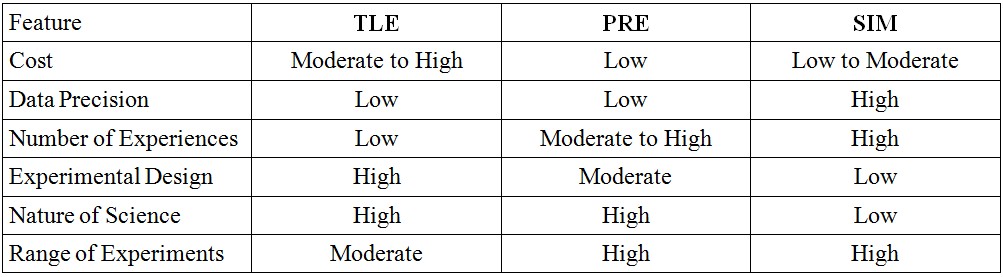
These three approaches have their advantages and disadvantages depending on the pedagogical goals.
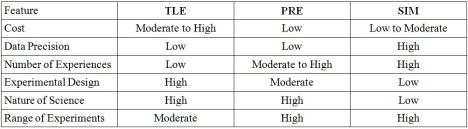
For the purpose of understanding science, high data precision is a negative. On the other hand, for memorizing scientific principles, equations, or laws, it is useful.
Examples
Concrete examples will aid in understanding the essential differences between these three approaches. Below are four examples, one each from physics, earth science, chemistry, and life science.
Projectile Motion
TLE: One of the first experiments to be simulated, projectile motion, poses significant challenges for traditional labs. Using safe (light and soft) projectiles results in significant air resistance and complicates the data analysis excessively. Using dense and hard projectiles makes the experiment unsafe in classrooms.
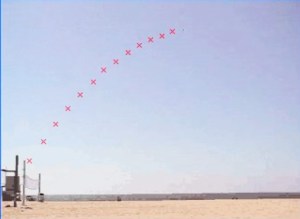 In any event, students cannot track the projectile over its trajectory and must measure only the distance travelled. They might also measure the time but would have difficulty in correlating that measurement to investigation goals.
SIM: Simulations allow students to alter the angle, the projectile mass, and the launch force (or energy) and watch an animation of the trajectory. The data collected depend on the particular simulation and may include maximum height as well as distance. Usually, these simulations assume that the launch height is zero, an assumption not true in real life. The simulations ignore air resistance and produce results that fit Newtonian physics with great precision.
While high precision simplifies analysis, it also creates a false impression in students. They don’t realize that science requires extracting meaning from often ambiguous data that may contain significant random errors. These errors can obscure the conclusions and can allow different people to come to different conclusions.
Because the data collected are summary data (height and distance), students don’t have the opportunity to see the quadratic nature of the trajectory or to understand that the vertical and horizontal components separate and can be individually analyzed. These latter issues also exist for the TLE experiments.
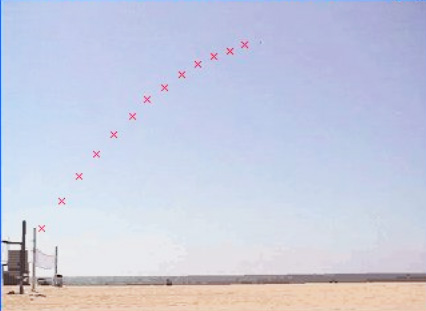
PRE: Real projectiles, e.g., bocce balls, are launched with a reproducible launching mechanism. A video camera records the flight of the balls. With proper calibration, students can track the ball in fractional second intervals and determine the horizontal and vertical positions and speeds.
The mass of the projectile can vary, for example, by using hollowed-out balls or lead-weighted balls.
Students now have real-world data. They may have had to skip collecting some data points because the balls were not clearly visible in every video frame. Their positioning of a mouse on the ball provides the x and y coordinates at each frame. The inter-frame time provides the “clock” for the experiments.
The number of experiments available depends entirely upon the number of videos recorded for the experiments. For example, having three masses, three angles, and three values for launch force, you’d get 27 experiments. Each experiment might have 20 or more data points collected for analysis.
Daily Tides
TLE: No classroom can have measurement of tides over a period of hours and also do so for many days during a month. Most classrooms aren’t even close to the ocean.
Teachers can provide students with tables of tidal data to analyze, but then students don’t collect their own data.
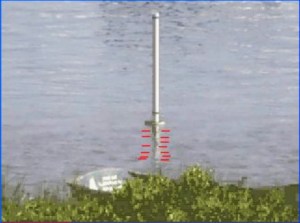 SIM: Simulations of tides generally ignore the fact that the nature of tides varies considerably depending on location. The motion of tides may be simulated as a sine wave, which is a rather inaccurate representation.
Students have to take on faith that the simulations of tides are accurate representations, which they cannot be.
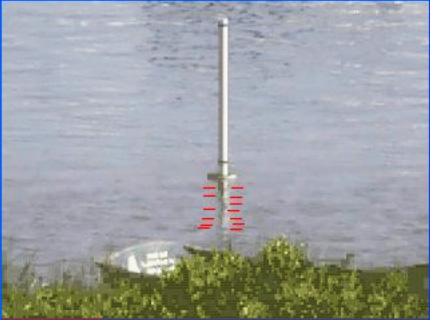
PRE: By simply placing a pole in a bay and photographing the motion of the water level as it moves up and down the pole, students will have ample opportunity to examine real tides. They’ll discover, depending on the class level, how the amplitude, phase, and period of tides vary (or don’t) day by day.
The smoothness of the water changes throughout the day and provides ample random error. Yet, the patterns remain clear even with some points omitted and the random error.
Analysis of Hydrates
TLE: This experiment has become a standard in chemistry classes everywhere. Students dry and weigh a crucible. Then, they place some chemical in the crucible and weigh again. Finally, they heat the crucible to remove the water of crystallization from the chemical and weigh once more.
The mass of unheated and of heated chemical provides the data required to measure the mass of water lost and, along with the molecular mass of the anhydrate, the molecular ratio of water to chemical.
This experiment is fraught with burned fingers and broken crucibles. Only a few chemical hydrates are safe enough to use in a classroom. Few students have enough time to analyze more than one sample in a class period. Most of the time is spent weighing and waiting for the crucible to cool.
SIM: Simulations of this experiment tend to focus on the procedure more than on the science. The weighing and heating operations clearly are unreal. Students don’t see the interesting physical changes in the appearance of the chemicals. Attempts to simulate these changes are inaccurate.
Using simulations for this experiment results more in repeated exercises in calculations than in understanding the nature of science.
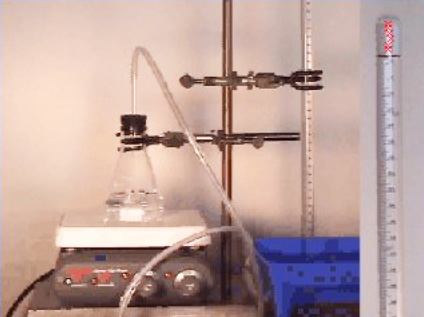
PRE: Just about any chemical hydrate can be used. In the case of the Smart Science® system, ten were chosen. For each chemical, ten masses were carefully weighed in one-gram increments. One hundred experiments were run. Students must read the triple beam balance to obtain the masses of the heated crucible plus chemical. The empty crucible provides an eleventh point.
Students make their own choice about how to handle the data. Should they calculate the water of hydration for each mass and then average them? Should they fit a least-squares line to the dry masses and use the slope to determine the water of hydration? If they find outliers, how should they be treated?
With so much data, especially when compared with the TLE approach, students begin to gain an understanding of what science really is like. Of course, the data are not precise and may not all be accurate. Some compounds may decompose on heating and provide results that do not match textbook answers.
Biodiversity and Relationships
TLE: Unless you’re from New York, you may not have heard of this lab from the Regents’ “The Living Environment.” The portion being considered here relates to performing an enzyme test and doing chromatography to discover the chemical relationships between various plants.
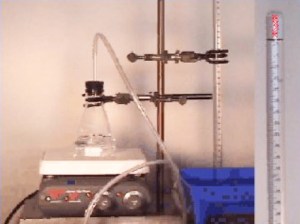 The enzyme test being performed uses a number of phony plant “extracts” that really are just food colors mixed or not mixed with a little vinegar. When a special enzyme test powder (baking soda) is mixed with the “extracts,” some fizz and some don’t. Students record the results.
Paper chromatography on the “extracts” depends on whether blue food coloring has been added to the green coloring present in all samples.
In reality, this lab is a hands-on simulation. Only the most clumsy student could avoid coming to the same conclusions as all of the other students. This simulated lab has no nuances, no ambiguities, no opportunity for error except the most extreme. It’s just pretend and play.
SIM: I haven’t seen a computer simulation of the hands-on simulation yet. You can, however, discover simulations of enzymes and of chromatography. As with the TLE case, they tend to be very clear-cut without the flavor of real science.
Because of the low cost of the hands-on version, don’t expect anyone to make a computer simulation soon.
PRE: In this lab unit, a large number of plants were grown. For every plant, a time-lapse video shows the plant from germination to about four weeks afterward. Students are shown the physical aspects of the plant (seed, leaf, stem cross section). They also are shown the effect of hydrogen peroxide on ground leaves and thin layer chromatography of the leaves. The TLC videos also show the progress of the TLC in motion.
Students must decide on the intensity of the enzyme reactions and record their results. Two students may readily rank the same experiment differently. They must also decide which three of ten possible chromatography bands to use to distinguish between the plants. Then, they must rank the intensity of the bands based on a scale of their own making.
Here, the advantages of the PRE approach over the TLE and SIM approaches becomes most obvious. Also, students can be provided with some leaf samples by their teacher and can perform simple paper chromatography on them in class to gain further understanding of the process. By combining real virtual experiments with some hands-on activities, the students end up with the best possible learning opportunity.
Which is Better?
You’re welcome to make your own decision and to comment here. As should be obvious by now, this writer prefers the PRE approach, especially when combined judiciously with TLE experiments. An example should help to explain how this is done.
In the PRE example of analyzing hydrates above, the hands-on components was left out. A very inexpensive and safe compound can be purchased inexpensively at any grocery or drug store. A piece of aluminum foil, an oven heated to 450 ºF, and a cheap postal scale provide the remaining materials. Despite the poor precision of the scale, students readily can find the correct ratio of water to dehydrated compound. They should perform this experiment at least three times on different masses of compound. They’ll begin to get a feeling for how the amount of compound used can affect their results and also for the effects of their care in weighing and handling the materials.
In the Smart Science® system, the combined PRE and TLE labs are called “hybrid labs.” Some labs, such as inorganic synthesis, really don’t lend themselves well to being virtual and are strictly done hands-on. Others, such as colorimetric determination of copper, are too dangerous and require expensive equipment. So, they are left as only virtual.
Nevertheless, the example of analysis of hydrates demonstrates the power of combining the two approaches into a single lab. Students have kinesthetic experiences and do experimental design. With the PRE experiments, they also are able to investigate a range of materials and obtain much more real-world data than they could with the TLE approach. As a result, they achieve a full science experience.
What should also be apparent is the relative paucity of real learning in the SIM approach. Truly, these attempts at online lab substitutes are really more like the early computer drills once popular. Like textbooks and videos, their focus is on the parts of science that don’t require lab experience: words, laws, equations, and procedures. These are the results of science and not the nature of science. They are best left to the non-lab portion of a science course. While lab experience may support this learning, its primary purpose must be to expose students to the nature of science, to give them an opportunity to perform scientific reasoning, and to come to appreciate the complexity and ambiguity of the sorts of empirical work that scientists actually do.
Some will argue for the classroom hands-on experiments despite the foregoing. They should realize that the classroom limits the ability of students to do experimental design and to explore ideas. Having to report to a classroom, set up equipment, run some experiment, clean up, and exit the room within a strictly determined period makes doing science quite difficult. In high school, the time alloted is usually less than an hour. Colleges know better and allot three hours for a lab period.
One large high school in a huge urban district is beginning to transition to entirely Smart Science® labs right now. Hopefully, this school signifies the beginning of a trend that can take our science education to new heights.
By providing a means for students to do their real experiments online and means to do at-home experiments safely and at very low cost, a good combination of PRE and TLE provides the best overall science investigation possible for our students.
Filed under: Uncategorized | 11 Comments »






 By Bert Kimura






 Amy Rolph, “














 Educational Technology and Change Journal