Adding decorative visualizations to learning content is supposed to render educational material more interesting and motivate students. Though entertaining pictures may distract learners and add to the cognitive load, instructional designers seek to avoid the creation of textual wasteland devoid of graphic oases. Thus, the purposeful and selective use of e-comics and other ornamental illustrations is by all means an ingredient in the e-learning design repertoire.
As a graphic medium of storytelling, comics combine pictorial elements with more or less scarcely used text modules – often in the form of speech bubbles. This results in a dialogic style of narration. One way to use this form of narration in instructional design is to depict controversial topics by engaging two characters in a dispute. Another possibility is to trace historic developments and events as pictorial sequences. Following ideas of anchored instruction, comics can picture a scenario or problem that forms the starting point for investigating the learning content. Finally, comics can also be used to simply loosen the ground, i.e., by including a sketch, learning material can be rendered less dense.
There are a number of Web based tools for the design of educational picture stories. They offer a broad variety of elements to create a comic strip, including a drag and drop feature that facilitates the use of this medium significantly.
(Click to zoom in.)
Toondoo is a comprehensive, yet easy to use flash application to create comics. It comprises a variety of premade backgrounds, figures and objects. Moreover, you can upload your own photos and graphic materials and create new avatars using a step-by-step wizard. All objects can be aligned, enlarged, reduced, placed in the foreground or background, copied, deleted and more. Besides, you can change the pose and facial expression of the figures. The rubric ImageR allows you to cut, crop and alienate photos – however, a basic desktop photo editor such as Picasa or Irfanview provides more options and better handling. This also applies to the embedded drawing tool Doodler. In contrast, the feature Book Maker proves to be an extremely useful add-on. It allows you to combine several ComicStrips into a book – a great way to present a class project or group work. You can download your completed comics as PNG-files or store them within the toondoo website in a password protected area.
Pixtonis an alternative environment to generate comics from existing models. The process is easy to learn and the expressiveness of the figures is impressive. The Web application offers a wide selection of poses, gestures and mimics. The variety of background images is, in contrast, less comprehensive. In designing a comic, the you can choose between three different formats: The option “Regular” leads to a drag & drop editor, which allows the free arrangement of elements. The option “Quickie” leads to a selection of prearranged settings with figures and speech bubbles. The “Large Format” can be used to design a single, large-scale scene. The completed comics are retrievable through a unique URL and publicly accessible. You can embed their products into your personal websites as flash files. Print and download options are available as well, but require a premium membership.
(Click to zoom in.)
Comiqs is an easy to use environment to turn photos into online picture stories. Based on flash, the tool is particularly interesting for members of the photo sharing community flickr. Pictures can be uploaded or imported from your personal flickr account. Afterwards, straightforward editing options allow you to arrange photos as comic strips and add speech bubbles.
She was a grade 5-6 multi-age teacher, and she was frustrated. She had just graded a basic multi-digit multiplication test. Most of the students had done well, but a large number had done poorly. There was no one in the middle. She suddenly had a revelation. All the students who did poorly were new to her this year—all the rest had been with her the year before. She looked at the poor tests more carefully and then realized those students were mostly missing the same questions.
What could it be about those questions? She studied them and realized that they all had a 0 (zero) somewhere in the digits. It only took a few more minutes to realize that the students were all treating multiplication by zero as if it were multiplication by one. She realized that she had not taught the zero multiplication rule to this group. She took them aside and gave them a quick lesson, after which they repeated the test with high scores.
How much student failure is caused by teaching students something that assumes they already have skills they do not indeed have? As this true story above illustrates, sometimes a very small and easily-taught skill can be all that is required to lift a student from failure to success. Unfortunately, few of us have the time that this teacher took on this one test, and even then, it took a certain amount of luck for her to spot the problem. How many similar potential revelations passed by her unnoticed?
Although intelligent curriculum design can solve many of these problems, this is the area where developing technology may be able to do the most good in the coming years.
One of my first reviews of an online curriculum was for AP Language and Composition, a course students frequently take in their junior year. In the very first unit, the students did a reading, after which they were required to write an essay in which they explained the author’s use of rhetorical devices in the piece. The unit had no instruction in rhetorical devices. This curriculum writer was from a prestigious, high achieving school so, perhaps, he was used to students walking into his class with the ability to complete this assignment, but I would bet that at least 90% of the juniors in America have never seen the phrase rhetorical devices before.
A little common sense in curriculum design goes a long way—don’t expect too much prior learning before a course begins. Once we pass that hurdle, though, we see how technology can help. If we can examine every course and lesson we teach and identify the prerequisite skills, we can then create a list of those skills. If the course writer expects students entering a class to be familiar with rhetorical devices, then that should be included in the course plan. Once we have such a list, we can create pre-tests to ensure students have the necessary skills to complete the course.
A Technological Solution
This is where technology can really help. We could create a library of learning objects for these critical skills. Students who need assistance with a prerequisite skill would be directed to a lesson to bring them up to speed as quickly as possible. A curriculum designer planning a lesson would identify the skills necessary for success. Some of them would be taught in the lesson itself, but others that should have been learned previously would be omitted. When students have not had the prior learning, they would be directed to the necessary learning object for remediation.
Ultimately, in many cases, the technology would make this happen automatically. Someday a computer analysis of a multiplication test will be able to indicate that students failed because they did not know how to multiply by zero, and it will direct those students to an appropriate lesson. We have some basic programs in math and reading that do some of this already, but this feature is rarely integrated into regular online classes at this time. Furthermore, it usually requires students to leave the regular class and enter a separate program, a process that does not work well for a variety of reasons. In the future, all such learning must be integrated into one learning package.
But even with today’s technology much of this can be done. We can create that library of learning objects easily right now, and we can direct students to appropriate lessons right now. We can adopt instructional policies that reward students who use these processes to reach higher levels of achievement rather than punish them for starting at a lower level.
As previously discussed in this column, when it comes to Twitter, there is no “right way” to do things. Learning the right balance of tweets, re-tweets and replies to meet your needs and increase your return on (time) investment is a learning process like any other. For this column, I’ve compiled a list of educators and technologists that I look to as good examples of using Twitter in an approachable way to network, share, learn and grow.
Programs:
@MAET – Michigan State University Master of Arts in Educational Technology – Shares information on upcoming program events as well as what is new in educational technology. This account is excellent at interacting with program students and others.
@CapMSU – Michigan State University Campus Archaeology – @CapMSU – The MSU Campus Archaeology program excavates sites around the MSU campus and shares their findings with the campus community. This account provides a fascinating historical perspective and shows us what archaeologists do and how they work.
Individuals:
@gravesle – Michigan State University – Leigh is the coordinator of MSU’s Master of Arts in Educational Technology program and shares excellent articles and resources.
@Tjoosten – University of Wisconsin Milwaukee – Tanya is very open to sharing her adventures in educational technology at UWM and has great information.
@UWM_CIO – University of Wisconsin Milwaukee – Bruce Maas is the CIO for the University of Wisconsin Milwaukee and very accessible to education colleagues on Twitter. He’s an excellent example of transparency and availability in leadership.
@NealCross – Southwest Baptist University – Neal is an instructor, a learning management system administrator, and very collaborative in his work. He is interactive, helpful and fun to follow.
@Captain_Primate – Michigan State University – Ethan is a professor at MSU and an expert in digital humanities. He is an evangelist for open access teaching and learning, and he teaches his courses outside of the central campus learning management system, using WordPress and more.
@kevinoshea – Purdue University – Kevin is a technologist working closely with online education and is adept at putting Web 2.0 tools to work.
Publications/Organizations:
@Educause, @EducauseReview – EDUCAUSE is a non-profit association with the mission of advancing “higher education by promoting the intelligent use of information technology.” Stay apprised of upcoming events, interesting educational technology news and new study data by following them on Twitter.
@mashable – Mashable is not geared specifically toward higher education, but they offer excellent, short articles on Web 2.0 tools and innovative ways to use them. I get much of my technology news from Mashable and have found them to be an invaluable resource for explaining how things work.
Businesses:
TechSmith:@TechSmith, @TechsmithEDU, @jingTips, @SnagItTips – TechSmith takes a very approachable stance with their customers, offering beta membership, technical support and tips via Twitter. They are always on the lookout for people using their products in innovative ways.
Biggby Coffee:@BiggbyBob, @T_C_B, @BiggbyJedi, @BiggbyFelicity – Biggby Coffee could write the book on using social media in business. The company founders are active, reaching out to customers and offering glimpses of what goes on behind the scenes. Employees obviously love the company, making the excitement contagious.
Insomniac Games:@insomniacgames is an independent video game developer that takes support to new heights using Twitter. Have a question about one of their games? Ask them on Twitter and you’ll often have a response the same day.
Who do you follow that you find interesting? Would you like to add to this list? Please e-mail your favorites to jlknott@gmail.com. You should also follow @etcjournal on Twitter for information and updates each time a new article is posted.
I’ve been reflecting over the last few days on common questions I’m asked as I go about my job as a Learning Technologist. Questions like “I don’t have time to think about this” or “Why should I use this?” come up a lot. It’s clear to me now that a key skill in my role is to be able to respond to these questions effectively, in such a way as to cause the questioners to rethink their position and open up to a new viewpoint. I can tell you now that this isn’t easy. Here are some pointers:
In my education context, the worst thing you can do is throw blame around and talk about “what we need to do” rather than “it’s terrible that we don’t do such and such.”
Another important point is to relate your talk to your audience. There are many reasons for this. Firstly, among educators in 2010, understanding of learning technology is low so talks about it may be confusing and off-putting. Also, you want to be talking about processes and value they understand and can relate to. Further, it should always be about how the technologies fit into the bigger picture and if you just bang on about the ICT it’ll feel alien to their world.
I also like to stress the the possible incorporating of learning technologies is an element of the learning design process. So, as an organisation, the key is to value learning design; to value giving time and space to reflect and think about how you teach. The potential use of learning technologies is part of this process in the sense that they exist as tools in the toolbox from which you pick and choose. I spoke about the tools in the toolbox metaphor a few days ago. Valuing learning design is key, and it comes from the educators themselves and the management of organisations. So the subtle difference here is that you are NOT pushing e-learning because it ticks a box that needs to be ticked, but you ARE promoting good teaching and learning by engendering a culture of giving time and space to reflect on learning design.
Yes, there is learning to be done. But I think a good quality educator should be prepared to continually learn and adapt. Learning and adapting is an important part of living.
Learning online isn’t different to learning offline. Learning is the same as it’s been forever.
The change isn’t so drastic. Learning online isn’t different to learning offline. Learning is the same as it’s been forever. Learning strategies may change as we have more options (more tools), but the end result is the same thing you’ve always been asked to deliver. All you need to do is understand how to work the new tools and, more importantly, understand the values behind each.
If you’ve been paying attention to online education, you’ve seen the hype about how great it is. You may also have noticed that Arne Duncan, the Secretary of Education for the Obama administration, is a big fan of online education. He sees it as a source of new ideas.
Online learning certainly is revolutionary as was steam power, for example, or electricity. But it’s what we do with it that will make the difference. Suppose that you had the opportunity to create a new online learning school. A venture capitalist has provided you with funds, and now you must decide how to proceed. What will you create?
Each choice you make will impact the quality of education that your students receive and will also impact your bottom line. You choices will also affect the teaching experience in your school, your ability to hire good people, the quality of your Internet connection, and so on. Consider these as secondary issues when compared to product quality (i.e., how well your students are educated) and profitability. I focus on these two because they often are at odds with one another.
Online technology promises great education everywhere at low cost. The Internet is becoming ubiquitous. Even very poor countries around the world now have improved Internet access as fiber optic cables are laid to reach them. Here, in the United States, although we lag behind some industrialized nations, access is improving, and most rural locations receive some form of Internet access at a reasonable cost.
Because the cost of servers and broadband access is much lower than that of buildings and buses, the cost of delivering online education must be lower than that of traditional education. As better software tools become available, online teachers will be able to handle as many students as, or more than, their traditional counterparts with equal or better attention to individuals. As a side benefit, these teachers also do not have to commute, saving energy and carbon emissions.
Just imagine that you have no limits on spending and are allowed many years before profitability becomes an issue. You could find the best software for tracking student progress and providing just-in-time intervention if a student has problems. You could locate the best social networking software for allowing productive discussions about the current class topics. You could create curricula that engage students with creative thinking rather than memorizing for tests. You could use the newest multimedia technology to deliver compelling lessons – even in 3-D and Dolby sound. Teachers would become guides, coaches, and mentors helping students to find their own way. Course software would automatically determine when students must have more help and provide it if available or inform the teacher to take action. The software would also inform administrators about these incidents so that new learning threads could be created.
The combination of great teachers, well-trained in online instruction, dynamic software, worldwide social interaction, a database of all student online activity, data mining software that seeks out patterns in that database, and dedicated creative administrators might just build the best education system imaginable. Current traditional classroom education could not hold a candle to it.
However, we don’t live in this utopian world. The bottom line pulls like an albatross and constantly deflects our trajectory. In education, you have little ability to raise your prices. Charter schools, for example, have a fixed amount they receive per student. Even private schools have to deal with competition. Online schools do not have century-old tradition and decades of alumni to attract students and contribute in fund-raising drives. The quest for more profit must focus on costs.
Your school can achieve tremendous cost savings simply by not giving classes. You may laugh before you realize that some online diploma mills are giving diplomas for “life experience.” The highest costs for running online schools appear to be course creation and teacher salaries. The former occurs at the beginning, and the latter is recurring. You can reduce your start-up costs by hiring teachers who already have the courses designed or simply follow a textbook. The latter costs may be reduced by hiring teachers as 1099 employees who contract with you and are paid based on some formula related to the number of students. That way, you don’t offer benefits.
If you pay your teachers W2 salaries, then you reduce costs by increasing the number of students supervised. You also can avoid assigning students to a particular teacher. Instead, the first available qualified teacher handles the next student question. You can reduce or eliminate moderated discussions in classes so that teachers can deal with a larger number of students.
In short, you can minimize the costs of your online school by emulating the worst practices of traditional schools and then finding ways to make your education product even lower in quality than possible in such classes. You’ve turned your class into an online version of Princeton Review or Barron’s review notes and practice exams.
With online classes about to be at least a partial school experience for half of our students and with online tools becoming widespread even in traditional classrooms (sometimes as homework), it’s critically important that we, as a society, work for the best outcome.
I have found science courses offered by online schools that have no lab experience at all, not even virtual. Because few standardized tests actually test for the learning that should take place with such lab experience, it’s not surprising that these online science classes can produce good scores on standardized tests. The courses present the science concepts that will be tested, allow students to memorize them, and provide practice in preparation for the tests. They do not develop the students’ concept of the nature of science and do not exercise scientific reasoning skills. They certainly don’t allow students to collect or even work with empirical data. They’re just “teaching to the test.”
With online classes about to be at least a partial school experience for half of our students and with online tools becoming widespread even in traditional classrooms (sometimes as homework), it’s critically important that we, as a society, work for the best outcome.
At this moment in time, we have a choice. We can have the best of education, better than previously possible for large numbers of students, or we can have the worst of education, worse even than failing schools in large urban districts. We get to choose, but only if we act for our future, which depends on the quality of our education system for every student, and if we don’t get caught up in any “back to basics” movement. Our success lies in the future and not in the past. We need to use the best ideas available, many very old (e.g., Socratic method), and the newest technologies, but we should use these technologies with care and not just because they’re new and exciting.
Internet technology provides the biggest change to education since the invention of the printing press. Let’s use it well!
Rob and Maria are two fictional students who appear in Disrupting Class: How Disruptive Innovation Will Change the Way the World Learns by Christensen, Horn, and Johnson. In the early stages of the book we see Rob struggling to understand a concept in chemistry that Maria picks up easily. Fortunately, Rob’s father has not forgotten those lessons, and he is able to help Rob understand by using a different instructional approach from the one used by Rob’s teacher. The lesson the book would have us learn is that the teacher used an instructional process that fit Maria’s learning style, but Rob needed an approach that matched his learning style in order to find success. The book looks forward to a day in which emerging technology related to online education will allow instruction to match learning styles and bring educational success to everyone.
The concept is seductively simple. A student’s learning style is assessed at the beginning of the class, and the results are used to direct him or her through a succession of learning activities designed to meet his learning needs. As you explore the concept, though, you begin to see that it isn’t all that easy. Ironically, a little more study may suggest the opposite—that it is even easier than it looks.
The first problem is determining what we mean by learning styles. Most readers probably think they know because they took a workshop or read a book that taught the concept. Most readers are probably thinking along the lines of Visual—Auditory—Kinesthetic. That is not, however, the only theory of learning styles. In fact, my own research indicates that there are at least 100 different theories of learning styles, and many are significantly different from one another. While I have certainly not looked at all 100, the ones I have reviewed all seem to make sense to some degree, but they all seem incomplete as well. I have never found one that perfectly matches the student differences I saw in my teaching career.
What kinds of lessons can we create that work most effectively with the identified [learning] styles?
But let’s say we could come to agreement on an identifiable set of learning styles. What would we do about it? Would we send the student down a path in which every lesson has the same instructional qualities? Most theorists say that you then design instruction to match the learning style, but others say the opposite, that we need to strengthen the weaker areas. What kinds of lessons can we create that work most effectively with the identified styles?
And at what cost will this be? Will each course have to be essentially four to five courses running in roughly parallel paths? It costs enough to make one course, let alone four different courses that somehow interweave.
A number of years ago I had an enlightening experience that may point the way toward a solution, one that is within the means of present technology. Back when people were first realizing that IDEA contained Section 504, which required regular classroom teachers to accommodate the identified learning needs of students, I wrote an article on this on behalf of the school district’s special education director. She gave me a pile of newly compiled documents detailing accommodation suggestions for various handicapping conditions so I could include examples in my article. I was surprised to find that the same instructional strategies were being suggested over and over again for different handicapping conditions. A teacher who routinely used a relative handful of methodologies would have almost never had to change instruction to accommodate any student.
When I asked the special education director about this, she explained that all students, regardless of ability, learn better when these methodologies are used. It’s just that some students have the motivation and the ability to learn without those methods, while other student must have those methods to succeed. Unfortunately, those effective methods are not the most popular ones in education, especially at the secondary and post secondary levels.
So let’s look again at Maria and Rob, whose chemistry teacher presented a traditional fact and math-based lecture on gas laws that Maria understood but which Rob did not. Rob was able to get the lesson later when his father used some visual aids to enhance understanding. I contend that if the teacher had used a different approach, not only would Rob have gotten it, but Maria would have gotten it more easily as well. In other words, Maria was able to overcome the teacher’s weak instruction, but Rob was not.
All students, regardless of learning styles, learn better when they are in an educational environment that includes active learning, mastery learning, engaging tasks, and higher order thinking.
When I first started experimenting with innovative instructional approaches, I was teaching the extremes of secondary education—I had both Advanced Placement and ninth grade remedial classes. At first I tried these methods in the remedial classes, and I was immediately rewarded with significant improvement. I maintained a more traditional approach in the AP classes since they were doing well enough, I thought. Eventually the methods migrated to AP as well, where, to my surprise, they had an even greater effect than in the remedial classes. By the time enough years had passed that I had former ninth grade remedial students passing the AP exam, I was sold.
All students, regardless of learning styles, learn better when they are in an educational environment that includes active learning, mastery learning, engaging tasks, and higher order thinking. We simply need to provide a wide variety of such learning activities throughout our classes.
So can this be done in online education?
The first time we ever had a special education student enroll in our online school, a very unhappy special education teacher pointed at the student’s IEP, with its page-long list of required modifications, and asked us how we were going to meet all those needs. So we looked at them .The first was that the student had to be allowed to take notes on a laptop. OK. The next was that he had to be allowed extended time on tests. OK—our tests were generally untimed. By the time we had read through the list, she saw that fully 90% of the requirements were met simply by his being in an online environment.
A well designed, varied online curriculum, with a variety of multimedia pieces and engaging learning activities, can meet the needs of students with varied learning styles, even without major advances in technology. It can do many of those things even better than it can be done in a regular classroom.
So I am confident that we can meet the needs of students with varied learning styles. I believe the bigger problems we face involve prerequisite skills, sequencing, and transfer loads, but those topics will have to wait for future columns.
At the end of the July 13 discussion, the Ambassador of Yemen to the UN in Geneva remarked that people who could not read because they had had no opportunities to go to school should be included among “Reading Disabled Persons” and thus benefit from the same copyright restrictions in WBU‘s draft treaty, in particular, digital texts that can be read with Text-to-Speech (TTS) software.
The Ambassador of Yemen hit a crucial point.
TTS was first conceived as an important accessibility tool to grant blind people access to texts in digital form, cheaper to produce and distribute than heavy braille versions. Moreover, people who become blind after a certain age may have difficulties learning braille. Now its usefulness is being recognized for others who cannot read print because of severe dyslexia or motor disabilities.
Indeed, why not for people who cannot read print because they could not go to school?
What does “literacy” mean?
No one compos mentis who has seen/heard blind people use TTS to access texts and do things with these texts would question the fact that they are reading. Same if TTS is used by someone paralyzed from the neck down. What about a dyslexic person who knows the phonetic value of the signs of the alphabet, but has a neurological problem dealing with their combination in words? And what about someone who does not know the phonetic value of the signs of the alphabet?
Writing literacy
Sure, blind and dyslexic people can also write notes about what they read. People paralyzed from the neck down and people who don’t know how the alphabet works can’t, unless they can use Speech-to-Text (STT) technology.
Traditional desktop STT technology is too expensive – one of the most used solutions, Dragon NaturallySpeaking, starts at $99 – for people in poor countries with a high “illiteracy” rate. Besides, it has to be trained to recognize the speakers’ voice, which might not be an obvious thing to do for someone illiterate.
Free Speech-to-Text for all, soon?
In Unhide That Hidden Text, Please, back in January 2009, I wrote about Google’s search engine for the US presidential campaign videos, complaining that the text file powering it – produced by Google’s speech-to-text technology – was kept hidden.
To help address this challenge, we’ve combined Google’s automatic speech recognition (ASR) technology with the YouTube caption system to offer automatic captions, or auto-caps for short. Auto-caps use the same voice recognition algorithms in Google Voice to automatically generate captions for video.
As the video above says, the automatic captions are sometimes good, sometimes not so good – but better than nothing if you are deaf or don’t know the language. Therefore, when you switch on automatic captions in a video of one of the channels participating in the project, you get a warning:
Short words are the rub
English – the language for which Google presently offers automatic captioning – has a high proportion of one-syllable words, and this proportion is particularly high when the speaker is attempting to use simple English: OK for natives, but at times baffling for foreigners.
When I started studying English literature at university, we 1st-year students had to follow a course on John Donne’s poems. The professor had magnanimously announced that if we didn’t understand something, we could interrupt him and ask. But doing so in a big lecture hall with hundreds of listeners was rather intimidating. Still, once, when I noticed that the other students around me had stopped taking notes and looked as nonplussed as I was, I summoned my courage and blurted out: “Excuse me, but what do you mean exactly by ‘metaphysical pan’?” When the laughter subsided, the professor said he meant “pun,” not “pan,” and explained what a pun was.
If you switch on the automatic captions [2], there are over 10 different transcriptions – all wrong – for the 30+ occurrences of the word “rip.” The word is in the title (“Don’t get sucked in by the rip…”), it is explained in the video description (“Rip currents are the greatest hazards on our beaches.”), but STT software just attempts to recognize the audio. It can’t look around for other clues when the audio is ambiguous.
That’s what beta versions are for
Google deserves compliments for having chosen to semi-publicly beta test the software in spite of – but warning about – its glitches. Feedback both from the partners hosting the automatically captionable videos and from users should help them fine-tune the software.
A particularly precious contribution towards this fine-tuning comes from partners who also provide human-made captions, as in theOfficial MIT OpenCourseWare 1800 Event Video in the MIT YouTube channel:
Once this short word issue is solved for English, it should then be easier to apply the knowledge gained to other languages where they are less frequent.
I have done so with the Lessig at Educause: Creative Commons video, for which I had used another feature of the Google STT software: feeding it a plain transcript and letting it add the time codes to create the captions. The resulting caption .txt file I then downloaded says:
0:00:06.009,0:00:07.359
and think about what else we could
be doing.
0:00:07.359,0:00:11.500
So, the second thing we could be doing is
thinking about how to change norms, our norms,
0:00:11.500,0:00:15.670
our practices.
And that, of course, was the objective of
0:00:15.670,0:00:21.090
a project a bunch of us launched about 7 years
ago,the Creative Commons project. Creative
And soon, when Google opens this automated captioning to everyone, they will be able to say what they want to write in a YouTube video – which can be directly made with any web cam, or even cell phone cam – auto-caption it, then retrieve the caption text file.
True, to get a normal text, the time codes should be deleted and the line-breaks removed. But learning to do that should be way easier than learning to fully master the use of the alphabet.
Recapitulating:
Text-to-Speech, a tool first conceived to grant blind people access to written content, can also be used by other reading-disabled people, including people who can’t use the alphabet convention because they were unable to go to school and, thus, labeled “illiterate.”
Speech-to-Text, a tool first conceived to grant deaf people access to audio content, is about to become far more widely available and far easier to use than it was recently, thus potentially enabling people who can’t use the alphabet convention because they were unable to go to school and labeled “illiterate” the possibility to write.
This means that we should reflect on the meanings of the words “literate” and “illiterate.”
Now that technologies first meant to enable people with medically recognized disabilities to use and produce texts can also do the same for those who are “reading disabled” by lack of education, industries and nations presently opposed to the Treaty for Improved Access for Blind, Visually Impaired and other Reading Disabled Persons should start thinking beyond “strict copyright” and consider the new markets that this treaty would open up.
An interesting theme arose for me in a recent e-mail conversation with my ETC Journal colleague Claude Almansi. She said Twitter is “so simple to use: all you need is to have an idea of what you want to achieve by using it, and be able to effectively communicate in 140 characters.” This got me thinking about effective communication and how hard it is to achieve. This challenge, coupled with Twitter’s ambiguous purpose, makes it easy to see why so many are confused about what Twitter can do. This column defines basic Twitter terms and address some strategies you can implement to communicate more effectively the relatively amorphous Twitter environment.
Definitions
RT – ReTweet. To share a Tweet you found interesting, use the ReTweet function. This is like crediting the original writer for sharing the information.
DM – Direct Message. This is a private message between two people. Some businesses and organizations set Twitter up to automatically DM people when they follow an account. To many Twitter natives, this is considered impersonal and irritating. Use a DM when making plans or when writing something that only affects you and one other person. This saves your common followers from a timeline cluttered with things they find irrelevant.
@ – A Twitter reply. Place @ in front of the username of the person you are writing to. For example: “@etcjournal Thank you for the article! It helped answer my questions!” In this case, @etcjournal would see your reply and know that you enjoyed one of the articles we posted. The followers you have in common with @etcjournal would also see this reply.
# – Hash tag, used for earmarking Twitter search terms. For example, if I wanted to make ETCJournal searchable on Twitter and encourage other people to do so as well, I might say something like “I just read an article on blended teaching and learning in #ETCJournal. It was very helpful!” Then, to search, one would visit http://search.twitter.com and enter #ETCJournal to see all tweets that incorporate that hash tag. Hash tags are especially useful for facilitating conference back channel conversations and identifying themes in your tweets. Note, however, that hash tags are not stored forever and when used too liberally can become clutter.
Lists – A relatively new Twitter feature, lists allow you to organize those you follow into lists based on a theme. For example, adding ed tech colleagues to an “educational_technology” list would allow you to filter out and view what they are saying, obscuring tweets from users not on that list. This tool is helpful for users who follow several hundred individuals to manage what they see and when. To create lists and see who lists you, visit http://www.twitter.com and click Listed (to see who lists you) or New List to begin creating lists of your own.
Back-channel – At conferences, there will often be a “back-channel” of users sharing ideas and thoughts on the conference in real time using Twitter or other social networking sites. This is useful for following others at the same conference who, perhaps, attend different sessions.
TweetUp – An in-person meeting of Twitter users. TweetUps are common at conferences and in larger cities, and an excellent means for building your network and meeting new people with interests or locations in common.
Basic Strategies
Be social. Find people who have similar interests as you, and interact with them. ReTweet the resources they post that you find interesting, and open a dialogue using @ replies and DMs. Often, when people are deciding whether or not to follow you back, they will look at your Twitter page and ascertain whether you interact with those in your followers list. If your account is all one-way, with you merely pushing information outward, they will choose not to reciprocate the follow or view your account as SPAM.
Be approachable. If people are making assertions that you do not agree with, try sending them a DM with your perspective, as opposed to an @ reply. Try to be open to ideas that differ from your own. This was one of the hardest hurdles for me to overcome in my Twitter use.
Attend local and conference TweetUps. Especially at conference, TweetUps can prove to be a valuable resource and a lot of fun. If you are attending a conference, ask the conference staff if they know of a scheduled TweetUp. If there isn’t one, schedule one yourself, using the conference hash tag. Conferences like Educause, SLOAN-C and Purdue’s Teaching and Learning with Technology conference all schedule TweetUps as part of the proceedings to give Twitter users participating in the conference back-channel a chance to meet in person and share what they have learned.
An important part of my face-to-face classes now is to allow students a research choice of creating a blog site and posting their research on it for public comment. Since actually getting the “public” to comment on a blog, even on exciting and current topics like “Is there a gay gene?” or “Is Gardasil a good thing or not?” is nearly impossible, I require everyone in the class to post comments on three different blogs other than their own.
As I read through the posts, comments, and author responses to the comments, I am reminded over and over again that I am not the only person in this classroom with important information. Each of these students has life experience and some have knowledge that is relevant to this subject. From the student with a gay friend to the young woman who was given the Gardasil vaccine without being told what it was, their information is pertinent and—most importantly—it is very important to and valued by their peers. They ask questions in these comments as well as respond to the information, and some of the conversations that result are far more intellectually demanding than the course syllabus.
I still allow a research option that is “just” a traditional research paper. But for the first time, I asked everyone who chooses to write an essay to post it on our discussion forum for comments. Everyone in the class also posted a comment about two research papers.
How did that work?
Every paper had at least one comment, which surprised me, but several topics were very popular. “Women’s reproductive rights” was a topic that received a lot of comments, but the one I want to mention particularly was “Obesity and You.” Although obesity would be a logical topic in a class on Science, Health, Gender and Race, it was not one that I had included in the list of possible research topics—either for the blogs or the papers. When a student approached me about this subject, I was nervous but let her take it on.
Why was I nervous? Obesity is a topic that is emotional, personal, and difficult to talk about in an objective manner—which is what I require for a research paper. The student did a good job on the paper, and when she posted it online for comments, I tracked the responses.
The first was fine: “I found your paper to be very informative on the topic of obesity. Obesity is such a sensitive subject for those that are over weight; however it is such an important topic that needs to be dealt with. I liked all of the statistics that you used throughout your paper. These helped me realize just how obese our world is becoming and how we need to do something to stop it.”
The author expressed surprise and pleasure that someone had actually read her paper (“I didn’t think anyone would”) and found it helpful. Other comments continued to be thoughtful and respectful. Readers asked for more information on connections between genetics and obesity, race and obesity—and the author responded to them all with more information and always thanked them for reading her paper.
I realized that while obesity might be a difficult topic when students are discussing it in person, online offered a medium for a more thoughtful exploration.
What did I learn? Several things. I realized that while obesity might be a difficult topic when students are discussing it in person, online offered a medium for a more thoughtful exploration. No one was casual or thoughtless or cruel in this discussion. While I can’t generalize too much from this particular experience, when I think back to all of my online discussions, I realize that I have seldom had a comment that I needed to correct or censor for tone. Wherever they learned it, my students seem to have netiquette down pat.
I also learned that I was right—students want feedback from their peers, and they are good, conscientious and careful about giving feedback to others.
And the discussions and further research that resulted also contributed to the learning experience.
The URL for the video below is http://www.youtube.com/watch?v=kTvHIDKLFqc.The possibility to automatically caption YouTube videos in English was announced by Google on Nov. 11, 2009: a huge step forward for deaf people that benefits all users. And this is typical of most accessibility measures.
The participants in the accessibility discussion were instructional design professionals, teachers and students. Therefore they were already well aware of the need for accessibility in teaching and of the existence of requirements for its enacting.
For instance they all knew that non-text objects – pictures, videos, audio files – conveying info but not accessible to all can be used, but that an alternative must be provided for people with disabilities preventing access to such objects. Nevertheless. as accessibility4all.wikispaces.com/Discussion shows, some interesting questions and issues emerged in the discussion:
General themes
Among the general, conceptual themes of the discussion:
Universal design and redundancy
Universal design, i.e., planning something that everybody can use (whether in real life or on the Web), may not be fully reachable, but it is a goal that must be kept in mind from the start of the designing process.
Redundancy – i.e., offering the same info/knowledge in different forms – is a means towards that goal. Alternative formats can be linked to in order to avoid cluttering a given web page.
Accessibility tools
The phrase “accessibility tools” is used to describe different things:
Assistive technology for people with disabilities: e.g., screen readers – like JAWS – for blind people.
Emulators of assistive technology used by designers to check how a page will be perceived by people who have to use an assistive technology: e.g., screen reader emulators – like the Fangs addon for Firefox.
Automated accessibility checkers used by designers, but only indicatively – just as automated spell checkers are only indicative.
Specific issues
Among the more specific and concrete issues discussed:
Language
In the context of online learning materials, if web sites must be accessible to all, including people with language disabilities/problems, won’t that entail a stylistic flattening? Or, as Robert Becker put it, in connection with the Universal Design theme:
. . . So, to make a point, I could say that assigning Chaucer’s Middle English or Shakespeare’s Elizabethan text is to erect a barrier to learners. That may be, but to do otherwise is to erect an even greater barrier to Learning.
I recall a personal experience teaching English to inner city adult students trying to earn associate degrees. I dumped the prescribed reading list full of “accessible” texts and replaced it with real literature. The memory of watching most of my students successfully engage with Jane Austin will never fade.
In Learning generally there is no greater barrier than the absence of challenge and aspiration.
Tables
Tables can be a barrier for blind people, because reading with your ears with a screen-reader means reading linearly. This issue was first raised – in connection with the Universal Design theme, again – by Beverley Ferrell, moderator of the ITForum list:
If blind people read in a completely different manner ( and we may not be aware of this) and screen readers read like this:
I have not had time to read and comprehend all of this vs design for data etc such as Tufte recommends, so is it really the best way to display the data for those who are not sight disabled or must we always design two versions? and what about adding mobile issues to this? There are those who disagree with Tufte’s ideas also. Tables might not be useful, so data in graphs etc would be a real challenge for the new person designing accessible information.
Invitation
I have only highlighted some of the points raised in that discussion about accessibility on the Instructional Technology Forum mailing-list. You can find several other themes in accessibility4all.wikispaces.com/Discussion. The mailing-list discussion is now closed, but it can continue either in the comments to this post or on the wiki [1], which is a more democratic platform than a blog ;-). As the video at the beginning shows, the means to enact Web accessibility are progressing fast, for the benefit of all, not only of people with disabilities.
There were three ways in which technology and technology issues were relevant. First of all, as is pretty much the norm in today’s world, email and the Internet were used for the logistics of the conference. The call for proposals was posted online, and it was also emailed to attendees and presenters of previous conferences. The conference was advertised using online technology. Communication with presenters and attendees was online.
Secondly, most of the presentations used a wide range of computer technology, from PowerPoint presentations to DVDs to linking to web sites. For example, my own presentation combined all three. Some of the PowerPoint presentations were fairly straightforward. However, one presenter used an interactive PowerPoint presentation which was quite sophisticated. Again, this type of technology use is not new. It is a rare presentation today that does not use some form of computer technology.
However, the third way in which technology was used and discussed at the conference is what actually prompted me to write this essay. World War II ended 64 years ago. That means that Holocaust survivors are an aging and, frankly, dying population. One of the key questions and concerns at the conference this year was: what do we do when there are no more survivors? Survivor testimony is undoubtedly one of the most powerful tools for teaching about the Holocaust. Pictures of the atrocities shock, dismay and disgust, but they are inanimate, as are films, documentaries, and even books. None of them bring the horror of what Hannah Arendt referred to as the banality of evil that was perpetuated as clearly as hearing and talking to a living person who experienced these horrific events. According to Holocaust educators, teaching about the Holocaust should be more than teaching about facts and figures. It should have an emotional impact so that its lessons will not be easily forgotten. The goal of Holocaust education is not merely to inform, but to bring an end to the violence and hatred that bring about genocide and mass killings.
Ephraim Kaye of Yad Vashem in Jerusalem focused his session, titled “Using New Technologies to Study and Teach the Holocaust,” on the various ways that technology can help accomplish these ends (see the bottom of the webpage for a summary of his remarks). Yad Vashem has a range of materials available online. Besides the traditional videos, lessons, and Internet links, they also incorporate YouTube to present material in English, Arabic, and Farsi. Kaye also pointed out that as a result of computerizing survivor names there have been family reunions after decades of separation.
However, Kaye also pointed out technology has a serious downside that can be a challenge for educators. With the advent of the Internet, the proliferation of hate sites and Holocaust denial sites has increased. He states: “This challenge makes it imperative that educators teach students to be savvy and discriminating about the information they access online.” (There are a number of good sites which address information literacy skills, such as this one from Rosemount High School in Rosemount, MN.
However, to return to the original question of what do we do when there are no more survivors, let’s look at what is being done. The US Shoah Institute at the University of Southern California has documented “nearly 52,000 video testimonies of Holocaust survivors and other witnesses in 32 languages and from 56 countries.” The US Holocaust Museum in Washington, DC, and many other Holocaust museums around the country have archives of taped survivor testimony. Many Holocaust education websites for teachers, such as The Tennessee Holocaust Commission, have access to survivor testimony.
However, Yad Vashem developed the idea of combining survivor testimony using a documentary style. Rather than merely being the “talking heads” accounts that are the norm, Yad Vashem has attempted to create documentaries with more depth. Survivors are taken back to places, such as their hometowns in Poland, Germany, or the Ukraine, and/or back to the concentration camps where they were incarcerated, and filmed as they walk around and talk about their lives, and how they changed forever during the Holocaust. For many of these survivors, this is the first time they have returned to these places, and hearing them reminisce about their lives and talk about the changes creates a more emotional impact than just hearing someone talk about their life while seated in their living room. The viewer is reminded that this is about a specific human life, not just some person who has no past or no future. One of the critical components of this format is that it “closes the circle” so that the viewer can gain an understanding of the survivor’s whole life experience.
For Holocaust educators, modern computer technology provides ways that can give depth and breadth to this difficult topic. Not only can we access archives and documents of historical and current events related to the Holocaust, modern technology provides educators and students ways to connect with others that were unthought of just a few years ago. For example, the Maine Holocaust Education Network maintains a Ning that has a link to the US Holocasut Museum Twitter Feed.
The title of this press release caught my eye: “Ancilla College Ready to Go Completely Online as Part of Emergency Preparedness Plan”[1]. In case of emergency, the college can break the glass and press the red button that says “Campus closed. We’re now completely online.”
Ancilla is in Donaldson, Indiana, about 90 miles southeast of Chicago, and the college has hired The Learning House, Inc., to develop OPEN, which is an acronym for online preparation for emergency needs.
With OPEN in place, the college is now prepared for anything and everything that spells disaster, including flu pandemics, snow storms, floods, hurricanes, and heavy rains. Officials can now shut down the campus without worrying about disruption in learning. Like an emergency generator, all the classes shift into online mode and continue with learning as usual.
What happens if the campus shutdown lasts for months? Not a problem. From the moment OPEN, the emergency backup system, kicks in, it can function until a couple of weeks after the official end of term.
The heart of the OPEN system is Moodle, or modular object-oriented dynamic learning environment. It’s open-source and free, and it serves as a CMS, or course management system — aka as a learning software platform, LMS (learning management system), or VLE (virtual learning environment).
Faculty “pre-load” what are called Moodle “course shells” with all the stuff that’s associated with learning, such as lessons, schedules, readings, lectures, assignments, activities, discussions, resources, etc.
Students, instead of reporting to their classrooms on campus, use their computers and internet connections from home or other locations to log in to the online counterparts of their classes and continue their education.
Interestingly, nowhere in this article does the writer say, directly or indirectly, that the online classes are in any way inferior to F2F (face-to-face) classes. The implication is that nothing in the way of quality is lost, and students continue to receive an effective education.
Don’t get me wrong. No one, including me, wants to see Ancilla shut down by a disaster. However, suppose it does happen in the first week of instruction and extends to a week after the last day of instruction, and suppose learning continues completely online without disruption and student achievement and satisfaction with the online classes are neither more nor less than with F2F classrooms.
Would the college pour millions into reconstructing the F2F campus and continue with business as usual, returning to the classroom-based model of learning and abandoning the online model until the next disaster strikes? Or would it pause to take stock of online learning as a viable alternative?
My guess is that it might take a disaster of this magnitude to change the way colleges view totally online classes. And once they do, they’ll never return to the mindset that classrooms are the only way to teach effectively.
BTW, this article is the first for this column, “Totally Online,” and in coming weeks and months, I’ll be publishing others that touch on the subject of completely online instruction. Other editors and writers are also debuting their columns this week in ETC: Jessica Knott, “ETC, Twitter and Me,” and John Adsit, “Meeting the Needs.”
The person who can smile when things go wrong has thought of someone to blame it on.
I got that saying off of a coffee mug years ago, but I think it more accurately sums up the most prominent thinking of American educators than any other statement I know. Sure, we know of the well-documented problems with the results of our educational system, but no matter who we are, we can identify someone else, often several someone else’s, who is really at fault. We ourselves would be doing a topnotch job if not for . . .
And a lot of that is true. There is plenty of blame to be spread around the system. The problem is that since we are surrounded by such wonderful scapegoats, it is easy to feel comfortable in our own processes, even when the people and forces we are blaming are in turn pointing their fingers at us. Even worse, a corollary to the statement from the mug might be that if we know ahead of time that we have someone to blame, we really don’t have to make any effort to succeed.
Perhaps the most thoroughly blamed individuals are the students themselves. Oh, what wonderful educators we could be if only the students would come to the classroom properly prepared and motivated! Once again, much of that is true. Teachers in inner city schools struggle with horrific challenges, and it would be easy to develop a “What’s the use?” attitude, give up, and just go through the motions. Ironically, the opposite is also true. Many teachers in affluent communities can essentially phone in their lessons with the knowledge that the students will still somehow succeed without us, at least by our conventional standards of measure.
But studies over the last two decades have shown that individual teachers are succeeding far beyond their peers in the same troubled schools with the same students, year after year after year. Studies over the past two decades have shown that in many affluent high schools with impressive achievement results, the students actually lost ground when compared to their level of achievement when they entered the schools.
Educational leaders today call in unison for teachers to adapt their teaching to meet the educational needs of the students, but that call is not well heard in a typical classroom, especially at the secondary and post secondary levels. There the dominant mode of instruction is still generic delivery of information with the hope that the student will somehow master most of it. Before we can truly begin to meet the needs of our students, we must have the will to do so and the belief that it matters. Once we have that, we can begin to talk about the instructional strategies that can make it happen.
If online education is to realize its potential, it cannot have a goal of creating pale imitations of failed classroom practices.
Technology, especially the technology related to online education, is often touted as the great hope for meeting the needs of a diverse student population. It does indeed have that potential, but before it can do that it must understand those needs and find new and innovative ways to meet them.
One of the first commercially developed online education programs created videotapes of college professors lecturing in huge lecture halls, with their presentation slides taking up much of the screen and their talking heads streamed in the upper corner. It was a predictable failure–predictable, at least, to people who understand the needs of students.
If online education is to realize its potential, it cannot have a goal of creating pale imitations of failed classroom practices. It must instead use its resources to create a totally new approach, one that accentuates the positive of its approaches and eliminates the negative to the greatest degree possible. In this column I hope, in effect, to create a generic RFP for the kind of educational services we need in the future of online education. I may not have all the answers, but I do hope I can ask some of the right questions.
I’m learning several new things in the classroom these days, thanks to the opportunity and necessity of online teaching. At the university, every class is assigned a learning management system course site. It is used for all course reserve materials, and as a teacher, I have gradually expanded to using automatically graded quizzes, posting class news and information, and now requiring online discussions. Hybrid classes are those that go beyond using the course site as a bulletin board. Hybrid classes incorporate a significant amount of online learning and interaction along with the face-to-face component of the class.
I teach face-to-face classes at a large public university and I usually have about 100 students in a class. It’s easy for a student to hide in that setting. I don’t know all the names, and even with a seating chart, it is hard for me to call on the right student with the right name! They also don’t know each other, for the most part. A shy student could go through the entire class without ever making a public comment, saying hello to a fellow student, or interacting with me beyond submitting papers and taking an exam.
That’s changed now. Every student in my class is part of a small online discussion forum of eight or nine. Each student is required to post in response to regular prompts from me. At least twice during the semester I schedule time for these discussion groups to meet face-to-face. So students not only know that Brad posted an opinion that contradicted or supported their opinions, but they know who Brad is when they sit next to him in class or pass him on campus.
For the most part, students love this kind of interaction. Out of perhaps 1000 students I have engaged this way, I can remember only two comments from students who did not want to be required to express and support an opinion that could be identified as theirs.
“I don’t care what a bunch of teenagers are eating for lunch.”
“I just don’t have time for it.”
I’ve heard all of these arguments (and then some), and could not disagree more. Hello, my name is Jessica Knott, I work as an instructional designer at Michigan State University, and I love Twitter. Since I signed up for the Twitter service in 2007, I have watched it (and myself) evolve from “I just ate a sandwich” to “Does anyone have good resources for marketing my online course?” When used well, Twitter is so much more than a status update service, it is a wonderful communication and information gathering device.
From conference back channels to blog post sharing to chatting with friends, the greatest thing about Twitter is that it can be whatever you make it. I have had the great fortune of making friends and valuable contacts from around the world, and fervently believe that the opportunity to network is one that educators should take advantage of. We’re all doing such fascinating things, why not share them?
That said, I understand that Twitter is not for everyone, nor will it meet the needs of all. I hope that, in my time here, I will provide information and resources you find useful to improve your Twitter experience, or help you in your implementation decisions.
I would love to hear from you. What do you want to see? What do you struggle with? What are your concerns? Let’s start the conversation! If you’d like to start it on Twitter, I can be found at http://www.twitter.com/jlknott or http://www.twitter.com/etcjournal. Otherwise, don’t hesitate to e-mail me at jlknott@gmail.com. I look forward to “meeting” you.
When such an education luminary as Robert J. Marzano starts singing the praises of interactive whiteboards (IWB), people listen. And sales go up. In an ASCD article, Dr. Marzano writes about huge gains, 16 points, in student achievement when the magic boards are used in classrooms.
Are these boards really the magic fix for our classrooms that we’ve all been so desparate to find? Or, are they just another classroom fad? If the latter, then they’re certainly an expensive one that costs thousands of dollars per classroom.
We should ask two penetrating questions. Is there another less expensive way to match interactive whiteboards? Do they, uniquely, really produce the gains Dr. Marzano reports?
Answering the first question poses no real challenge. Nearly every classroom already has a projector screen. Many have VGA (or better) projectors installed or available. These projectors that display a computer’s screen are readily available at much lower costs than the IWBs. The IWBs, after all, just display a computer screen. The computer is required in both cases.
For a modest cost, classrooms can have the display capabilities of IWBs. What about the interactive part? IWBs allow teachers to work directly with the projector screen. They can use a special stylus or their fingers to perform the same actions that a mouse does right on the board. In so doing, they must turn, at least partly, away from the students. A computer properly set up allows the same teachers to face the class while manipulating the information on the screen. It could even be a touch screen but wouldn’t have to be. The IWB has no advantage here.
Readily available software will allow teachers to perform the same actions of drawing colored lines that the IWB does along with all of its other capabilities. Generally speaking, the IWB holds no advantage over a much less expensive projector and screen.
What about the advantages of having the teacher standing at the board gesticulating and interacting directly with the board? I can imagine that some teachers with really good showmanship skills could glean some benefits from this technique. They themselves might enjoy preforming in this manner. However, I believe that the students will benefit very little and, in the cases of less capable performers, not at all.
The second question requires looking at what Dr. Marzano reports. He claims that three features “inherent in interactive whiteboards” improve student achievement.
The learner-response device, a handheld voting device or “clicker.”
Use of graphics and other visuals to represent information.
Interactive whiteboard reinforcers such as visual applause for the correct answer.
Of these three “inherent” features, the second two can readily be added to the simple projector and screen system that costs a small fraction of what an IWB costs. They are inherent only in computer-based projection systems, not in expensive IWBs. They require the same amount of teacher preparation in either case and should have the same pedagogical results.
Voting devices in the hands of each student cost extra no matter which system you use. They can be purchased without buying an IWB. So far, results strongly suggest that the appropriate use of voting devices in classrooms truly does improve average student achievement. The student responses are anonymous, and the aggregated responses appear as a bar graph for all to see and discuss. Every student participates.
In my opinion, all the benefits that Dr. Marzano presents can be achieved without using an interactive whiteboard.
Dr. Marzano goes on to explain the common errors made with IWB technology and also to explain that teachers must organize their content carefully if they wish to make the best use of the technology. He makes the important point that technology will not fix anything by itself but requires training and work. Otherwise, results can be worse with the technology than without.
The popularity of IWBs has forced educators to rethink the way courses are taught, and for that, we can be appreciative of their invention. New ideas that have come from classrooms using the technology have been trumpeted across the education marketplace by the manufacturers of IWBs because of the profits that they will gain from increased sales.
In my opinion, all the benefits that Dr. Marzano presents can be achieved without using an interactive whiteboard. Less expensive alternatives exist. The boards use up valuable classroom space and have a very high cost. If you gave each of the teachers in a school the money that might be spent buying (and maintaining) an IWB, would they spend it on one, or would they find better uses for the money? More to the point, if you gave them the alternatives of an IWB system or a projector along with the difference in cost to spend on other classroom material, which would they be most likely to choose?
In these days of declining school budgets, let’s spend our education dollars wisely.
There is a phishing scam going round via Twitter direct messages sent from already compromised accounts. The message says something like “Is this (from) you?”, followed by an apparently legit link, but which redirects to a scam page that asks you to log into your Twitter account.
If you do, the phisher can in turn use your account to send the same message to all your contacts. And so on. The problem is that the phisher can also use your account to send other messages, like: “I’ve been robbed while I was in X on holiday, can you send me some money I’ll repay as soon as I get home”, for instance.
So, just as with e-mail phishing scam, the best way is not to click on the link. But if you’ve clicked, not to enter your account data unless you are rock-sure the request is from twitter. And if you have entered your account data, to change your password as fast as possible, and warn your contacts about the scam.
That’s what I am doing with this post, because I got caught too. I realized it a few seconds later and changed the password for the ETCjournal twitter account immediately. Although no direct messages were apparently sent from that account during these few seconds before I did, it seems safer to send this warning.
In general: the tweets from the ETCjournal twitter account are automatically generated from its two feeds, Entries RSS and Comments RSS, via twitterfeed. So any twitter message by ETCjournal that does not bear the mention “from twitterfeed” should be considered a priori suspect.
The comment period for the $650 million Department of Education’s “Investing in Innovation Fund,” referred to as i3, has ended. An article in Education Week discusses the main thrusts of these comments. For the entire text of the proposed priorities, click here.
Some large urban school districts object to small rural districts being favored. Small rural districts have problems with devoting resources to writing such complex grant applications and with conducting the studies requested in the guidelines. A requirement for 20% matching funds from the private sector, including foundations, has also received criticism because of the very short time frame. Some districts complain of the “adequate yearly progress” (AYP) requirement.
My perspective is that of a small business president. For this purposes of comment, it only matters that I have been working on innovation in education for over ten years and have encountered just about every road block to having schools use my innovative services as you can imagine.
The i3 guidelines allow three different types of proposals: scale-up grants of up to $50 million, validation grants of up to $30 million, and development grants of up to $5 million. The last of these requires a two-stage application process and does not require the high level of studies with proven results that the other two do.
Here’s the description of the scale-up grants. (Emphasis added.)
Scale-up grants would provide funding to scale up practices, strategies, or programs for which there is strong evidence (as defined in this notice) that the proposed practice, strategy, or program will have a statistically significant effect on improving student achievement or student growth, closing achievement gaps, decreasing dropout rates, or increasing high school graduation rates, and that the effect of implementing the proposed practice, strategy, or program will be substantial and important.
Validation grants are described in the following way. (Emphasis added.)
Validation grants would provide funding to support practices, strategies, or programs that show promise, but for which there is currently only moderate evidence (as defined in this notice) that the proposed practice, strategy, or program will have a statistically significant effect on improving student achievement or student growth, closing achievement gaps, decreasing dropout rates, or increasing high school graduation rates, and that with further study, the effect of implementing the proposed practice, strategy, or program may prove to be substantial and important.
Click the image for the PowerPoint presentation.
This is how development grants are explained.
Development grants would provide funding to support new, high-potential, and relatively untested practices, strategies, or programs whose efficacy should be systematically studied. An applicant would have to provide evidence that the proposed practice, strategy, or program, or one similar to it, has been attempted previously, albeit on a limited scale or in a limited setting, and yielded promising results that suggest that more formal and systematic study is warranted. An applicant must provide a rationale for the proposed practice, strategy, or program that is based on research findings or reasonable hypotheses, including related research or theories in education and other sectors.
Only school districts and nonprofit education businesses may apply. Entrepreneurs who provide tools are not eligible.
Note that the largest awards require “strong evidence.” Those districts that choose to submit “scale up” proposals must include innovations with this evidence. “Strong evidence means evidence from previous studies whose designs can support causal conclusions . . . and studies that in total include enough of the range of participants and settings to support scaling up to the State, regional, or national level . . . .”
It’s a very reasonable assumption that most of the new, innovative tools for education will come from small businesses. In the difficult education marketplace, having a new and better way to provide some aspect of education provides an edge over large existing businesses. The large education companies have an established way of doing business and usually will not seek change unless forced to do so by the market.
The i3 guidelines, however, are skewed toward large entities by their requirements for studies, which are quite expensive to carry out.
The i3 guidelines, however, are skewed toward large entities by their requirements for studies, which are quite expensive to carry out. My business has not been able to do a study and most of those I’ve looked at have the same problem. This basic problem seems to pervade many federal and state operations. The large businesses that can afford lobbyists, studies, extensive marketing, and other activities not accessible to their smaller kin get the bulk of federal largesse.
Besides, education studies often have flaws. I’ve seen two studies produce opposite conclusions on the part of the investigators. Generally, education studies compare a new method or device in classrooms with the status quo. Of course, the teachers and students know that they’re doing something differently and react to that fact as well as to the actual new method or device.
The “new math” was studied and found to be the great savior of our student mathematical literacy. What happened? When rolled out at scale, it just didn’t work, and a generation of students was hobbled in its mathematics learning by this idea. Suddenly, it was “back to basics” again.
The i3 study requirement is therefore doubly flawed. Studies do not produce reliable black-and-white results. Understanding their data requires very knowledgeable people and often they will conclude only that the new idea may help students. It’s much too easy to bias the study results in the direction that the investigator wishes.
The second flaw in the requirement is the institutional bias that such requirements have against our greatest innovators, small organizations and individuals. The greatest new idea in education could be out there right now seeking acceptance, crying in the wilderness and unheard by the districts, agencies, and foundations. You can be sure that a number of good ideas are struggling to be recognized.
The i3 program also appears to assume that innovation will come from within schools. But schools tend toward inertia. An entire system of school districts, state departments of education, and colleges of education has been built to keep things stable, to avoid change. Good ideas have originated within schools to be sure. However, this approach of the i3 program ignores our greatest resource, entrepreneurship. The program should reward schools that reach out to the entrepreneurial community to find new, exciting, and innovative ways to improve education.
We do not know yet what we’ll see in the final guidelines. However, none of the comment summaries in the Education Week article suggest a movement toward encouraging entrepreneurship. If we’re to make a real difference in education, we must engage all of our resources including the most powerful agent for change we have. While, as an entrepreneur myself, I am biased, I believe that the facts support my conclusions.
Let’s engage all of our national resources in this important effort.
Across the U.S., colleges and schools are facing unprecedented budget cuts. A web search will erase any doubts that the problem is exaggerated or just a bump in an otherwise smooth road. Here are a few articles that surfaced in a quick search:
According to the latest headline, the University of Hawai`i system is facing a $76 million budget crisis that threatens “massive cuts to programs, departments and schools”[1]. Yet, the state recently announced that $203 million has been released to the UH for capital improvements.[2]
The same holds true for the public schools. At a time when budget cuts are forcing layoffs, pay cuts, furloughs, and program reductions, the state is releasing $75 million for — you guessed it — capital improvements.[3]
I’m aware that UH is not alone and that countless colleges and universities around the country are facing similar hard times and budgeting practices. Thus, when I refer to UH specifically, I’m also referring to all the other higher ed institutions that are suffering similar fates.
For me, the fundamental question is, Are physical structures such as classrooms and offices so essential to education that they must take priority over programs and staff? Or put another way, When push comes to shove and we’re forced to choose between the two, do the buildings win?
Perhaps 20 or even 10 years ago, the answer would have been yes. Without campuses and buildings, education would be impossible.
But today, with online programs flourishing, the answer has to be a resounding no. Education is already being delivered online via strategies that don’t require expensive classrooms and offices. In fact, nearly all the physical structures that make up a traditional campus are superfluous for totally online classes. Students and professors can work from anywhere: home, dorm, coffee shop — wherever they have an internet connection.
To its credit, the UH isn’t completely oblivious to the potential of online learning. To address the severe budget cuts, the chancellor has begun a system-wide planning process to prioritize efforts, and under “D. Maximizing resources,” we find “Explore greater use of technology–enhanced learning (distance learning) to increase access to learning opportunities and achieve savings”[4]. The fact that this is last among the six priorities in this category is telling, I think.
The problem, I’ve been told, is the state’s funding process, which treats capital improvements as a separate budget item. Colleges and schools aren’t allowed to reallocate CI funds to other uses. Thus, we face the very real prospect of offering students well-maintained as well as new buildings but severely truncated programs.
But what if . . .
What if the funding process were made more flexible and colleges were given the power to use all or most of the CI funds in innovative ways to save or restore the programs that are now in danger of being cut or curtailed?
If this actually happens, how would we ensure that the funds would be used wisely?
My bias is toward pouring the funds into electronic infrastructure, staff reorganization, and resources that would mazimize a college’s completely online strategies and offerings. In my mind, the money’s there for colleges to thrive, but only if they’re willing to take the leap from physical to primarily virtual structures.
Given the freedom to decide, are colleges ready for this leap? Or would they still opt for capital improvements?
Needless to say, gravity is probably strongest in the middle, where the pull is toward a collegial splitting of the funds between CI and online, But the real danger in this kind of non-decision is that we may simply perpetuate the status quo, watering down the real power of the funds and going through the motions of changing without actually changing and ensuring that the we’ll travel all the way back to where we are now.
As I noted in one of my past articles in which I mentioned the problem the computer giant DEC had with creating critical improvements in its computers, the problem lies in the fact that an incumbent system, created to better accommodate an existing situation, acts to perpetuate itself even after the situation changes. That comes about for two reasons.
The first is simple resistance to change, both psychological and legislative. We have always done something one way, and we are used to it. We also have systems, rules, and regulations that have to be changed, and that requires convincing people who are not experts in the change situation that the change is necessary and beneficial. That has already been mentioned, so I hasten along to the second point, the one on which I wish to dwell.
Many people may remember the staggering improvements made decades ago at Garfield High School in Los Angeles, a school with almost complete Hispanic enrollments, with 80% on welfare, which went from the poorest imaginable academic success to unbelievable (to the College Board, at least) academic success in only a couple of years. One small part of that improvement, the efforts of math teacher Jaime Escalante, was depicted in the movie Stand and Deliver. While that movie did a good job depicting Escalante’s work, it failed to show that he was a part of a school-wide revolution, a revolution brought on by earth-shaking changes in the educational process.
One of those changes was instituting a rule that students could not take elective classes if they were below grade level in the key academic areas of reading, writing, and math. As a consequence, the school went from 12 art teachers one year to 2 art teachers the next. That was great for student academic achievement, but it was not so great for the 10 art teachers who lost their jobs. It took a lot of courage for the leadership to override the obvious objections and still make those changes.
I saw the same thing first hand when I was involved with an effort to do something similar, but on a much smaller scale, in a high school. Like almost all schools, such decisions were not made by any one person; they had to be determined by the school’s shared decision making body—in this case the department chair council. All attempts for change proposed by the four key academic departments (English, Math, Social Studies, and Science) had to be approved by the entire council, and those four votes were regularly opposed by the other 17 departments. (Yes, that’s right. Some of the departments represented one teacher or even half a teacher.) Any serious attempt to focus on academic achievement in the core content areas meant a very real threat that we would lose enough jewelry, typing, or vocal music students to cost someone a job. Any proposal that threatened that was a non-starter.
In one whole faculty meeting, an art teacher stood up and said, “I’m against this because it could cost me my job, and if you vote for this, you could be voting to take away my job.” It was the most effective argument anyone made on any side of the issue.
Similarly, when the school board of this very large district considered cutting back on bus transportation, the entire body of employees in the transportation department—a shockingly large number—came out en masse to make sure such a travesty could not be considered.
Whenever any change, such as Jim descries, is considered, we have to remember that a very substantial percentage of people are invested in that status quo, and they will do everything in their power to make sure it is maintained. There are a lot of people whose livelihoods are tied up in capital improvements, and you can be sure they will do whatever they can to keep those funds flowing.
If you want an example, turn on your television today and see how long before you get an urgent appeal from the health care industry trying to make sure that these horrible (to them at least) changes in the health care system are prevented.
Consider that the board of trustees of a university must be conservative or else that university will not endure. They’re supposed to take the long view and to continue to do things as they have been done for decades or even centuries. Contrast that attitude with corporate America’s narrow focus on next quarter’s results much to our national detriment. Ordinarily, I’d say that the university is making the better decision.
However, these are not ordinary times. For hundreds of years, higher education has, at its root, remained fairly constant. Students live at a university, attend classes given by sages, take tests, and have a social life that they’re unlikely to repeat later in life. The university was intended to be a place apart designed to imbue young adults with certain ideas without the distractions of living in society.
The Internet now threatens that ages-old constant in a manner not previously seen even with the impact of highways, automobiles, radio, and television. Most of us would agree that the hope exists for a better education world based on broadband communication. We are seeing some experimentation with these ideas in universities now but not too much. There’s been lots of paper saving and some bureaucracy trimming. Some institutions now deliver online courses. For example, Troy University located in an out-of-the-way area of Alabama makes most of its income from online courses including a contract with eArmyU.
The online courses are taught by adjunct professors, a nice way to say that they were unappreciated and underpaid. The regular faculty, at least those with which I had contact, obstructed efforts to expand the online program. They were not interested in having that online sideshow invade their hallowed halls. As John Adsit suggests, they are very much wedded to the status quo.
Unless they’d like to end up like the music industry, universities had better make plans and investments today. Higher education is a very large industry with lots of money up for grabs. If established universities drop the ball, there are plenty of organizations ready to pick it up. Jim’s bias toward “electronic infrastructure,” etc. is exactly right. Furthermore, universities should be thinking like some planners in Detroit who are considering demolishing entire neighborhoods outside of the city and converting them back to farmland. As lecture halls and classrooms become disused, how should that space best be utilized? What will higher education look like in twenty years? That’s a short time in the history of many universities.
Disclaimer: I am both uniquely qualified and perhaps ill-suited to write a review of this conference. Uniquely qualified as Director of Special Initiatives for Sloan-C and as one of a handful of people who have attended all 15 Sloan-C conferences; ill-suited because of the possibility of “bias” but also because, frankly, I spent most of my time there as usual talking with colleagues rather than attending conference events. So this will be a more impressionistic review of the conference rather than a comprehensive one. In reality, the conference has gotten so big that it’s not possible for a single individual to provide a complete review.
Up front, one new development is worth noting in particular: tweeting. I started tweeting at conferences earlier this year, but this was the first time for me to do so at a Sloan-C conference, and I did so throughout. The evolution of the tweetosphere even over the past few months is remarkable. People were coming up to me afterwards and thanking/complimenting me for my tweets; I found myself scanning session rooms to find fellow tweeters posting on the same presentation; I was able to get tweeted summaries of other presentations without attending them or being burdened to find print handouts; and I even met someone new because I mistook them for a fellow tweeter — so it’s becoming a notable social undercurrent at many conferences. Oh, and tweets make great notes for preparing articles like this one . . .
The person primarily responsible for bringing the Sloan-C conference into existence, Dr. Frank Mayadas, was the keynote speaker. Frank offered a three-part view of the current state of online education: retrospective, current, and future. The retrospective piece was of course gratifying for us “old-timers” who always appreciate the opportunity to reflect on just how far we and the field have come. How in the early days (in my case, pre-World Wide Web) we cobbled together makeshift or relatively primitive products (e.g., Lotus Notes, First Class, Web Course in a Box, Allaire Forums) to create online courses, while remembering the first Sloan-C conference where everyone knew everyone else (95 participants) and there were two presentations for each concurrent session.
Fast forward to the current conference with almost 1400 attendees total, including ~170 virtual attendees, and 40-50 presentations per concurrent session. Online higher education has entered the mainstream and continues to grow at a brisk clip thanks to the development of a lively practitioner community capable of rapid response, along with the growth of a healthy vendor community which has provided tools to fuel online education’s growth. But what about its future? Dr. Mayadas called for online education to reach truly full scale (as also reported in this Chronicle of Higher Education article), which would likely involve additional changes to the current landscape, such as more targeted government support and greater attention to making online education attractive to a much larger proportion of faculty.
Unlike many conferences which are struggling with conference attendance due to budget crises and constraints, this conference actually grew in size relative to last year, with a 5% growth for onsite attendance and 20% overall growth for the conference including virtual attendees. On Thursday morning, I “convened” the plenary session for the virtual attendees, which meant I monitored the computer feed (messages and questions), responded to any transmission issues as well as I could, and relayed any questions or comments to the speaker during the Q&A period. Although it was difficult to know from the messages, it appeared that many if not all of the virtual attendees were finding value in this presentation at least; and as one virtual attendee noted, virtual attendance was good not only for his budget but also for his waistline, as he was eating a lot less food than if he were attending the conference in person. ;-)
The speaker, Andrew Keen, has attained some fame due to his book The Cult of the Amateur, and his self-professed aim as a “polemicist” was to provoke thought and discussion through expounding his contrarian positions, for instance:
The Internet poses a danger precisely because it makes education too inexpensive (cheap/free).
Educators’ authority is based on the authority conferred by their hard-won wisdom and must be maintained; kids don’t really know anything of value (i.e., wisdom).
The Internet’s real-time speed prevents thoughtfulness, which is another challenge to educators.
Needless to say, Keen’s talk provoked a fairly lively Q&A session (and evoked strongly contrasting reactions from attendees afterwards). It would have been nice if he had understood his audience a little better; at one point, his speech was proceeding under the assumption that most of his audience were tenured faculty, so he seemed a bit surprised when he actually polled his audience to find that very few (<10%) were in fact tenured faculty. All in all, however, Keen succeeded in his goal to provoke thought and discussion about the issue, even if IMO he missed a golden opportunity to have a more nuanced discussion of the issues with an audience that was more sophisticated about the issues than what I suspect he customarily faces. Then again, perhaps his aim was more on target: over the past several years the Sloan-C conference has evolved into a conference which attracts a large proportion of first-timers, and this year was no exception, with perhaps as many as 50% of the attendees being first-timers (based on a show of hands at a plenary session).
I also attended several concurrent sessions which reinforced for me that online education continues to evolve, expand, even backtrack in a myriad of directions. One of them had a “back-to-the-future” feel for me, as the presenter was advocating a return to modularized learning management systems as an alternative to the current crop of LMSs and their relative inflexibility and drive toward being enterprise-level solutions. The discussion at another session on learning objects reminded me that we were well past the days of attendees looking for wisdom from pioneer presenters; instead, the audience is often at least as knowledgeable as the presenter(s). That session generated a side conversation with an attendee about a particular learning object repository solution her institution was using, so I did that in lieu of attending additional sessions that afternoon.
______________________________
During the panel, I had an epiphany of sorts, realizing the extent to which online education has provided an opening for private sector companies to become more deeply involved in higher education.
______________________________
The next morning, I served on a panel discussing the issue of relationships between higher education and the corporate sector, specifically vendors serving the online higher education market. During the panel, I had an epiphany of sorts, realizing the extent to which online education has provided an opening for private sector companies to become more deeply involved in higher education. Some may react to this insight with a “duh!”, and to some extent I also wondered why it took me so long to realize this. I’d been more focused on the other unanticipated effects of online education on higher education, such as the creation of higher, more concrete standards and expectations for course quality and instructor involvement.
Later that morning, I attended a session which described research showing how the Quality Matters project has positively impacted its users several years later. After the session, I got involved in yet another extended “shop talk” discussion. No doubt I missed lots of good conference sessions, and indeed that’s now unavoidable. But for me the great value of this conference has been, and continues to be, the quality of interaction with long-time colleagues and meeting new ones. In other words, for me the conference is a non-stop schmoozefest.
Some would say this is a highly ironic observation to make about an online education conference. I would say that an in-person conference is an excellent form of tribal gathering to touch base with those numerous colleagues with whom the primary relationship is an online one. Virtual conferences are on the rise, they already have some advantages, and they will only get better. In-person conferences may be attended less frequently, but they are not going away anytime soon — at least if they maintain the quality provided by events such as the Sloan-C conference.
John Adsit (Collaborative Leadership Is Essential for Change) has hit on the primary issue with individual teachers. They say, “What I am doing now is working.” They say that even when it’s demonstrably untrue. It’s a simple litmus test for bad teachers for the simple reason that there’s always a student who could use something different. You never reach perfection in education just as you never have a final theory in science.
Several people have alluded to the necessity for good leadership, leadership that will challenge the teachers who believe that they have reached the final plateau and that everything is working. What happens to businesses with that attitude? Good leaders must lead and must lead with a vision of what’s coming in the future. They cannot rest on laurels or stick with good enough. Then, they must transmit that vision to their people and find ways to motivate them to improve continually.
Consider that even if a teacher has created the perfect course today, that course will not be perfect tomorrow. Yesterday’s students listened to transistor radios and watched maybe an hour of television a day on 9-inch black-and-white sets. Today, they text constantly and watch hours of incredibly diverse television programming each day. Yesterday, they mailed hand-written letters and waited days for replies. Phone calls outside of the local area were expensive. Today, they have instant communications and can call Europe from the U.S. for free.
______________________________
No matter how resistant to change teachers may seem to be, it’s there in the classroom that change must take place.
______________________________
When your target audience changes, your strategies for creating learning must also change. The perfect becomes imperfect, although the perfect never really was perfect.
Leaders face the problem of predicting the future. Which of many options for improving education do you embrace? What should you change and what should you retain? Generally speaking, you must distinguish between strategy and tactics. Find learning strategies that have stood the test of time, that have been working well for a long time. Two examples are discovery and creation. Most people, and especially younger people, love to make new things and to discover new ideas.
Another strategy is paying personal attention to students. Make them believe that you care. Also, challenge students so that they aren’t bored. However, don’t worry about entertaining them. That’s not a teacher’s job. You’ll have to be more specific regarding the particular material that you’re charged with teaching of course.
Changing tactics means finding different ways to involve students in learning. How do you use skills that they have developed and that didn’t exist a few decades ago, skills you may not have? Which old-fashioned ideas still resonate?
No matter how resistant to change teachers may seem to be, it’s there in the classroom that change must take place. If students are bored, the teachers are too. They’d love to have the opportunity to make their jobs more fun and rewarding. Leaders must show them the way so that they become the solution and no longer are seen as the problem. Don’t expect teachers to do this on their own just because a few have. They face many uncertainties and long hours to build change and often are unrewarded and even criticized for it.
I always liked that discussion about the body falling down the stairs and how it looked from various perspectives. I consider myself a change agent and that got me called into the office, moved from school to school, and actually allowed me to work for the President of the United States.
The answer is not on the page
KidsNetwork National Geographic and the laser disk programs I had (old technology) made me think in new ways, especially when the kids wanted to know why they couldn’t use the technology that I was using, computers, digital cameras, story boxes, etc. With laser disks, you could capture frames and create presentations. I also had a lumaphone from Hawaii somewhere, and we could see the people we talked to. This was revolutionary. You know what? Even though that stuff is old hat and we have moved on, there are people still looking for the answer on the page.
So what changed was me. I was not looking for the answer on the page. The kids were free to think, read, and use other sources. Dr. Hilda Taba did this without the technology. She used pictures. But that was way before the Internet. There have always been people seeking to create change. Change is chaos to many and quite frightful.
Perhaps you used to be a teacher and you learned what was in the book, so you dropped the book or lost it — easily replaceable — and you could look every kid in the eye while standing your ground. It takes courage to do anything else. I don’t believe I know how classroom management is taught for computer use, nor do I know how people estimate the variables of change over populations not used to being given permission to think, explore, search. That’s a whole discussion for another day.
How do you manage different populations of students using technology?
I learned classroom management for technology through NASA and National Geographic. The Challenger Center and various groups demonstrated and taught as much as they could about different approaches. Earthwatch did some of this too. Everything you teach is not going to be interesting, but there are different ways of teaching.
I made up my own matrix, a game, some books, a classroom display and resources, a field trip, and local and international resources. But I can cheat because I live in Washington, D.C. What expert is not available to me? What gadgets and gizmos, intriguing laser disk lollipops, giant insects, lizards walking on water, astronauts coming in to tell kids how they got started? With the magic of multimedia, though, you can have access to the things that go on in D.C. In fact, most of this stuff have migrated to the web. Now the problem is that there is too much information and too many things to do, and someone has to make choices.
I used the standards that I knew, and the students and I would apply them in reviews of their individual and group projects. Not hard to do except for the first time. I sent home the objectives I wanted to accomplish at the start of every big unit. A mistake?
No. Three things happened. Parents who could help, did. Parents who did not understand or know about the topics asked to come in to learn it and help me. (That was scary, at first.) Kids who were not in my class, unfortunately, wanted in on some of the action. You can see how I was a nuisance.
We did the Challenger Center’s Marsville project in my class. I asked other teachers to be a part of it, but they refused. At that time, I almost had an accident while going home. As I rounded the curve in the neighborhood, I saw a giant Marsville that my kids had built for their friends.
Teaching as a passion
For social studies and geography, I did a study of the Chesapeake Bay, the great shell bay. The Fish and Wildlife Service helped me with field trips; National Geographic had a video and lesson plans, and the map was wonderful. We read sections of the book Chesapeake and learned more than the three paragraphs in the social studies book. We knew the history, the science of the estuaries that lead to the sea, and we seined for crabs, did water turbidity and salinity studies, and examined microscopic organisms. Click here for the lab part — where I work.
One teacher told me that when they decide how to do technology and get it right, she would make an effort to learn. I suppose she is still waiting. Another teacher I knew watched me and asked to be a part of the project. So we worked together. This woman was such a good teacher that we joked she could teach the dead to read and write. No kidding, she could get a child up to grade level in about a year. Immigrant kids.
Deloris Davis. What she did was not to do all the work. We had a parent committee who did most of it for us. I never thought of that.
Teachers in Hawaii — I went there to learn about the long canoes. I have a friend from New Zealand who is a book publisher. I studied Hawaii, the islands, and the history in depth because if you are a National Geographic trained teacher that’s what you do.
Lately there is always more to learn
So there is Web 2.0 and the new Blooms Digital Technology and TPACK. You can see why teachers who are used to a book might run screaming from the room.
Play— the capacity to experiment with one’s surroundings as a form of problem-solving
Performance— the ability to adopt alternative identities for the purpose of improvisation and discovery
Simulation— the ability to interpret and construct dynamic models of real-world processes
Appropriation— the ability to meaningfully sample and remix media content
Multitasking— the ability to scan one’s environment and shift focus as needed to salient details.
Distributed Cognition— the ability to interact meaningfully with tools that expand mental capacities
Collective Intelligence— the ability to pool knowledge and compare notes with others toward a common goal
Judgment— the ability to evaluate the reliability and credibility of different information sources
Transmedia Navigation— the ability to follow the flow of stories and information across multiple modalities
Networking— the ability to search for , synthesize , and disseminate information
Negotiation— the ability to travel across diverse communities, discerning and respecting multiple perspectives , and grasping and following alternative norms.
The school system did not like National Geographic, NASA, Discovery Channel, and others coming into my classroom to film because it made the other teachers feel bad. The teachers did not want to do the work, which I understood. Converting to technology is no easy task. It requires more than a leap of faith and a loss of total control, in some ways, of the classroom. It requires scholarship, diligence, and willingness to learn, and it also takes an inordinate amount of time. Few people appreciate that.
But it also leads to better classroom work. I was invited to leave teaching with early retirement and a bonus. Innovation and that kind of thing was not amusing to the school system where I worked even if I had worked for the President — which seems to have made it worse.
I was not a prima donna or a diva either. I simply love teaching.



 By Stefanie Panke
 (Click to zoom in.)
 (Click to zoom in.)


 In my education context, the worst thing you can do is throw blame around and talk about “what we need to do” rather than “it’s terrible that we don’t do such and such.”


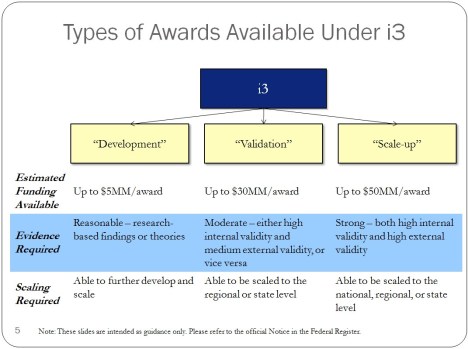











 Educational Technology and Change Journal